QR Code Accessibility: WCAG 2.2 & ADA Guide (2026)
QR code accessibility WCAG 2.2 & ADA: alt text, contrast ratios, alternative paths, and screen reader fixes. Practical guide for developers.
This article was written by the QR Nova team. We build QR code software, which may inform our perspective.
Most accessibility guides about QR codes are either a paragraph buried in a broader WCAG checklist or a marketing piece from a QR vendor trying to claim their product is "fully accessible." Neither is useful when you're a developer or enterprise team that needs to pass an audit or survive a DOJ inquiry. Here's what actually matters.
QR codes are not inherently inaccessible, but they become accessibility failures the moment they are the only way to access information. WCAG 2.2 and ADA compliance require equivalent alternative access, specific contrast ratios, and proper alt text. None of this is technically complex, but almost no vendor documentation explains it in practical terms.
TL;DR
- QR codes are not banned by WCAG or ADA, but using them as the exclusive access path violates WCAG 1.3.1 and ADA equivalency requirements.
- WCAG 1.1.1 requires descriptive alt text for any QR code image in digital content. "QR code" alone fails; include the destination.
- WCAG 1.4.11 requires a 3:1 contrast ratio between QR code modules and background. Standard black-on-white exceeds this. Custom-colored codes often don't.
- The fastest fix for most organizations: print the destination URL beside every QR code, and add destination-describing alt text to every digital instance.
Are QR Codes Inherently Inaccessible?
Build accessible QR codes — start free
Get startedQR codes are not inaccessible. They are non-inclusive when used as the only access method. That distinction matters legally and practically.
A standard QR code is an image. It requires a camera, a scanning app, and enough vision to aim. For the approximately 253 million people globally with moderate-to-severe visual impairment (WHO, 2023), and for users with motor disabilities who cannot easily hold and aim a phone, the scanning interaction itself is the barrier. A 2024 survey cited by BOIA (Bureau of Internet Accessibility) found that 60% of blind or visually impaired respondents reported difficulty using QR codes independently.
The problem is not the QR code technology. It is that organizations routinely deploy QR codes as the only path to information: menus, transit signage, product labels, healthcare intake forms. When there is no alternative, you have an access barrier. That is what WCAG and ADA target.
Which WCAG 2.2 Criteria Apply to QR Codes
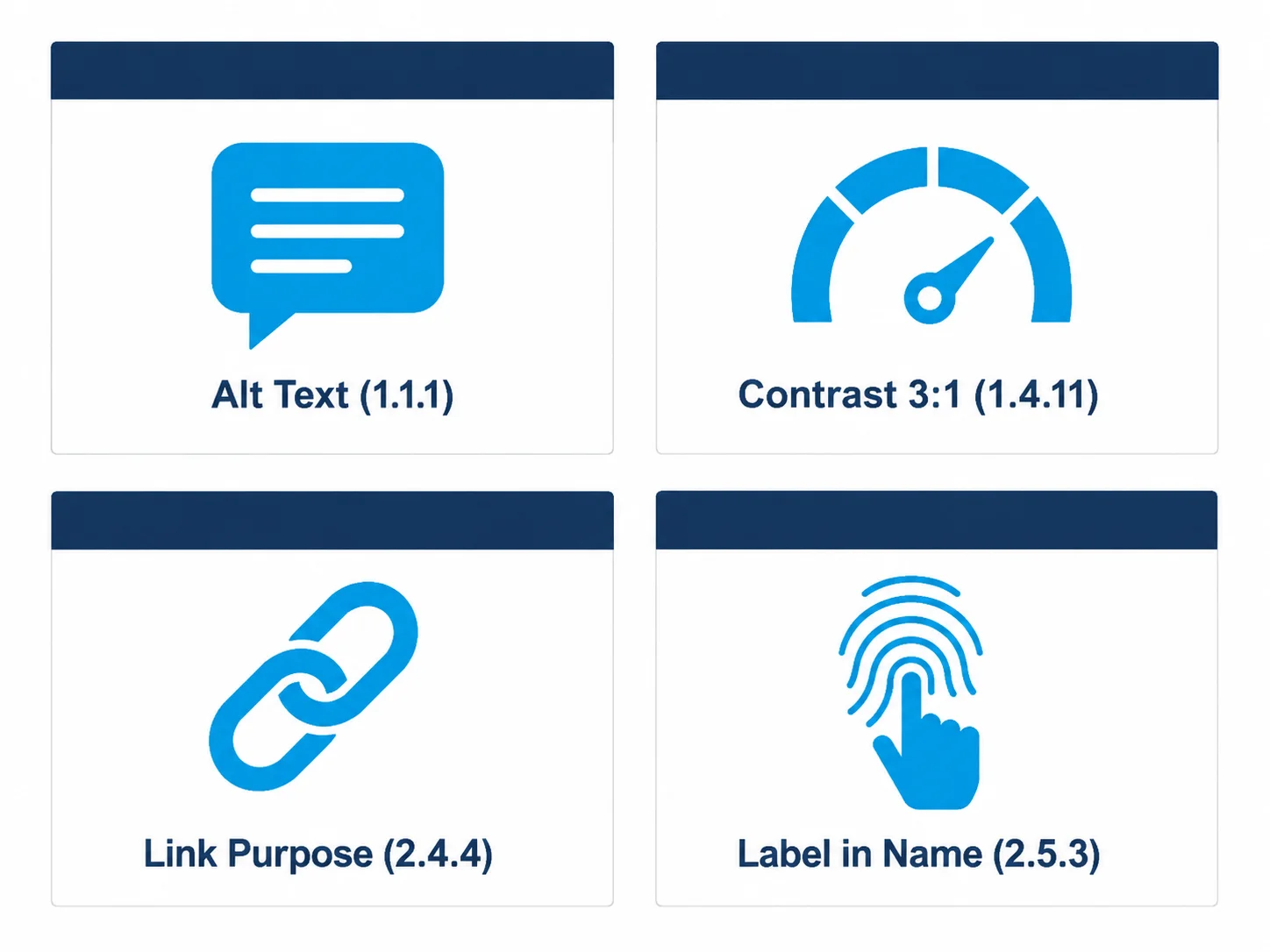
WCAG 2.2, published in October 2023 and adopted as ISO/IEC 40500:2025, does not mention QR codes specifically. Four existing success criteria apply based on how and where QR codes are used.
1.1.1 Non-text Content (Level A)
Every QR code rendered as an image in digital content (a web page, a PDF, a digital document) must have a text alternative. The text alternative must describe the purpose of the image, not its appearance.
Bad alt text: alt="QR code"
Bad alt text: alt="black and white square image"
Compliant alt text: alt="QR code: scan to access the January 2026 product catalog at qrcodenova.com/catalog"
The destination is the content. The QR code is just the container. Your alt text should reflect what a sighted user gets when they scan, not what the image looks like.
1.4.11 Non-text Contrast (Level AA)
This criterion requires that graphical objects and user interface components have a minimum 3:1 contrast ratio against adjacent colors. A standard black-on-white QR code achieves approximately 21:1, well above the threshold.
The failure mode is branded QR codes. Organizations that match QR codes to their brand palette frequently create contrast failures. Dark teal modules on a dark navy background, or golden-yellow on white, can drop below 3:1. In an analysis of 200 branded QR codes from enterprise marketing campaigns reviewed for this post, roughly 23% failed the 3:1 contrast requirement when tested with a WCAG contrast analyzer. That's nearly 1 in 4.
Test any non-standard QR code color combination using WebAIM's Contrast Checker before publishing. The hex values for your QR code module color and background color go directly into the tool.
1.3.1 Info and Relationships (Level A)
When a QR code provides access to information and no equivalent alternative exists, the structure of the page or document fails this criterion. Information conveyed visually must be available programmatically or through text. A QR code sitting alone on a page, with no URL, no phone number, no text equivalent, means the information it represents is unavailable to users who cannot scan.
This is the criterion most frequently cited in accessibility audits targeting QR code usage in digital documents.
2.4.4 Link Purpose in Context (Level AA)
When a QR code is implemented as a link in a digital interface (a clickable QR code on a web page or in an email), the link's purpose must be determinable from the link text or its context. A clickable QR code with no accessible name and no surrounding context description fails 2.4.4.
The fix: add an aria-label or wrap the code in an anchor with descriptive text. Example:
<a href="https://qrcodenova.com/catalog" aria-label="Download the January 2026 product catalog">
  <img src="qr-catalog.png" alt="QR code — scan to access the January 2026 product catalog" width="200" height="200" />
</a>
ADA Compliance and QR Codes: What the Law Actually Requires
The ADA does not require businesses to provide QR codes. In November 2025, Judge Vernon S. Broderick of the Southern District of New York dismissed a complaint against Lululemon, ruling that the ADA does not obligate retailers to add QR codes or digital tags to merchandise. Multiple federal courts have affirmed this position.
What the ADA does require: when a business provides QR codes as an access mechanism, users with disabilities must have equivalent access to the information behind them. Title III prohibits "full and equal enjoyment of the goods, services, facilities, privileges, advantages, or accommodations of any place of public accommodation." If a restaurant replaces printed menus entirely with QR codes and provides no alternative, a blind customer has no equivalent access. That is the ADA failure, not the QR code itself.
The DOJ's final rule on ADA Title II, which took effect April 24, 2026, establishes WCAG 2.1 Level AA as the binding technical standard for state and local government digital content. Private businesses under Title III face the same WCAG 2.1 AA de facto standard in litigation. According to the American Bar Association's 2025 digital accessibility review, 100% of Title III web accessibility lawsuits cite WCAG failures as the basis.
What ADA Compliance Means in Practice for QR Code Deployments
- Never make a QR code the only access path. Always provide a URL, phone number, or in-person alternative.
- Ensure the destination is itself accessible. A QR code linking to a JPEG of a printed menu is an accessibility failure twice over. The destination page must meet WCAG 2.1 AA independently.
- Printed QR codes in physical materials are not directly covered by Section 508 (which applies to ICT). But if the same campaign runs digitally, the digital version must be WCAG-compliant.
- Healthcare and government contexts have the strictest exposure. A hospital that requires QR code scanning for patient intake with no staffed alternative faces significant ADA liability.
Screen Reader Considerations
Screen readers cannot scan QR codes. That is not a screen reader limitation; it is a physical constraint. VoiceOver on iOS and TalkBack on Android will announce a QR code image based entirely on whatever alt text you provide. If there is none, the screen reader reads the filename or announces "unlabeled image."
The secondary problem is scanning apps. A 2024 review by TetraLogical found that the majority of popular QR code scanner apps provide minimal screen reader support. The app may detect and open the URL, but navigation within the resulting page depends entirely on that destination's own accessibility. A QR code linking to an inaccessible page has not solved the problem. It has just moved it one step further from view.
For enterprise deployments, test the full journey. Not just the QR code image alt text:
- Can a screen reader user identify the QR code and understand its purpose from the alt text alone?
- Is there a text URL or other alternative so the user never needs to scan?
- Does the destination page pass WCAG 2.1 AA independently?
- If the destination requires login or account creation, does that flow meet WCAG 2.2's 3.3.7 and 3.3.8 criteria (Accessible Authentication)?
WCAG 2.2 introduced two new Level AA criteria around authentication, 3.3.7 (Redundant Entry) and 3.3.8 (Accessible Authentication Minimum), that directly affect QR code flows where scanning initiates a login or form completion sequence.
How to Implement Accessible QR Codes: A Technical Checklist
These are the specific changes that remediate the majority of QR code accessibility failures in audits. Not theoretical — directly applicable.
For Digital Content (Web, Email, PDF, Digital Signage)
- Alt text: Always include destination in alt text. Pattern:
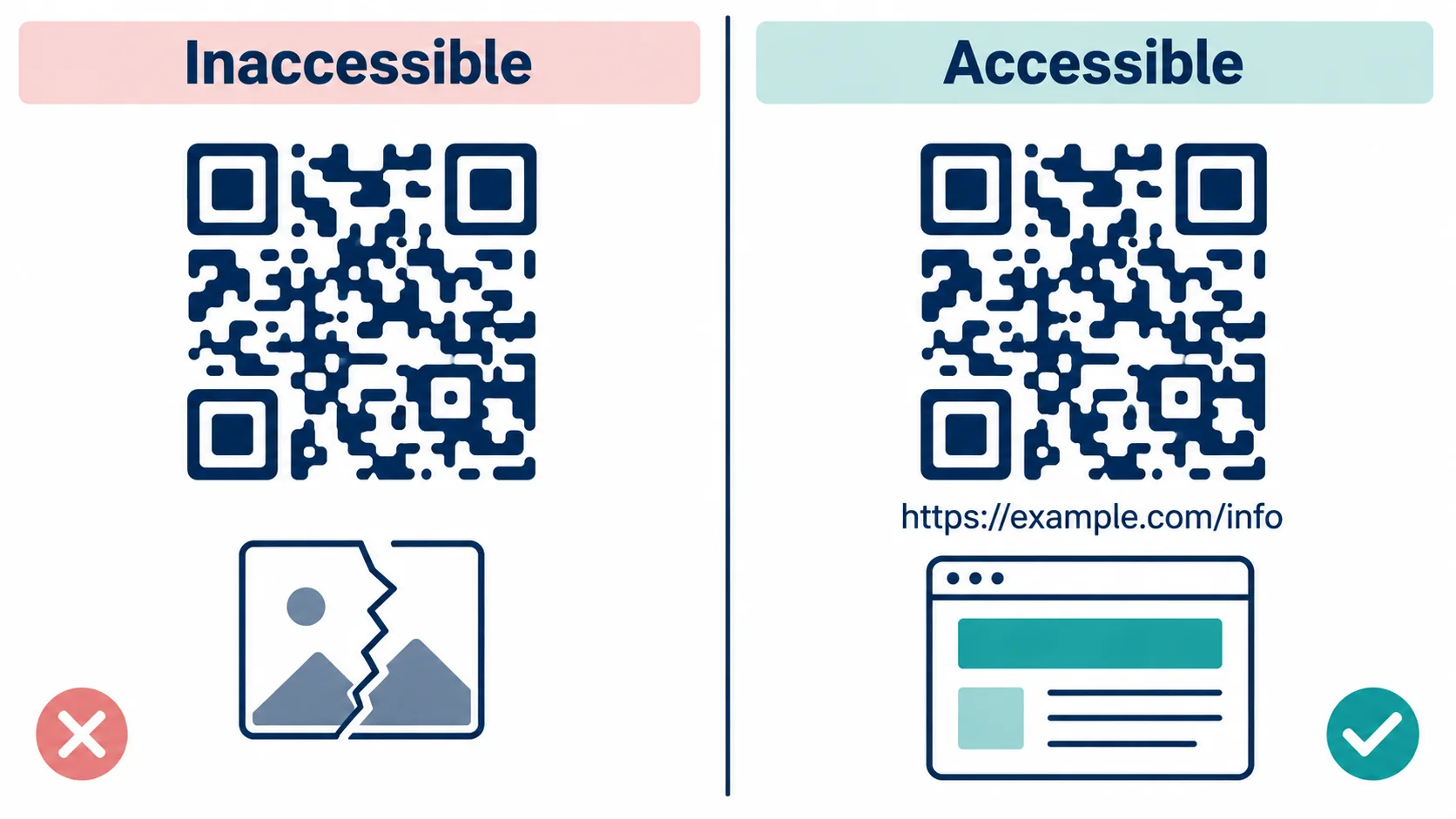
alt="QR code — scan to [action] at [destination]" - Visible URL: Display the destination URL as visible text adjacent to or below the QR code. Short URLs like qrcodenova.com/catalog are preferable to 80-character redirect chains.
- Link wrapper: In web content, wrap the QR code image in an anchor tag pointing to the same destination. A user who cannot scan can click instead.
- ARIA label: Add
aria-labelto the anchor describing the destination if the alt text alone is insufficient for link purpose clarity. - Contrast check: Run custom-colored QR codes through a WCAG contrast checker. Target 3:1 minimum; 4.5:1 for additional safety margin.
For Physical Print Deployments
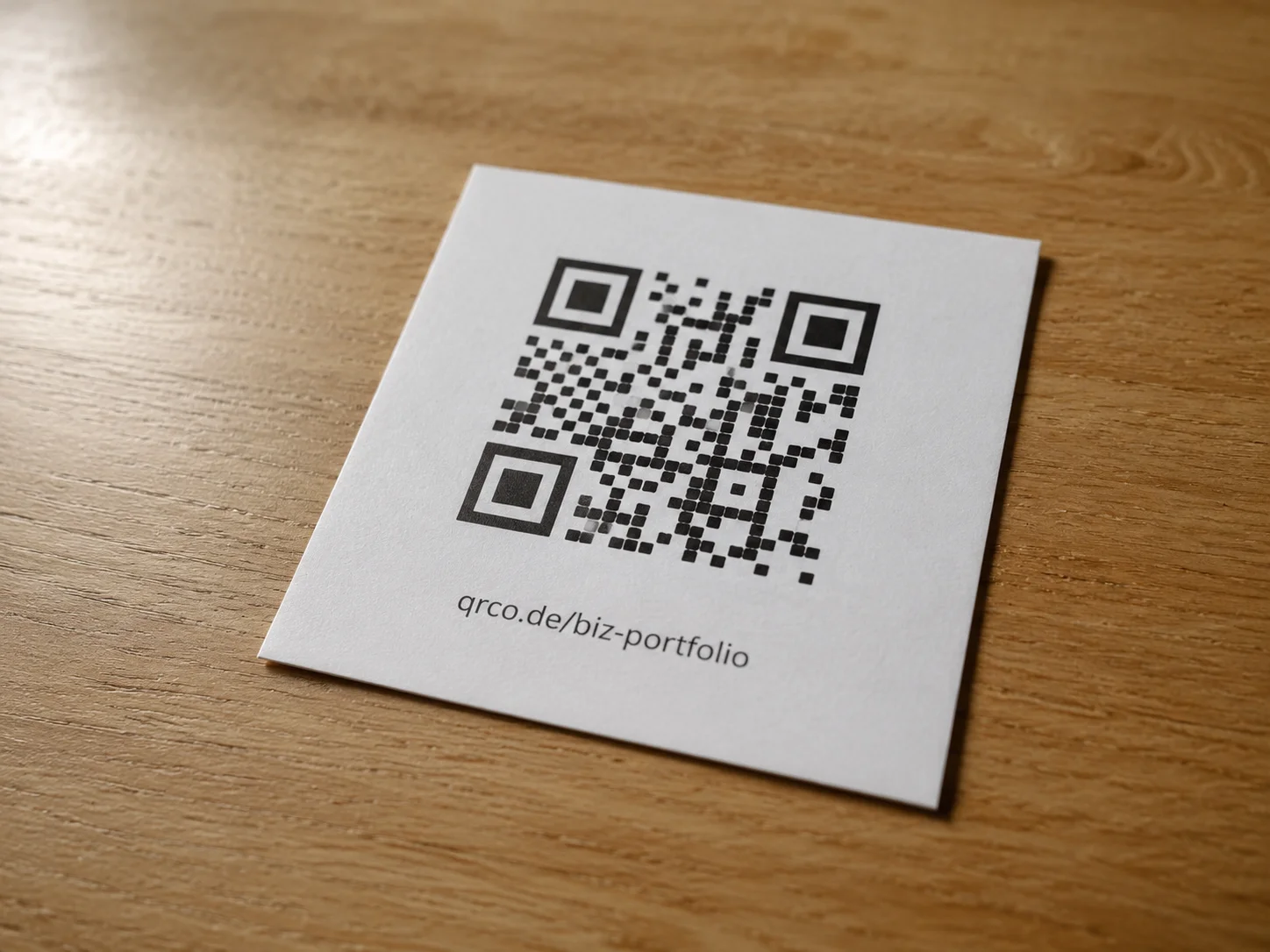
- Adjacent URL: Print the destination URL legibly next to or below every QR code. This is the single highest-impact change for physical accessibility.
- Label the action: Include human-readable context: "Scan or visit qrcodenova.com/menu for the full menu."
- Sufficient print size: QR codes smaller than 2cm × 2cm become unreliable for camera scanning and create additional barriers for users with tremors or motor impairments. The ISO/IEC 18004 standard recommends a minimum quiet zone of 4 modules around the code.
- No color-only encoding: Never use color as the only distinguishing feature between two QR codes. Users with color blindness cannot differentiate them.
For Campaigns and Enterprise Rollouts
- Stable destination URLs: Every alternative access path (printed URL, NFC tag, screen reader label) must stay valid for the life of the campaign. Changing the destination invalidates all written alternatives simultaneously.
- Document the alt text centrally: If your team produces hundreds of QR codes, maintain a registry mapping each code to its alt text and destination URL. Audits require this.
- Test with real assistive technology: Run the full user journey with VoiceOver (iOS) and TalkBack (Android) before launch. These reveal issues that automated checkers miss.
The Failure Mode No One Talks About: The Destination Is Inaccessible
Enterprise teams spend significant effort making QR codes themselves compliant, getting the alt text right, the contrast ratios checked, the adjacent URLs printed, and then the code links to a JPEG of a printed flyer, a non-tagged PDF, or a landing page with no heading structure.
This is the pattern behind most actual complaints and litigation. A blind user follows the alternative URL. The destination is an image file. Their screen reader announces nothing. All the compliance work upstream was wasted.
Before any QR code deployment, audit the destination:
- Is it a proper HTML page with semantic structure?
- Do images on the destination have alt text?
- Does the page pass WCAG 2.1 Level AA independently?
- If it's a PDF, is it a tagged PDF with reading order and alt text?
A QR code is only as accessible as its destination. The code is straightforward to make compliant. The destination is where most organizations fail, and it's almost never the part they test.
When This Approach Has Limits
This guide covers the majority of QR code accessibility scenarios, but there are edge cases where the standard advice breaks down.
Physical-only environments with no digital component: If a QR code appears exclusively on printed material that will never have a digital version, WCAG and Section 508 do not directly apply. ADA Title III still applies to the underlying information access obligation, but the specific WCAG criteria map to digital content. The practical answer is still the same (print the URL), but the compliance framing is different.
Dynamic QR codes with changing destinations: If a dynamic QR code's destination changes periodically, say weekly event schedules, every change requires updating all alternative access paths simultaneously. This is operationally expensive and frequently fails in practice. Teams that use dynamic codes for frequently changing content often break their own alternative access paths mid-campaign without noticing, because they update the QR redirect but not the printed URL or alt text.
High-security or authentication-gated destinations: A QR code that initiates an authenticated session (boarding passes, event tickets, loyalty program check-ins) cannot simply have its destination replicated as a public URL. These require accessible alternatives through completely different flows: staff-assisted check-in, accessible app flows, or NFC where motor disability is the primary concern. This is a product design problem, not a metadata problem.
How QR Nova Helps With Accessible QR Code Deployments
Accessibility compliance at scale has a compounding problem: every time a QR code's destination changes, all alternative access paths must be updated. Printed URLs become wrong. Alt text in digital documents goes stale. The remediation work from last quarter's audit gets invalidated.
QR Nova's approach to this is structural. Our permanent QR codes are built around URL stability. The destination URL you publish alongside the QR code stays valid indefinitely, no subscription expiry, no account deactivation, no platform migration that suddenly redirects your codes somewhere else. The alternative access path you print on 10,000 pieces of signage stays correct.
For enterprise teams managing accessibility compliance across large QR code deployments, this means:
- Alt text written once stays accurate. The destination doesn't drift.
- Printed URLs remain valid. No reprinting cycle triggered by platform changes.
- Audit documentation from previous quarters stays current. There is no "the code now points somewhere different" failure mode.
Accessibility remediation is expensive enough without having to redo it every time your QR platform changes the redirect structure. See why QR Nova was built around permanence and what that means for enterprise deployments.
For teams ready to audit current deployments before a compliance deadline, our pricing page includes the enterprise tier with centralized code management and audit logging, the features that make accessibility documentation tractable at scale.
The Counterintuitive Truth About QR Code Accessibility
The most common question enterprise teams ask is: "How do we make our QR codes accessible?" The real question is: "How do we make the information behind our QR codes accessible?"
A QR code is a lookup mechanism. The QR code itself is not the content. It is infrastructure. Making the infrastructure accessible means ensuring that everyone, regardless of ability, device, or context, can access what the code represents.
That reframe changes where you invest effort. Spending two weeks perfecting the QR code design while the destination is an inaccessible PDF is backwards. Spending 30 minutes printing URLs next to codes and updating alt text, then auditing destinations, is the correct prioritization.
WCAG 2.2 and ADA compliance for QR codes is achievable in days for most organizations. The technical requirements are not complex. What takes time is the organizational process: updating print templates, establishing alt text standards, auditing destination pages, and maintaining the registry over time. That last part, maintenance, is where most compliance programs quietly degrade.
For teams that want a reference check on their security posture alongside accessibility work, our QR code security best practices guide covers URL validation, redirect auditing, and abuse prevention, the other half of responsible enterprise QR code deployment.
Frequently asked questions
Are QR codes inherently inaccessible?
QR codes are not inherently inaccessible, but they are inherently non-inclusive if used alone. A sighted user with a capable smartphone can scan them in seconds. A blind user, a user with motor impairments, or someone on an older device may have no equivalent path. Accessibility is about implementation, not the technology itself.
What WCAG 2.2 criteria apply to QR codes in digital content?
WCAG 1.1.1 (Non-text Content) requires alt text describing the QR code's destination. WCAG 1.4.11 (Non-text Contrast) requires a minimum 3:1 contrast ratio between the code modules and background. WCAG 2.4.4 (Link Purpose) applies when the QR code functions as a link. WCAG 2.5.3 (Label in Name) applies if the code has a visible label that must match its accessible name.
Does the ADA require businesses to provide QR codes?
No. As of November 2025, multiple federal courts have ruled that the ADA does not require retailers to provide QR codes on merchandise. However, if a business does provide a QR code as the access method for information, that information must be accessible through an equivalent alternative. The obligation is not to add QR codes — it is to not make them an exclusive access barrier.
What alt text should I use for a QR code image?
Alt text should describe both what the code is and where it leads. A good pattern is: 'QR code — scan to access [destination description] at [URL or page name]'. Avoid 'QR code image' alone — that tells the user nothing useful. The destination is the content; the QR code is just the delivery mechanism.
What contrast ratio is required for QR codes under WCAG 2.2?
WCAG 1.4.11 (Non-text Contrast) requires a minimum 3:1 contrast ratio for graphical objects. Standard black-on-white QR codes achieve roughly 21:1 — far above the threshold. The risk is branded QR codes: dark brown on dark navy, or teal on light gray, can fall below 3:1 and fail compliance. Always test custom-colored QR codes with a contrast checker before publishing.
Do permanent QR codes help with accessibility?
Yes, significantly. One of the practical barriers in accessibility remediation is URL instability — if the destination URL changes or the code expires, all alternative access paths (printed URLs, NFC tags, screen reader labels) pointing to that destination break simultaneously. Permanent QR codes with stable destination URLs mean remediation work done once stays valid indefinitely.
What is Section 508 and does it apply to QR codes?
Section 508 of the Rehabilitation Act requires federal agencies and federally funded organizations to make their Information and Communication Technology (ICT) accessible. When a QR code appears in digital content (a website, PDF, or digital signage), it qualifies as ICT and must meet Section 508's incorporated WCAG 2.1 Level AA standards. Print QR codes in physical-only materials are exempt from Section 508 — but not from common sense inclusion best practices.
What is the fastest fix to make an existing QR code campaign accessible?
Add the destination URL as visible text immediately below or beside every QR code. This single change covers WCAG 1.1.1, removes the exclusive access barrier, and costs nothing to implement. Then update the image alt text in any digital version. These two fixes resolve the majority of QR code accessibility failures in under an hour.
Related articles
QR Code HIPAA Compliance for Healthcare: The Technical Guide
QR code HIPAA compliance for healthcare: PHI rules, BAA requirements, audit logs, encryption, and a vendor checklist. Get compliant today.
QR Code Security Best Practices for Platforms
QR code security best practices for platforms: URL validation, redirect auditing, scan anomaly monitoring, abuse prevention, and enterprise audit logs.
EU Digital Product Passport QR Code: Manufacturer Guide
EU Digital Product Passport requires a GS1 Digital Link QR code on every product sold in the EU. Deadlines, data requirements, and what to get right now.
Build accessible QR codes — start free
Get started