QR Menu Backlash Is Real. Here's the Fix.
Restaurant QR menu backlash is growing, only 31% of diners feel positive about them. Learn how to use QR codes the right way and which use cases actually work.
This article was written by the QR Nova team. We build QR code software, which may inform our perspective.
Scroll through r/KitchenConfidential or r/restaurateur for ten minutes and you'll find a consistent theme running through the complaints: guests are fed up with QR code menus. Not mildly annoyed. Frustrated. Posts from servers describe tables where elderly diners sit staring at a laminated card they can't figure out, or guests who put their phones face-down in protest. One server described a table of four that waited twelve minutes for a staff member to realize nobody had scanned the code. Another wrote about a regular who now specifically asks to sit in the section where "the nice server who brings real menus" works. The restaurant QR menu backlash is real, it is spreading, and it is costing restaurants real money. The solution isn't to throw out the technology. It's to stop using it badly.
TL;DR
- Only 31% of diners feel positive about QR code menus, and restaurants are actively returning to paper menus in response to complaints.
- The core problem is not QR codes themselves — it's replacing paper menus entirely instead of using QR codes as a complement.
- Specific groups are disproportionately affected: guests over 60, people with low battery or no data, and anyone with limited dexterity or vision problems.
- QR codes have legitimate uses in restaurants: seasonal specials, wine lists, allergen detail, and content that changes too often to print economically.
- The fix is a hybrid approach: physical menus as the default, QR codes as an optional add-on for guests who want them.
- Use dynamic QR codes so your links never go dead — a broken QR code is worse than no QR code.
What the data actually shows
Generate your first QR code — free
Get startedThe numbers are harder to dismiss than QR boosters would like. PYMNTS Intelligence research found that only 31% of consumers feel positively about viewing menus via QR code at restaurants. In a separate Ipsos poll (conducted post-pandemic), 58% of diners said they wanted paper menus back. Among guests aged 60 and over, that discomfort climbs to around 65%. Those figures have barely budged as of 2026.
The financial picture is just as rough. One restaurant group that tracked the switch carefully found that average check size dropped 10% after going QR-only. The reason isn't complicated: guests scrolling through a poorly formatted digital menu on a 6-inch screen browse less. They miss the dessert section. They skip the seasonal cocktail they would have noticed on a physical card. Paper menus let people see everything at once, laid out the way the restaurant intended. A phone screen doesn't replicate that.
Kristen Hawley, the founder of restaurant technology newsletter Expedite, put it plainly: QR code menus "are almost universally disliked." Worth noting: that's coming from someone who covers restaurant technology for a living, not a Luddite columnist grumbling about smartphones.
Why diners push back: the specific complaints
Not every complaint carries equal weight. But a few themes come up over and over, in Reddit threads and published research alike.
The phone-as-work problem
Sitting down at a restaurant carries a social expectation: someone will look after you. When a server drops a QR code card and walks away, the implicit message is the opposite. Figure it out yourself. One commenter on a thread about the topic compared it to self-checkout at a grocery store: "I came here to be waited on, not to do my own data entry." Dramatic? Maybe. But it tracks. People pay a premium at full-service restaurants partly because they don't want to manage the transaction themselves.
The accessibility gap
Of all the complaints, this one deserves the most weight. The stereotype is that older diners are the problem, but the access gap is broader than age. Someone with arthritis who struggles to hold a phone steady while zooming into small menu text. Someone with low vision who relies on large-print menus. A guest whose phone battery died on the commute over. A diner with a prepaid plan who has no data and no password to the restaurant's Wi-Fi.
None of these are edge cases. They represent a real slice of any restaurant's customer base, and a QR-only menu tells all of them the same thing: you're on your own. Michele Baker Benesch, president of Menu Men, put it simply: "People are frustrated, especially people 40 years and older. Sometimes their phones don't work."
The PDF problem
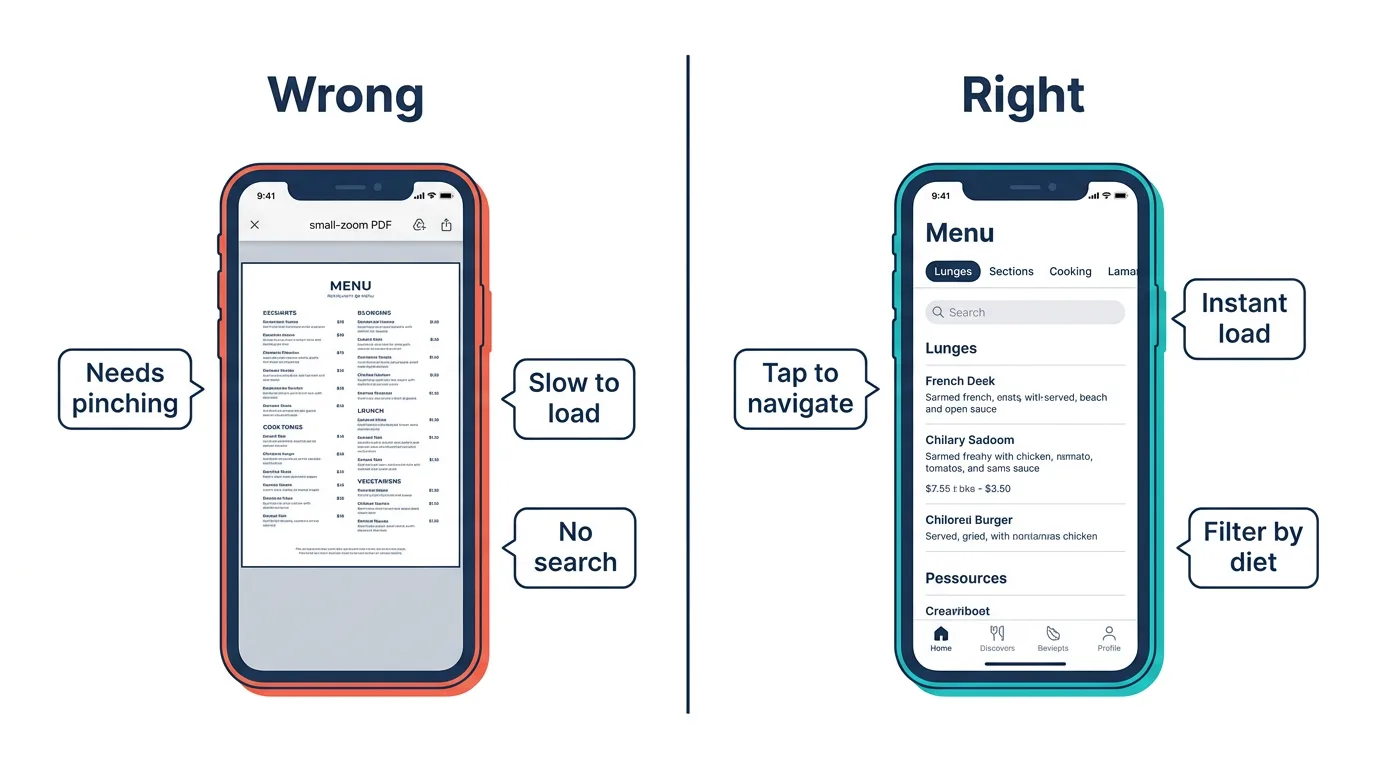
Almost entirely self-inflicted. A huge chunk of QR code menu complaints aren't about QR technology at all. They're about what the code points to. Countless restaurants set up a QR code that opens a PDF of their menu, which then loads slowly, displays at the wrong zoom level, requires pinching and scrolling to read individual items, and has no search or filtering capability. A PDF is not a mobile menu. It is a print document shoved into a context it was never designed for. If your QR code opens a PDF, you don't have a QR code problem. You have a menu design problem.
The dead link problem
Restaurants update websites, change hosting providers, redesign URLs. Static QR codes (where the destination is burned into the pattern at print time) can't be redirected. So when the menu moves from yourrestaurant.com/menu-v1.pdf to yourrestaurant.com/menu, every printed code in the restaurant becomes a 404 error. Guests scan a QR code that's been sitting on the table for six months and hit a broken page. Worse than having no QR code at all.
The impersonality complaint
Harder to quantify, but it shows up persistently in qualitative feedback. A physical menu communicates care. Someone designed it. Someone chose the typography, the weight of the paper, the way the dishes are described. Handing a guest a laminated square with a black-and-white code communicates one thing: operational efficiency. For fast casual, that tradeoff works. For mid-range and upscale restaurants, it actively undermines the experience guests are paying for.
What restaurants are actually doing about it
The industry response has been mixed but telling. A number of restaurant groups that adopted QR-only menus during the pandemic have quietly reversed course. Some ditched QR entirely and went back to paper. Others landed on the approach that most hospitality professionals (when you talk to them honestly, away from the tech vendor pitches) say makes the most sense: offer both.
The hybrid model is simple. Physical menus are the default. Servers place them at the table without being asked. The QR code sits on a small table tent or at the bottom of the physical menu, there for guests who prefer digital, want expanded descriptions, or are dining at a busy time when the server can't walk them through specials. Nobody is forced to use their phone. Nobody who wants a phone-based experience is denied it.
That's not a compromise. It's just treating different customers differently, which is the entire premise of hospitality.
Where QR codes actually belong in a restaurant
Acknowledging the backlash doesn't mean abandoning QR technology. It means using it where it adds real value instead of where it just cuts printing costs.
Seasonal and rotating specials
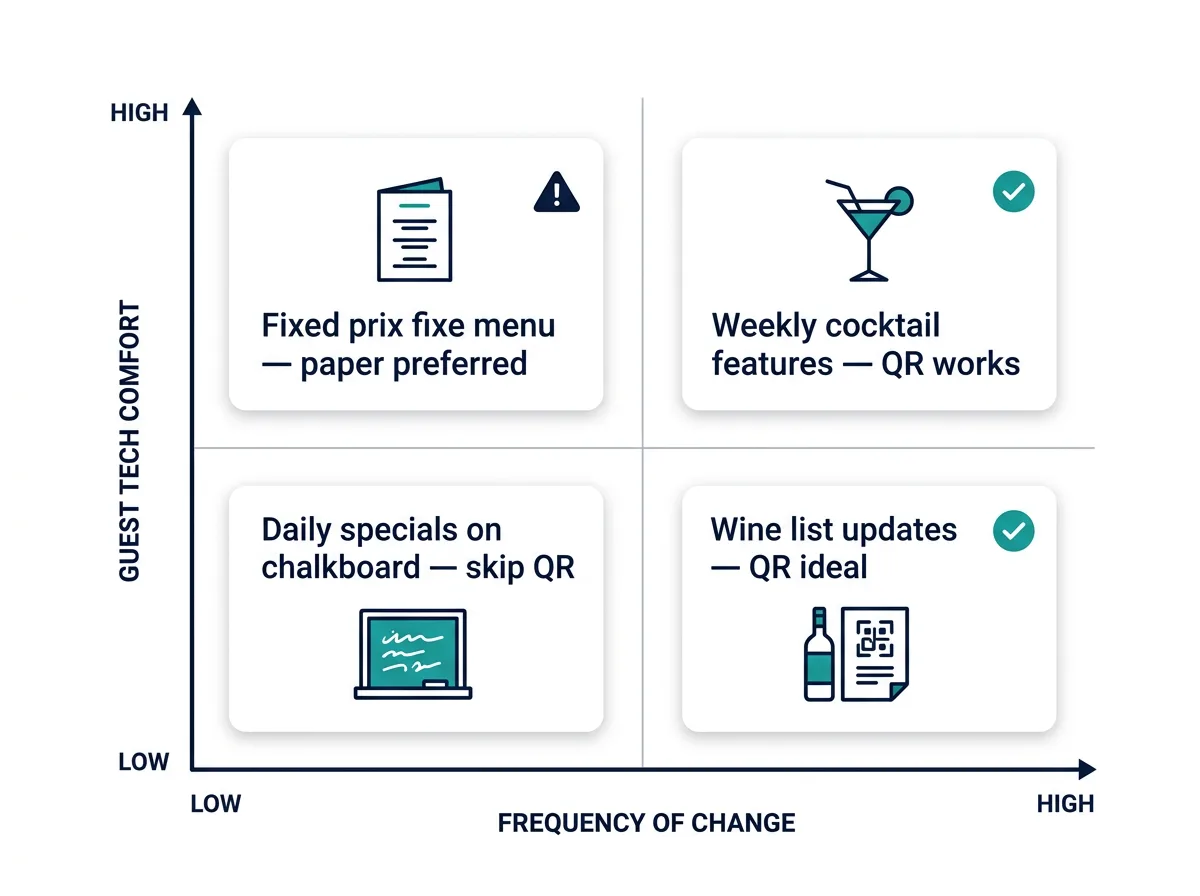
Your core menu is stable enough to print. Your specials board changes weekly or daily. A table card with a QR code pointing to this week's specials page is useful and doesn't replace anything. It supplements the physical menu already in the guest's hands. Guests who want to scan it will. Everyone else won't even notice it's there.
Wine and spirits lists
Wine lists are a natural fit. They change as bottles sell out or new vintages arrive, they contain more detail than most restaurants can practically print (tasting notes, pairing suggestions, vintage info), and the guests who care about the wine program are the guests most willing to pull out a phone for context. A QR code on the cover of your wine list saying "scan for full list and pairing notes" adds real value without removing anything.
Allergen and dietary information
Detailed allergen information is difficult to fit into a printed menu without making the layout unwieldy. A QR code linking to a dedicated allergen guide solves that and sends a signal: you take dietary needs seriously. This is one area where digital actually does the job better than paper.
Content that changes too often to print economically
If you're running a prix fixe that changes every two weeks or a cocktail program with weekly features, reprinting gets expensive fast. A QR code makes more sense here than trying to justify frequent print runs. Just make sure the code points to a well-designed mobile page, not a PDF.
How to set up QR codes that don't fail
Most technical complaints about restaurant QR codes are avoidable. Here's what separates codes that work from codes that frustrate.
- Use dynamic codes, not static. A dynamic QR code stores a short redirect URL in the code itself. When someone scans it, they hit whatever destination you've configured, and you can update that destination anytime without reprinting. Menu URL changes? Update the redirect. The physical code never goes stale. Tools like QR Nova's menu QR generator create dynamic codes by default, so the code you print today still works a year from now even if your menu moved.
- Point to a mobile-optimized page, not a PDF. Your menu destination should be a page designed for a phone screen: large text, clear sections, fast loading on a mobile connection, no horizontal scrolling. If your website doesn't have a mobile-friendly menu page, fix that before you start printing QR codes. A code that opens a broken or unreadable menu creates a worse impression than no code at all.
- Test across devices and lighting conditions. Before laminating anything, scan your codes with at least three different phones in the actual lighting of your dining room. Warm, dim lighting plays havoc with camera autofocus. If the code doesn't scan reliably under your own lights, it won't scan for guests either.
- Keep the code size reasonable. A QR code smaller than about 2cm x 2cm at table distance is asking for scanning failures. Bigger is almost always better for print. And keep adequate white space (the quiet zone) around the code. A code jammed tight against other design elements often fails to scan even when the code itself is technically fine.
- Always provide a fallback URL. Print the destination URL in small text directly beneath the QR code. Guests who can't get the scan to work can type it manually. Costs nothing. Eliminates a real source of frustration.
The right frame: QR codes are a tool, not a policy
The mistake that drove the restaurant QR menu backlash wasn't adopting QR codes. It was treating them as a policy decision rather than a tool decision. "We're going QR-only" is a policy. "We use QR codes for content that changes often, and we keep printed menus for guests who want them" is a tool decision. One of these generates Yelp reviews about how the restaurant made grandma sit there confused for ten minutes. The other generates zero complaints because nobody is being forced into anything.
Restaurant operators who are reading the room are doing exactly this. They're not swearing off QR codes. They're scoping them down to where they belong. If you want a practical starting point for building codes that are built to last and won't leave guests staring at 404 errors, this walkthrough covers the full setup process from choosing between static and dynamic to placement and testing.
The technology works fine when it stays in its lane. The backlash was never really about QR codes. It was about restaurants dressing up a cost cut as an upgrade and hoping nobody would notice. Guests noticed. And the restaurants that got it right are the ones still getting return visits from the tables that matter most.
Key takeaways
- Only 31% of diners feel positively about QR-only menus, the backlash has real data behind it.
- A 10% drop in average check size has been documented when restaurants switch to QR-only menus.
- The core problem is almost always execution: PDFs instead of mobile pages, static codes that go dead, and the removal of paper menus entirely.
- Guests over 60, those with accessibility needs, and anyone with a low-battery phone are disproportionately affected by QR-only policies.
- The hybrid model, paper menus as default, QR codes as an opt-in supplement, eliminates the vast majority of complaints.
- Use dynamic QR codes so your printed materials never become outdated.
- Good use cases for restaurant QR codes: rotating specials, wine lists, allergen guides, and content that changes too often to print economically.
Frequently asked questions
Why do customers hate QR code menus?
Most complaints aren't really about QR codes, they're about poorly executed digital menus. Common frustrations include menus that open as hard-to-read PDFs, slow loading on spotty restaurant Wi-Fi, codes that have rotted because a link changed, and the simple fact that pulling out a phone feels like work during what should be a relaxed meal. When QR codes replace paper menus entirely instead of supplementing them, those frustrations compound.
What percentage of diners prefer paper menus over QR codes?
According to PYMNTS Intelligence research, only 31% of consumers feel positively about QR code menus at restaurants. A separate Ipsos poll found that 58% of diners wanted to return to paper menus, compared to 39% who were happy with QR codes continuing. The numbers tilt even more heavily among guests over 60, where roughly 65% report being uncomfortable with QR code ordering.
Do QR code menus hurt restaurant revenue?
They can. One restaurant group documented a 10% drop in average check size after switching to QR-only menus, because guests who struggle to scroll through a digital menu end up ordering fewer items, particularly desserts and specialty drinks buried at the bottom. A physical menu that a server hands to a guest creates browsing behavior that a phone screen often doesn't replicate.
Should restaurants get rid of QR code menus completely?
Not necessarily. The problem isn't QR codes, it's using them as the only option. Restaurants that offer QR codes alongside printed menus report far fewer complaints. QR codes work well for seasonal specials, wine lists, event menus, and content that changes frequently. They're a good supplement; they're a poor substitute for a physical menu guests can hold.
What is the difference between a static and dynamic QR code for a restaurant menu?
A static QR code points to a fixed URL that cannot be changed after printing. A dynamic QR code lets you update the destination URL at any time without reprinting the code. For restaurant menus, dynamic codes are almost always the better choice, if your menu URL changes or you redesign your site, the printed codes on your tables won't become dead links overnight.
How should restaurants handle guests who can't use QR codes?
Keep a small stack of printed menus at the host stand and make sure every server knows to offer them without being asked. Train staff to recognize when a table may need a physical menu, if guests are looking at the table card with confusion, that's the cue. Never make a guest feel embarrassed for not wanting to use their phone. The point of hospitality is making people comfortable, not proving you have the latest tech.
Are QR codes still worth using in restaurants in 2026?
Yes, when used well. QR codes reduce printing costs for content that changes often, let you update prices or specials instantly, and can surface information, like allergen details or detailed wine notes, that paper menus can't practically include. The key is treating QR codes as a tool with specific use cases rather than a blanket replacement for every printed surface in your restaurant.
Related articles
QR Code for Apple Wallet & Google Wallet: How It Works
QR codes in Apple Wallet are the pass barcode, not an external link. Learn how wallet passes work, 5 key use cases, and how to create yours.
Best QR Code Generator for Small Business (2026)
QR code generator for small business in 2026: what actually matters. Scan permanence, no lock-in, free options that don't break when you cancel.
QR Code Marketing Ideas That Actually Work
25 QR code marketing ideas with real examples from Chipotle, Starbucks, and Coca-Cola. Which tactics drive scans, which don't. Free guide.
Generate your first QR code — free
Get started