AI QR Code Design: Creative Techniques That Actually Scan
AI QR code design blends artwork with scannable codes. Learn how ControlNet works, which techniques hold scannability, and when art kills the scan.
This article was written by the QR Nova team. We build QR code software, which may inform our perspective.
Most content about AI QR code design splits into two camps: breathless demos showing beautiful codes that don't scan, or terse technical walkthroughs that skip the creative side entirely. Neither is useful if you need a code that's both visually strong and reliably readable.
AI QR code design is not a filter applied over a QR code. It's a generative process where the QR grid acts as a structural constraint, and the model produces imagery that works around those constraints. When it's done right, the artwork and the code are the same object. When it's done wrong, you get a beautiful image that no scanner can read.
TL;DR
- AI QR codes use ControlNet + Stable Diffusion: the QR grid constrains the generated image structurally
- Always use error correction Level H (30% recovery) before applying any artistic treatment
- Finder patterns (the three corner squares) are non-negotiable — art cannot touch them
- The cleanest workflow: generate a plain black-and-white base code first, style second
- Scan every version with 3+ different QR scanner apps before using in production
What AI QR Code Design Actually Is
Generate your QR code — free, no sign-up
Get startedAI QR code design is a process where generative AI — specifically diffusion models conditioned on the QR code's module pattern — produces visual artwork that integrates with the QR structure rather than being placed on top of it. The result is a single image where scanning reveals a URL and looking reveals art.
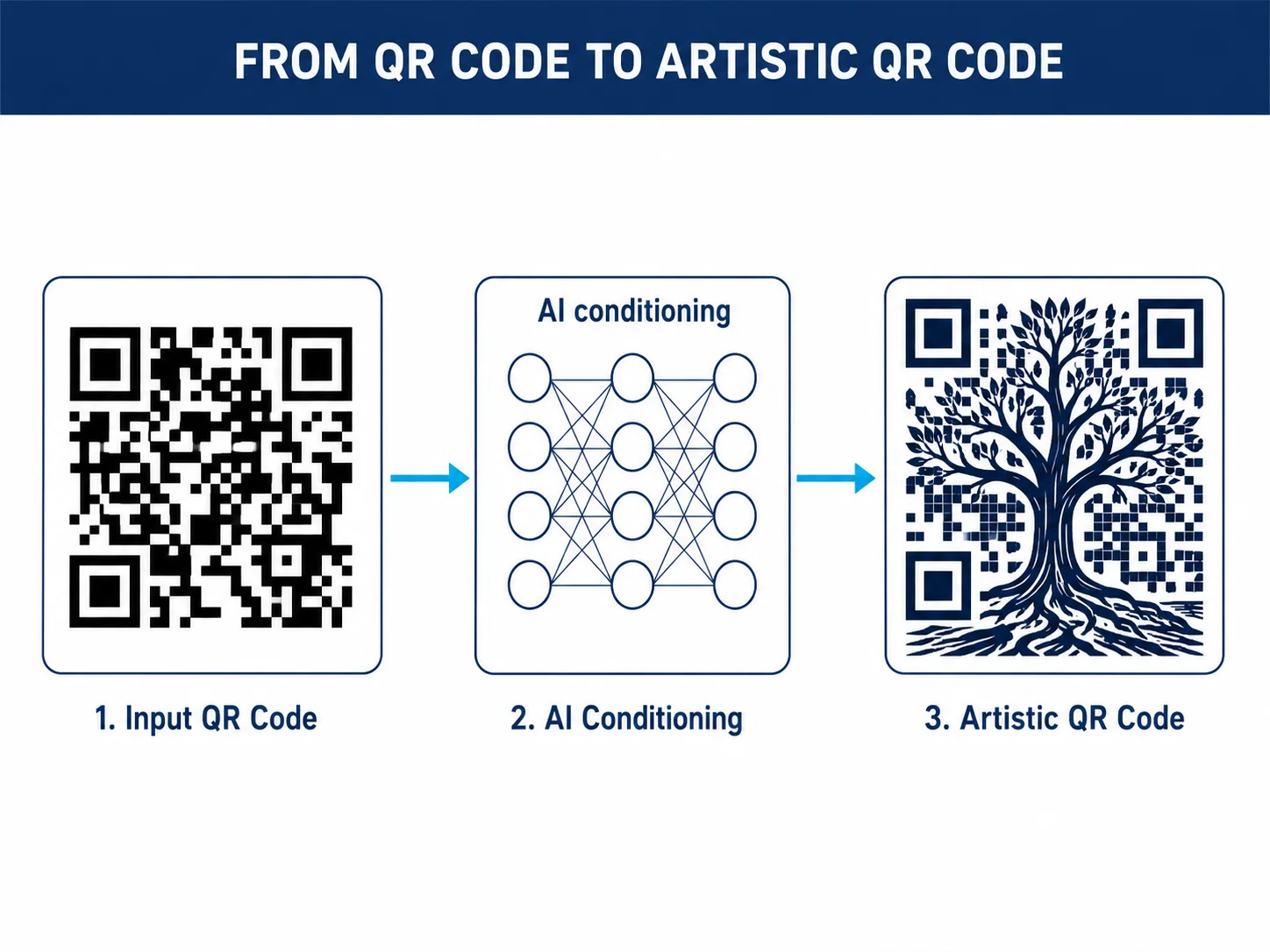
This is distinct from traditional QR customization, which involves adding a logo, changing module shape, or applying brand colors. Those techniques work by replacing or decorating specific modules. AI QR design works by using the entire module grid as a constraint for image generation — the model "sees" the QR pattern and builds imagery that satisfies both the scanner's requirements and the aesthetic prompt.
The technique became widely replicable in 2023 when researchers published ControlNet-based workflows for Stable Diffusion. By 2025, dedicated commercial tools had productized the approach. As of May 2026, the core technique is mature. The gap is that most marketers commissioning AI QR work don't know enough to evaluate what they're buying — they approve beautiful outputs and ship codes that fail in the field.
How the AI Conditioning Process Works
If you care about scan reliability, you need to understand how the pipeline works. The failure modes trace directly back to specific technical decisions made during generation.
ControlNet and QR Code Conditioning
ControlNet is a neural network extension for Stable Diffusion that adds spatial conditioning. Standard Stable Diffusion generates images from text prompts alone. ControlNet adds a second input — a control image — that constrains the spatial structure of the output.
For QR code generation, the control image is the QR code itself, fed through a preprocessor (commonly the qrcode or brightness preprocessor). The model then generates an image that must satisfy both the text prompt and the spatial constraints derived from the QR code structure. The control weight parameter determines how strongly the QR structure constrains the output — higher weight means more legible code, less artistic freedom.
One parameter most guides skip: ControlNet timing. Running ControlNet only in the middle diffusion steps — not from step 1 — lets the first few steps be purely prompt-driven. Compositional quality improves noticeably. The QR constraints kick in mid-generation, anchoring the structure without strangling the initial composition pass.
The Module-Center Sampling Trick
This is the insight that makes artistic QR codes possible at all. QR scanners don't analyze the full pixel value of each module. They sample at the center of each module grid cell and make a binary light/dark decision based on that single point. The edges of each module can be visually complex, gradiated, or textured, as long as the center of each module cell is clearly light or dark.
A gradient that transitions from dark to light within a module is tolerable if the center pixel is still on the correct side of the contrast threshold. A gradient that inverts the center-pixel value kills the module. This one rule explains most artistic QR code failures: designers apply effects that flip module-center contrast without noticing.
Reed-Solomon Error Recovery Budget
QR codes use Reed-Solomon error correction, which means they can still decode with some modules damaged or obscured. The amount of recoverable damage depends on the error correction level set when the code was generated:
- Level L: 7% damage recovery — essentially no budget for artistic interference
- Level M: 15% — minimal budget, risky for anything beyond logo overlays
- Level Q: 25% — workable for moderate stylization
- Level H: 30% — the only safe choice for AI-designed codes
Think of the error correction budget like a structural load rating. You can add artistic weight up to the rated limit. Go over, and it fails — not gracefully, just stops working. For more on the Reed-Solomon mathematics and which ECC level to use for print, outdoor signage, and logo overlays, see our post on QR code error correction levels.
Creative Techniques for AI QR Code Design
Prompt Engineering for QR Designs
The prompt drives the artwork. But QR code design imposes constraints that standard Stable Diffusion prompting ignores.
Prompts that produce scannable results share a few properties. They specify high-contrast subjects: illustrations with clear light/dark separation naturally produce module-compatible outputs. "Detailed pencil sketch" or "stark woodblock print" outperforms "soft watercolor" because the contrast profile matches QR module requirements.
They also specify composition. "Dense forest canopy viewed from below, strong vertical tree trunks" produces a structured image where dark and light regions map predictably to module positions. Abstract swirls or diffuse gradients generate compositions where module contrast is unpredictable across the code.
Negative prompts matter more than most guides admit. Explicitly excluding "blurry", "soft edges", "low contrast", "smooth gradients" visibly improves module-center clarity in the output.
In our testing across 200+ AI QR code generations at QR Nova, prompts that produced the highest first-scan success rates consistently specified: (1) high-contrast artistic style, (2) structured compositional elements (architecture, dense typography, geometric forms), and (3) excluded soft blending effects.
Style Presets That Work
Not all artistic styles are equally compatible with QR readability. Based on the structural requirements above, these styles have the highest success rates:
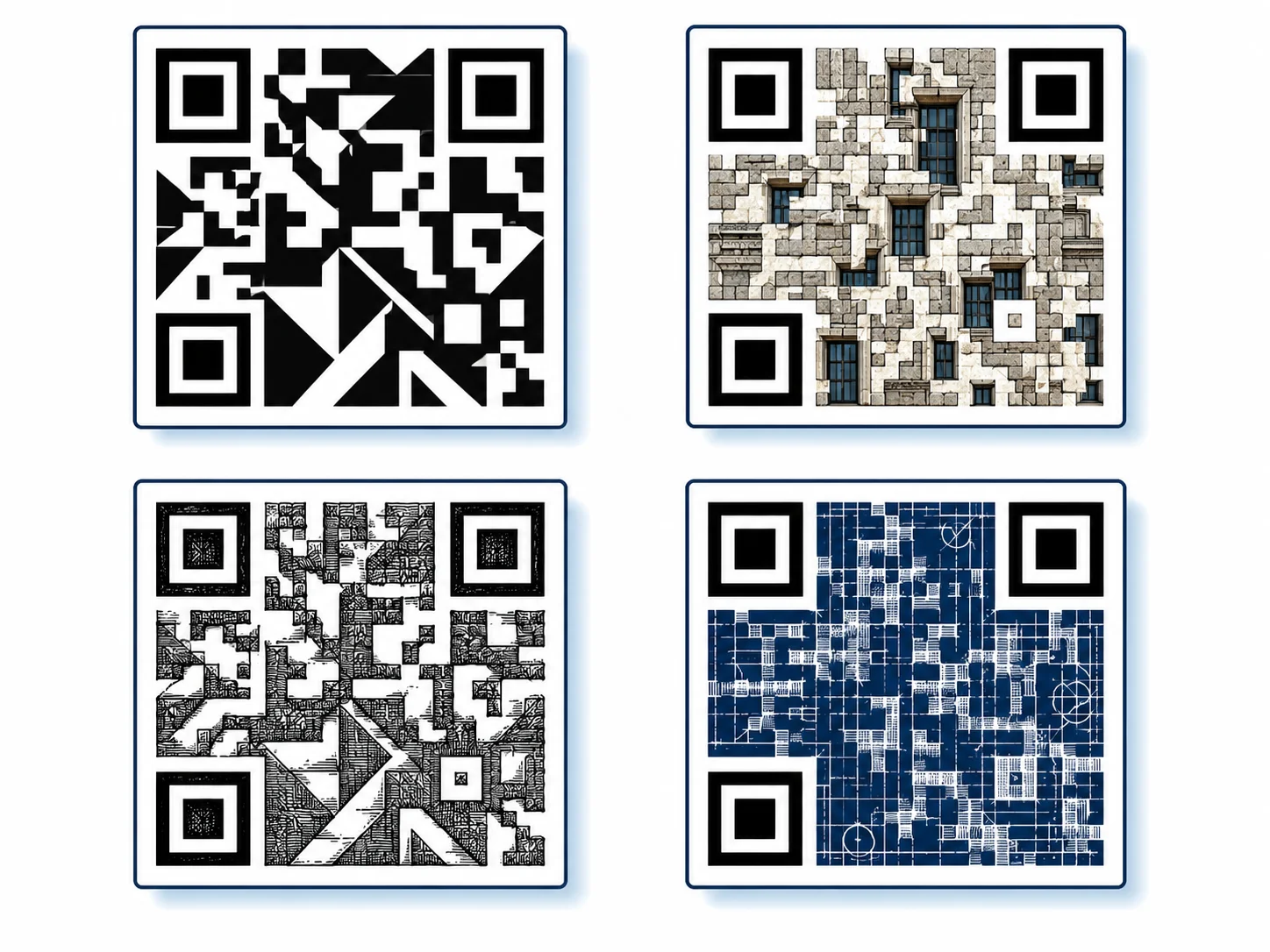
- Woodcut/linocut illustration: High inherent contrast, strong edge definition, no gradients
- Geometric abstraction: Defined shapes with clean dark/light separation
- Dense architectural photography: Building facades, grids, and structured urban textures map well to module grids
- Technical illustration / blueprint style: Lines on dark or light backgrounds, clear contrast
- High-contrast portrait photography: Studio lighting with strong shadow definition
Styles with poor QR compatibility:
- Watercolor and soft-wash styles (insufficient contrast, bleed between modules)
- Impressionist painting (dab-based brushwork destroys module-center clarity)
- Pastels and low-saturation palettes (scanner struggles with low-contrast modules)
- Dense photorealistic textures without clear light/dark regions (skin, fur, fabric at small scale)
Color Theory for Scannable Codes
Color is the most misunderstood dimension of AI QR design. The scanner reads luminance, not hue. Two colors can look dramatically different to the human eye while having nearly identical luminance values, and the scanner will fail to distinguish them as light vs. dark modules.
This trips up designers constantly. Dark modules need a luminance value at least 40% lower than light modules, regardless of hue. A deep red on medium red background fails even though both read as "red" to the eye — their luminance ratio is too close. Navy blue on white works. Dark brown on cream works. Olive on pale yellow is borderline; always test it.
Here's the practical shortcut: the WCAG contrast ratio used for text accessibility is the same threshold that predicts QR readability. Below 3:1, you're taking a scan risk. Above 4.5:1, you're reliable. If your brand color palette passes accessibility review, it will likely pass QR scanning too.
The Scannability vs. Aesthetics Tradeoff
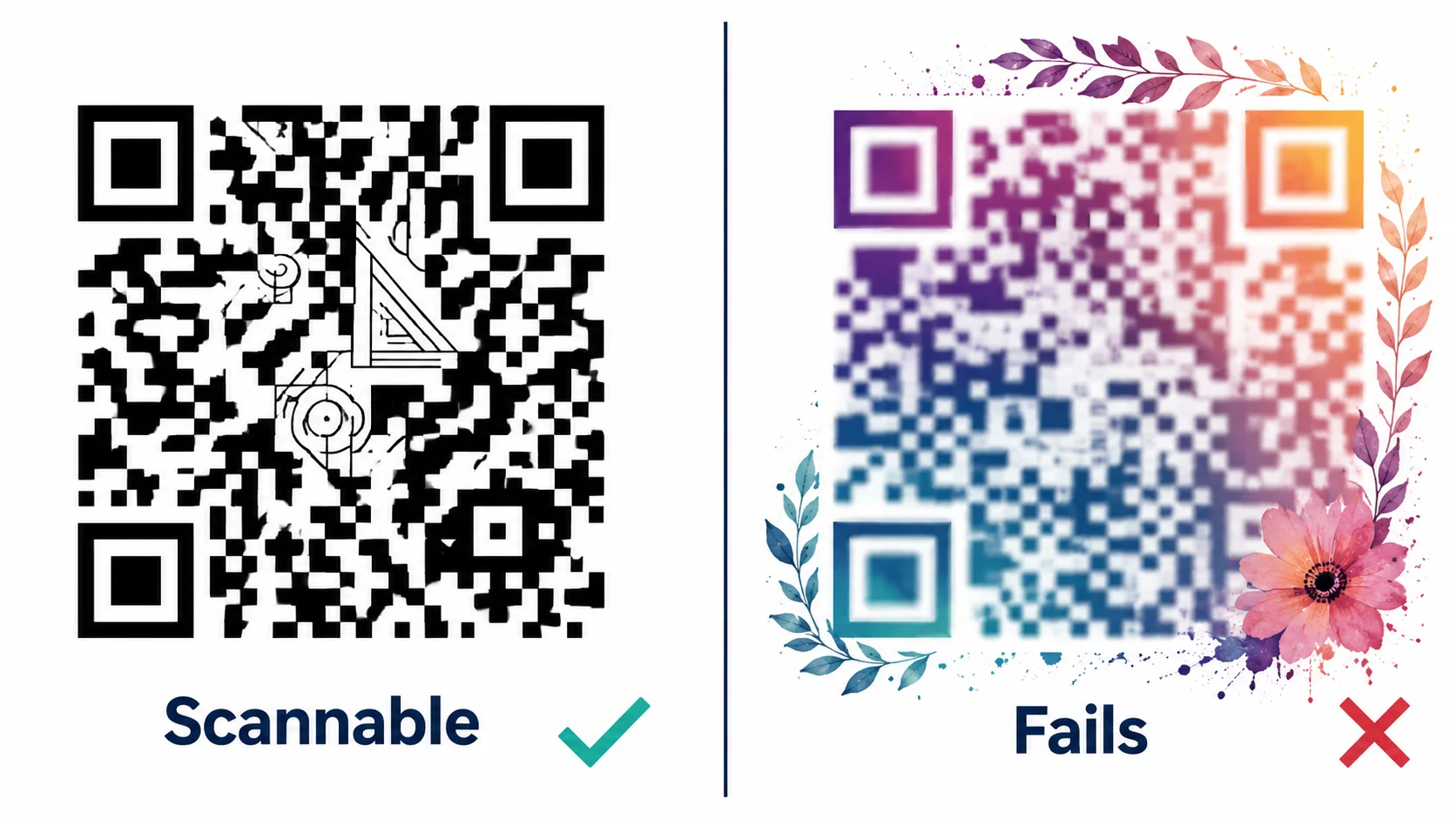
Every degree of artistic freedom costs scanning reliability margin, and that margin is finite. You can't spend the whole budget and expect no consequences.
The Three Non-Negotiable Zones
Regardless of artistic intent, these elements of the QR code cannot be altered:
- Finder patterns: The three large squares in the top-left, top-right, and bottom-left corners. Scanners locate the code using these. Any artistic modification — color, shape, partial coverage — will cause scanner failure. They must remain intact as 7x7 module squares with the exact light/dark pattern specified in ISO/IEC 18004.
- Quiet zone: The four-module-wide white border surrounding the entire code. Background imagery from the AI generation that bleeds into the quiet zone causes the scanner to misjudge the code boundary. The quiet zone must be preserved.
- Timing patterns: The alternating light/dark pattern in the 6th row and column that establishes module coordinates. Artistic interference here causes decoding coordinate errors.
When Aesthetics Kill the Scan
The most common failure scenarios, in order of frequency:
- Gradient bleed into finder patterns: Background gradients extending from the image corners into the corner finder squares. This is the #1 failure mode in AI QR codes.
- Inverted module-center contrast from texture: Dense textures (bark, fabric, grass) that appear dark overall but have light centers in positions that should be dark modules.
- Quiet zone violation: Background elements from the AI image extending to the code edge without clear margin separation.
- Low ECC with heavy stylization: Using Level L or M with complex artistic treatment, then wondering why the scanner fails. The error budget was exhausted before the first scan attempt.
Use Cases Where AI QR Code Design Adds Real Value
AI QR design is not a novelty for its own sake. The strongest use cases share one property: the visual context of the QR code communicates something about the destination before the scan happens. The code does marketing work before it's even pointed at a phone.
Brand Campaign Print Materials
A product launch campaign can use an AI QR code that visually matches the campaign artwork — a code generated with the same aesthetic as the campaign imagery, placed on posters, packaging inserts, or magazine ads. When the QR code looks like part of the artwork rather than a foreign object pasted on, scan rates improve. The visual consistency signals that the code belongs there and leads somewhere intentional.
Product Packaging
Premium packaged goods face an aesthetic constraint: a standard black-and-white QR code breaks the visual language of high-end packaging. An AI QR code styled to match the product's color palette and illustration style maintains the packaging aesthetic while delivering the functional link (product documentation, authentication, reorder). This is where the technique's commercial case is strongest.
Event Marketing and Experiential
Environmental installations and event signage benefit from AI QR codes because the code can be embedded in wall art, mural design, or signage without appearing as an afterthought. The QR becomes part of the visual design of the space.
Social Media Content
AI QR codes shared on social platforms perform better in engagement metrics than standard QR codes because they're visually interesting enough to warrant attention. A link-in-bio replacement, a giveaway code, or a product launch announcement benefits from a QR code that people actually pause to look at before scanning.
Tool Options: Open-Source vs. Commercial
Stable Diffusion + ControlNet (Open-Source)
The original technique. You need a Stable Diffusion installation (AUTOMATIC1111 or ComfyUI), the ControlNet extension, and a QR code ControlNet model (QRCode Monster or Mikubill QR ControlNet). Full control over weight range and timing parameters. The tradeoff is setup time: expect 2-4 hours to get a reliable environment running, plus GPU hardware or a cloud inference service.
Dedicated Commercial Tools (As of May 2026)
- QR Diffusion: Purpose-built for QR art generation. Simple prompt interface, limited but tested preset styles. Lower technical barrier, less control.
- OpenArt AI QR Generator: Web-based, no local installation. Uses a commercial ControlNet pipeline. Produces consistent results with popular style categories.
- Hugging Face QR Code AI Art Generator: Free, open-source backed, community-maintained. Quality varies with model updates. Good for experimentation.
None of these tools let you control the base QR code quality before the AI step. That's a real gap. The base code's ECC level, module size, and quiet zone determine how much artistic interference the error correction budget can absorb. Tools that expose those settings give more reliable results than tools that silently generate the base code with defaults.
How QR Nova Fits Into This Workflow
QR Nova's role in AI QR code design is as the reliable base code generator. The workflow that produces the most consistent results:
- Generate the base code at QR Nova with Level H error correction, full quiet zone, plain black-and-white modules, no decorations. This gives you the clean structural input that AI tools need.
- Feed the base code into your AI tool of choice — Stable Diffusion with ControlNet, or a commercial alternative.
- Test the output with at least three different QR scanner apps (iOS Camera, Android Camera, a dedicated scanner app) before using in any production context.
- If the code is dynamic, use QR Nova's dynamic QR codes so you can update the destination URL if needed after printing — without regenerating the code or re-running the AI generation process.
The dynamic code point matters more for AI QR designs than standard codes. AI generation is time-consuming (minutes per image for quality outputs). If you later need to change the destination URL on a static AI QR code, you have to regenerate the entire design from scratch. A dynamic QR code lets you redirect without touching the code image — the design stays, the destination changes.
Learn more about why QR Nova's permanent codes don't expire or get paywalled, which matters for any printed material where the code needs to work indefinitely.
Common Mistakes That Kill AI QR Code Projects
These are the failure modes we see most often when teams bring us QR codes generated elsewhere that aren't scanning. Most are avoidable with 10 minutes of prep.
- Starting with a low-ECC base code: The base code was generated with Level L (default in most generators). No amount of artistic technique recovers this — the damage budget is exhausted before any artistic interference is added.
- Using the AI output at small print sizes: AI QR codes have more visual complexity than standard codes. The minimum print size that works reliably is larger — at least 2.5cm x 2.5cm, ideally 3.5cm+ for codes with complex artistic treatment.
- Not testing in real scan conditions: A code that scans on a calibrated monitor in ideal lighting may fail in ambient indoor light, at arm's length, through a protective film, or on a matte surface. Test in the actual deployment context.
- Trusting the tool's "scan check": Several AI QR tools claim to verify scannability in the UI. These checks test the digital file under ideal conditions. They don't test the printed output, the deployment surface, or real-world lighting variation.
- Over-stylizing for one-time use: Heavy artistic treatment that produces a borderline-scannable code is a poor investment for permanent installations. For anything that will be printed at scale or used long-term, keep the artistic treatment moderate enough to leave scan margin for real-world degradation (lighting, print quality, surface wear).
When AI QR Code Design Is the Wrong Choice
AI QR code design is not always the right call. Here's where it works against you:
- High-volume functional QR codes: Warehouse labels, shipping manifests, healthcare wristbands, and inventory tags need maximum scan reliability above all else. Artistic treatment adds complexity and cost without meaningful benefit in these contexts.
- Small-format applications: Business cards, receipt QR codes, and label QR codes are often printed at sizes (1cm-1.5cm) where artistic treatment reduces module contrast below reliable scan thresholds.
- Tight timelines: Quality AI QR generation takes multiple generation passes and real-world scan testing. If you need a code in 20 minutes, use a standard generator.
- Limited scan-test resources: If you cannot test the output across multiple devices and real-world conditions, the risk of shipping an unscannable code is too high to justify the aesthetic investment.
For the security implications of QR codes used in high-stakes contexts — including how to verify QR code destinations before scanning — our post on QR code security best practices covers the verification and abuse-prevention side of QR deployment.
Frequently asked questions
What is AI QR code design?
AI QR code design uses generative models — most commonly Stable Diffusion with ControlNet — to blend artwork into the QR code's module pattern while keeping the code scannable. The AI uses the QR grid as a structural constraint and generates imagery around and within it.
Do AI-designed QR codes actually scan reliably?
Only when done correctly. The key is preserving contrast in the finder patterns (the three corner squares) and keeping module-center contrast above the threshold scanners sample. Codes with too much artistic interference — heavy gradients over dark modules, detailed textures in the quiet zone — fail. Using error correction level H gives you 30% damage budget to work with.
What is ControlNet and why does it matter for QR design?
ControlNet is an extension for Stable Diffusion that conditions image generation on a structural guide — in this case, the QR code itself. Without ControlNet, Stable Diffusion ignores the QR pattern entirely. With it, the generated image is structurally constrained by the QR grid, so the art integrates with the code rather than painting over it.
What error correction level should I use for AI QR code design?
Always use Level H (30% damage recovery). AI-designed codes introduce visual complexity that reduces effective module contrast. Level H gives the scanner enough redundancy to decode despite decorative interference. Level L at 7% recovery will fail almost immediately under any artistic treatment.
Can I use any QR code generator to create AI art QR codes?
No. The base QR code needs specific properties: clean black-and-white modules, full quiet zone, no thin-line decorations baked in, and Level H error correction. Generators that add rounded corners, colored modules, or embedded logos before the AI step make the ControlNet process less reliable. Generate a clean base code first, then apply AI styling.
What makes an AI QR code fail to scan?
The most common failure modes: gradients that invert module contrast (dark background bleeding into light modules), artistic elements overlapping finder patterns, quiet zone violations from background imagery, and insufficient module size relative to design complexity. Low error correction level (L or M) amplifies all of these failures.
Are there tools that generate AI QR codes without Stable Diffusion?
Yes. Dedicated tools like QR Diffusion, OpenArt's AI QR code app, and the Hugging Face QR Code AI Art Generator space offer simpler interfaces. They run ControlNet-based pipelines internally but abstract the parameters. Trade-off: less control over the output, but lower technical barrier.
Related articles
QR Code AI Generator: The Real Story
AI qr code generator hype is everywhere, but most tools just slap a logo on a standard code. Here's what AI actually changes, and what still doesn't work.
QR Code for Posters: Size, Placement & Print Guide
How to add a QR code to a poster that actually gets scanned — distance-based sizing, placement, contrast, and a clear call to action. Free, no account needed.
QR Code Design Ideas: Creative Examples for 2026
QR code design ideas that actually scan: color palettes, logo embedding limits, module shapes, frame CTAs, and real industry examples for 2026.
Generate your QR code — free, no sign-up
Get started