How to Make a QR Code (Without It Failing at Print)
By Nacho González, Founder of QR Nova · Updated August 3, 2026
How to make a QR code that actually scans: static vs dynamic, error correction, testing before you print. Free, no sign-up.
This article was written by Nacho González, founder of QR Nova. We build QR code software, which may inform our perspective.
Most guides on how to make a QR code hand you three clicks and a download button, then leave you to discover two weeks later why the code prints fine and refuses to scan. Search the phrase and the first page is mostly generator homepages promising it takes "seconds," which is true and also beside the point. Making a QR code that works is not the same as making a QR code that scans on the first try — the content type you pick, whether you go static or dynamic, the error correction level you set, and whether you test it before printing all decide the outcome. This guide covers all four, in order, with the failure modes generic tutorials skip.
TL;DR
- Static QR codes are free, permanent, and correct for most use cases. Dynamic codes cost a subscription but let you edit the destination and see scan data after printing.
- Error correction (L, M, Q, H) trades code density for damage tolerance. Use M for general use, Q for handled items, H whenever you add a logo.
- Test every QR code on two phones, at the real distance and lighting, before you print or publish it. Skipping this step is the single biggest cause of "it worked on my screen" failures.
- You can make a static QR code free right now at QR Nova, no account, no expiration.
What Kind of QR Code Do You Actually Need?
Try it now — no sign-up needed
Get startedBefore you open a generator, know what the code is supposed to do. That decides which "type" you pick in the tool, and getting it wrong is the most common reason people regenerate a code three times before printing anything.
- URL: sends the scanner to a website, landing page, form, or video. The most common type by far.
- WiFi: connects a phone to a network automatically, no typing a password. Use for a WiFi QR code at a café, office, or short-term rental.
- vCard / contact: saves a name, phone, email, and company directly to the scanner's contacts app. Common on business cards.
- PDF: opens or downloads a document, menus, manuals, spec sheets.
- Plain text: displays a message with no link, WiFi password sharing where you'd rather show the text than auto-connect, or simple instructions.
- Email / phone: pre-fills an email draft or opens the dialer with a number ready to call.
Every generator, including QR Nova, groups these under a type selector. Pick the type that matches the action you want, not the closest-sounding one, a URL type pointed at a vCard-formatted text file usually fails to trigger the "save contact" prompt on the scanning phone.
Static or Dynamic — the Decision That Actually Matters
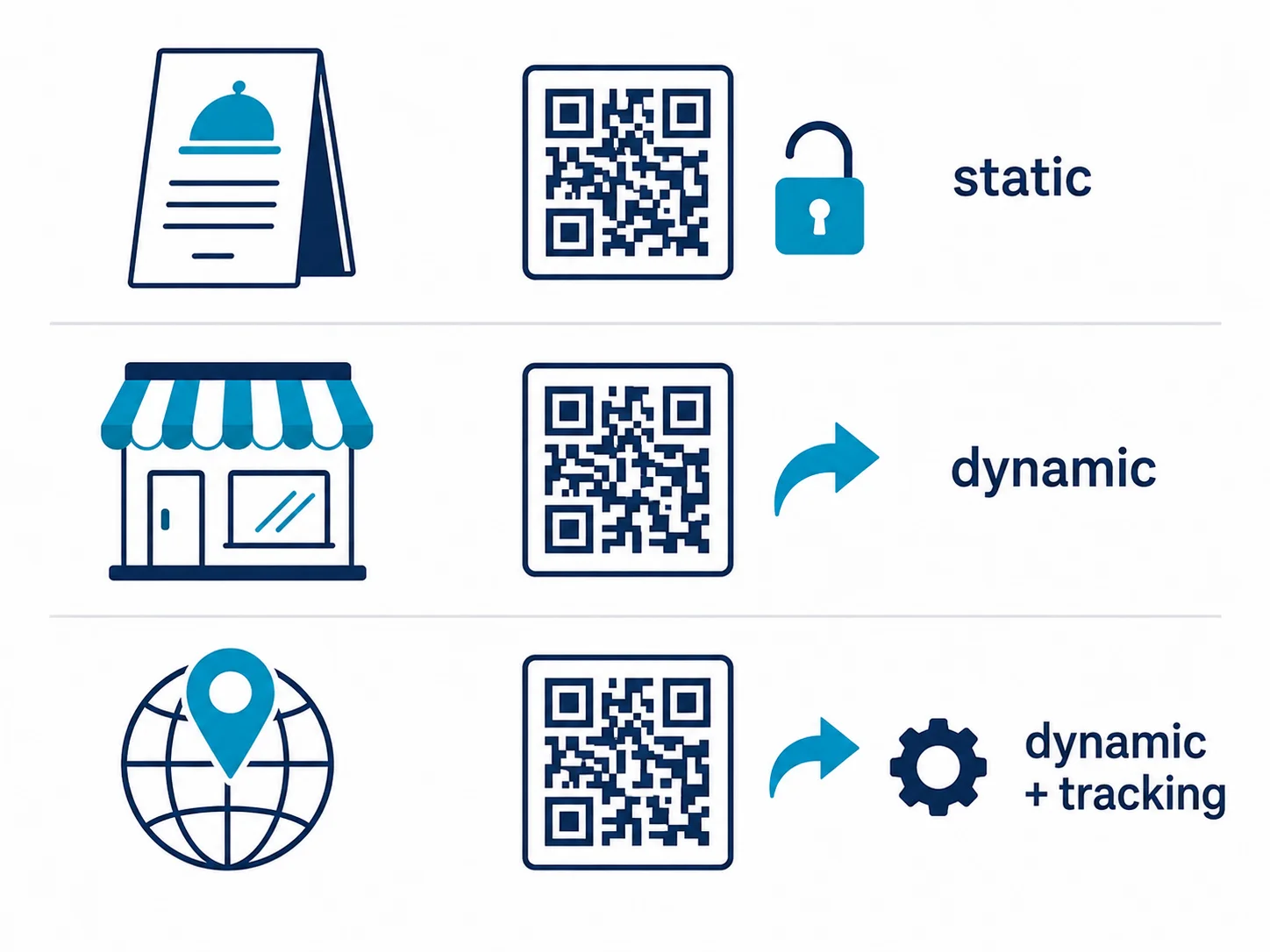
A static QR code encodes your content directly into the pixel pattern. There's no server involved, no account required, and it works forever because there's nothing to expire. A dynamic QR code encodes a short redirect URL instead, the platform's server looks up where that URL currently points and forwards the scanner there. That indirection is what lets you edit the destination after printing and see scan counts, but it also means the code stops working the moment the platform's server goes down or your subscription lapses.
Most people default to dynamic because generator homepages upsell it aggressively, but the decision should follow the use case, not the marketing page:
- Low complexity — a restaurant table tent linking to a fixed menu page: static is enough. The menu URL doesn't change often enough to justify a subscription, and if it does, you edit the destination page itself, not the QR code.
- Medium complexity — a regional retail campaign running across 40 store windows for six weeks: dynamic with basic scan tracking earns its cost, you can redirect the code to a new landing page mid-campaign without reprinting posters, and you get scan counts per location.
- High complexity — a national product launch with per-region tracking, a custom short domain, and multiple team members managing links: dynamic with a custom domain and UTM parameters is the right tool, the tracking and edit flexibility outweigh the subscription cost at that scale.
Our full breakdown, including exact pricing from the major platforms, is in Static vs Dynamic QR Codes: Complete Guide. The short version for this guide: if you're not sure you need to edit the destination after printing, you don't need dynamic yet.
Set the Right Error Correction Level
QR codes use Reed-Solomon error correction, a redundancy scheme defined in the ISO/IEC 18004 standard originally developed by Denso Wave in 1994, to survive partial damage. Four levels are available, and the level you choose changes both how much damage the code can survive and how visually dense the printed pattern looks.
| Level | Redundancy | Best for |
|---|---|---|
| L | ~7% | Digital-only codes with no risk of damage (email signatures, screens) |
| M | ~15% | General purpose, the default for most static codes |
| Q | ~25% | Handled items exposed to wear: menus, packaging, business cards |
| H | ~30% | Any code with a logo, or codes exposed to outdoor weathering |
Higher error correction is not free. It adds more modules to the same code, which makes the pattern denser and can push a code below the minimum readable size faster than a lower level would. A code with a logo generated at Level H can survive losing up to roughly 30% of its data to the logo overlay and physical damage combined, one generated at Level L cannot, this is the single most common reason a logo-branded QR code fails while an identical one without a logo scans fine.
How to Make a QR Code With QR Nova (Step-by-Step)
These steps apply to any static generator, using QR Nova as the reference since it needs no account for static codes:
- Pick your content type at QR Nova's free generator: URL, WiFi, vCard, PDF, text, email, or phone.
- Enter your data. For a URL, paste the full link including https://. For WiFi, enter the network name and password exactly as configured on the router.
- Choose static or dynamic based on whether you'll ever need to edit the destination after printing.
- Set error correction if the tool exposes it, Level M for most cases, Level H if you're adding a logo.
- Download as SVG for print, PNG for screens. SVG is a vector format, it stays sharp at any size from a business card to a billboard. PNG is fixed-resolution and degrades if scaled up after export.
The whole process takes under a minute for a static code. Dynamic codes add one more step, creating an account so the platform can host the redirect and the scan log.
Customizing Without Breaking Scannability
Colors and logos make a QR code look intentional instead of like a placeholder, but both interact with error correction in ways that generic tutorials rarely explain.
Adding a logo
Keep the logo under 20% of the total code area, and generate at Level H so the code has enough redundancy left to survive the overlay. A logo covering 30% or more, or a logo placed on a code generated at Level L, removes so much of the underlying pattern that scanning becomes inconsistent, it may work on a new iPhone with a strong camera and fail on a three-year-old Android in dim light.
Custom colors
Keep contrast high between the modules (the small squares) and the background. Dark modules on a light background is the safest combination. A common failure: light gray modules on white, which looks elegant on screen and fails to scan reliably because the camera can't distinguish module from background at the contrast threshold most scanners use.
Test Your QR Code Before You Print or Publish
Skipping this step is the single biggest cause of "it worked when I made it" complaints. Testing on the same bright, high-resolution screen you designed the code on tells you almost nothing about how it behaves printed at 2cm on matte cardstock under fluorescent lighting.
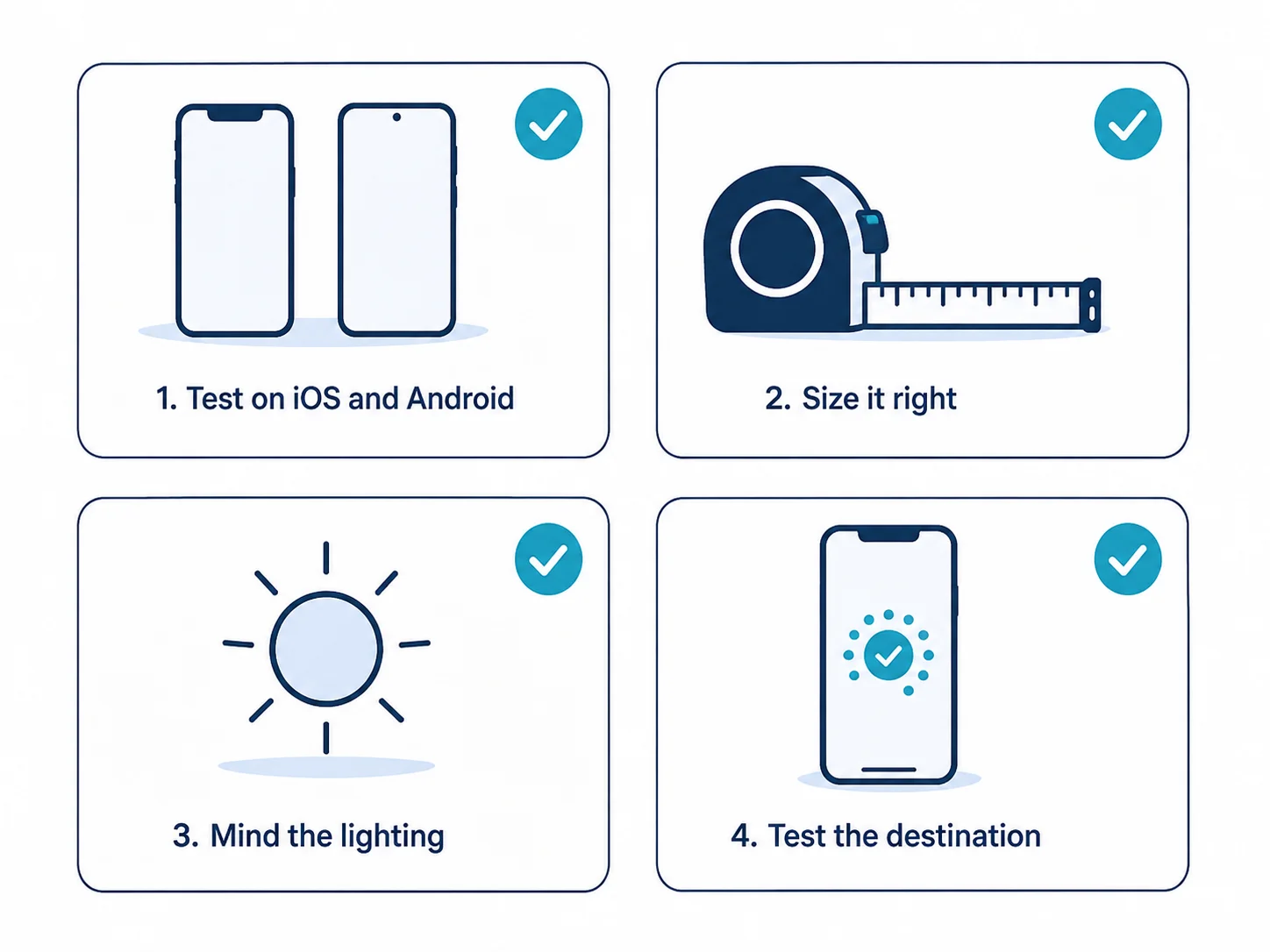
- Scan with two different phones, one iOS and one Android. Camera hardware and scanning software vary enough between manufacturers that a code failing on one and working on another is common, not rare.
- Test at the real distance. A code for a poster read from 3 meters needs to be tested from 3 meters, not 15cm from your laptop screen. The rule of thumb: the code's physical size should be at least 1/10 of the intended scanning distance.
- Test in the actual lighting. Outdoor signage under direct sun and indoor menus under warm restaurant lighting behave differently from your office monitor's backlight.
- Confirm the destination loads correctly on mobile. A scannable code that opens a desktop-only page or a broken link still fails the reader, even though the QR code itself worked perfectly.
Common Reasons a Freshly Made QR Code Fails to Scan
These come up repeatedly with codes made in the last hour, before any physical wear has had a chance to damage them:
- Logo too large for the error correction level — the leading cause of newly-made codes that fail intermittently.
- Missing quiet zone — the white margin around the code needs to be at least four modules wide. Cropping too tight, common when placing a code inside a designed flyer, removes the scanner's reference frame.
- PNG exported small then scaled up in a design tool — raster upscaling blurs module edges. Always export at final size or use SVG.
- Low contrast custom colors — pastel-on-pastel combinations that look fine in a brand kit fail the scanning threshold.
- Tested only on the design screen — a code that scans instantly from 10cm on a laptop can still fail at arm's length under warm lighting; see the testing section above.
- Dynamic code on a platform mid-trial — some generators issue dynamic codes during a free trial that silently stop redirecting once the trial ends, before you ever get a warning. If you're printing anything permanent, confirm the platform's dynamic codes don't expire on cancellation.
When You Shouldn't DIY Your QR Code
A single generator page covers the vast majority of use cases, but it's not the right tool for everything:
- Bulk generation — hundreds or thousands of unique codes for serialized products or event tickets need an API or CSV batch tool, not a one-at-a-time generator.
- Retail and supply chain compliance — packaging destined for GS1-regulated retail shelves needs GS1 Digital Link-compliant encoding, a standard format most consumer generators don't implement correctly.
- Anti-counterfeiting — codes meant to prove product authenticity need cryptographic serialization per code, which requires a purpose-built platform, not a generic generator.
If your use case is a single link, a menu, a WiFi network, or a business card, the steps above cover it end to end. Anything requiring per-unit uniqueness at scale needs a different tool.
How QR Nova Makes This Easier
Static QR codes at QR Nova are free with no account, no watermark, and no expiration, because a static code needs no server to keep running. Every download defaults to SVG, so you're not stuck scaling a blurry PNG later. If you do need a dynamic code, editable destination and scan analytics start at a flat monthly rate and, unlike several competing platforms, the code keeps redirecting even if you cancel, it just stops adding new scan data. That's the opposite of the subscription trap where a canceled plan kills a code already printed on thousands of flyers.
Once your code is made and tested, the people scanning it need nothing extra either, modern phones read QR codes natively. If anyone on your team asks how, point them to our guide on how to scan a QR code on any phone.
Make your QR code free at QR Nova, static codes need no account and never expire. For anything that needs to survive handling or a printed logo, set Level H and test it before it goes to the printer, not after.
Frequently asked questions
How do I make a QR code for free?
Go to a generator like QR Nova, pick your content type (URL, WiFi, vCard, PDF, text), enter the data, and generate. Static QR codes are free with no account and no expiration. Download as SVG for print or PNG for screens.
What's the difference between making a static and a dynamic QR code?
A static QR code encodes your content directly in the pattern, it never expires and needs no server. A dynamic QR code points to a short redirect URL you can edit later and tracks scans, but it depends on the platform's servers staying online and your subscription staying active.
What error correction level should I use when I make a QR code?
Use Level M (about 15% redundancy) for general digital and print use. Use Level Q (25%) for anything handled a lot, like menus or business cards. Use Level H (30%) whenever you add a logo, since the logo itself damages part of the code.
Can I add a logo to my QR code without breaking it?
Yes, if you keep the logo under 20% of the total code area and generate at Level H error correction. A logo larger than that, or added on top of a code generated at Level L, removes enough data to make the code fail intermittently.
How do I test a QR code before printing it?
Scan it with at least two different phones (one iOS, one Android), from the real distance and lighting you expect in the field, not from 5cm away on a bright screen. Confirm the destination page loads and is mobile-optimized before you send anything to print.
Why does my newly made QR code fail to scan?
The most common causes are a logo too large for the error correction level used, low contrast between the code and its background, no white quiet zone around the edges, or a PNG stretched past its native resolution. Regenerate as SVG and re-test.
What size should I make my QR code for print?
Minimum 2cm × 2cm for close-range items like business cards. For posters read from a distance, the rule is 1/10: the code should be at least one-tenth of the expected scanning distance. A poster read from 3 meters needs a code of at least 30cm.
Do I need an account to make a QR code?
Not for static codes. QR Nova generates static URL, WiFi, vCard, and PDF QR codes entirely in your browser, no account, no email, no sign-up. Dynamic codes with editable destinations and scan tracking require an account because they run through a server.
Related articles
How to Create a QR Code (2026): Complete Step-by-Step Guide
How to create a QR code in under 60 seconds, free, no sign-up, no subscription trap. Static codes that never expire, dynamic codes you actually own.
Can You Edit a QR Code After Printing?
Can I edit a QR code after printing it? Static codes can't, but dynamic codes let you change the destination anytime. Here's exactly how it works.
What Is a Dynamic QR Code? How It Works
What is a dynamic QR code? It's a code with an editable destination and scan analytics, but it comes with a subscription trap most guides skip.
Best Flowcode Alternative in 2026 (Honest Comparison)
Flowcode's free tier gives you 2 codes. The next plan is $300/year up front. Here are the best Flowcode alternatives for every budget and use case.
Try it now — no sign-up needed
Get started