QR Code Analytics: What Data You Can Actually See
A QR code shows scans, location, device and time — but only if it's dynamic. Here's the exact data you can and can't see. Free, no account.
This article was written by the QR Nova team. We build QR code software, which may inform our perspective.
Most articles about QR code analytics show you a screenshot of a colorful dashboard and imply your QR code is quietly watching everyone who scans it. That's backwards. A QR code is a printed pattern — it has no sensors, no memory, and no idea who is pointing a camera at it. A QR code only produces analytics when it's a dynamic code routed through a redirect, and even then the data is limited to scan counts, timestamps, approximate city-level location, and device type — never a person's identity, never precise GPS, and never anything at all for a static code. What you can see is decided entirely by the type of code and what the scanner chooses to reveal on the page after the scan.
TL;DR
- Static QR codes collect zero analytics — no server is contacted, so there's nothing to count.
- Dynamic QR codes can show: total scans, unique scans, date/time, approximate location, device, OS, and browser.
- Location is city-level from IP, not GPS. A QR code cannot read your exact position.
- A scan is not a visitor and not a customer — to measure outcomes you need analytics on the destination page.
- You never see a scanner's name or email unless they enter it themselves on your landing page.
The One Rule That Decides Everything: Static vs Dynamic
Generate your first QR code — free
Get startedWhether you get any analytics at all comes down to a single distinction.
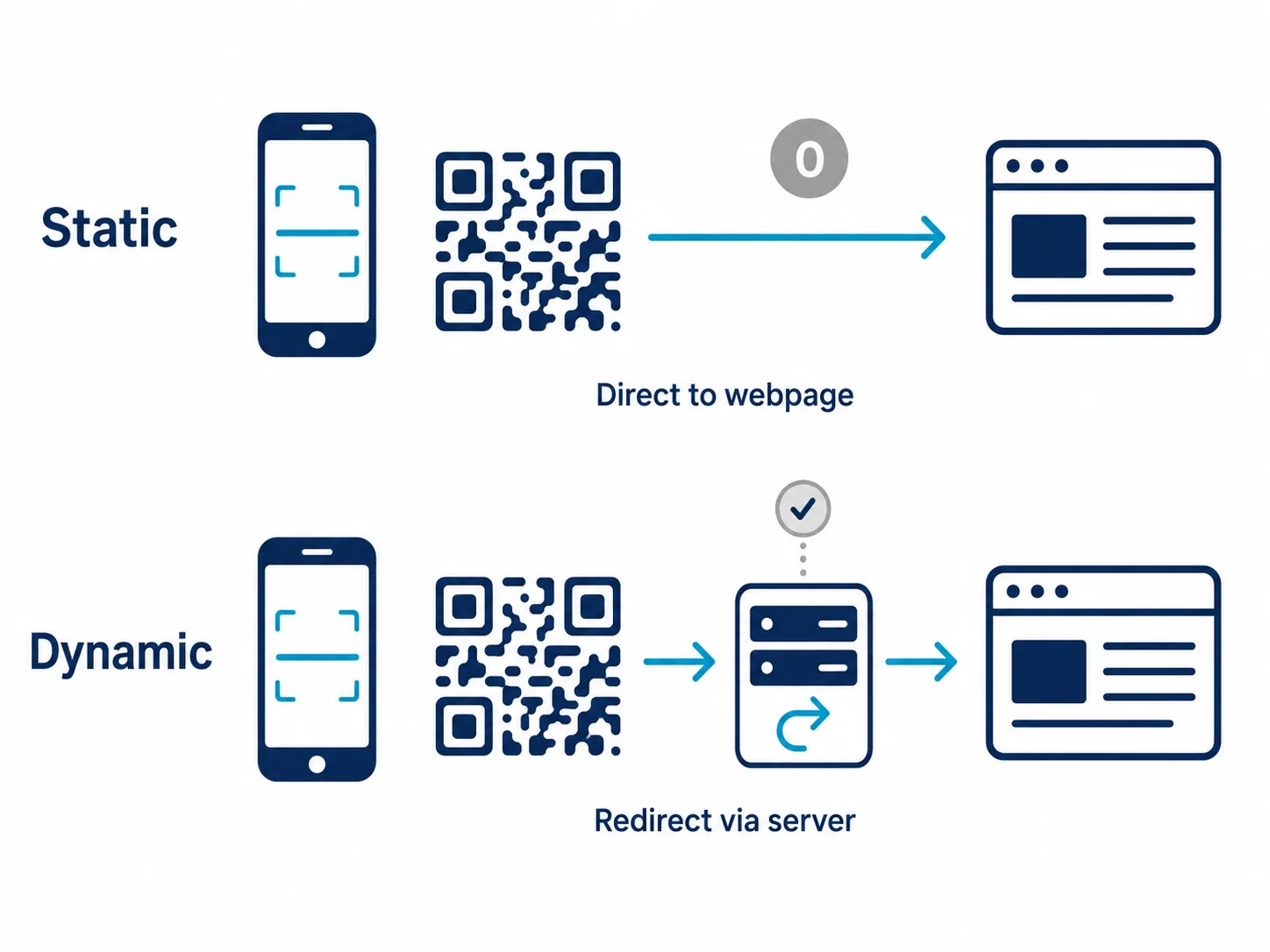
A static QR code encodes its destination — a URL, some text, a WiFi password — directly into the black-and-white pattern. When someone scans it, their phone reads the data from the image and goes straight there. No server in the middle, nothing to log. A static code is, by design, completely silent. It cannot count a single scan.
A dynamic QR code encodes a short redirect URL instead. The scanner's phone hits that redirect on the platform's server, the server logs the request, and then forwards the phone to your real destination. That single server hop in the middle is the entire source of QR code analytics. No redirect, no data. You can read more about that mechanism in our guide to how dynamic QR codes work.
This is why "does my QR code have analytics?" almost always reduces to "is my QR code dynamic?" If you generated a plain code that points straight at your URL, there is no dashboard waiting for you — and no amount of platform marketing changes that.
Exactly What Data a Dynamic QR Code Can See
When a dynamic code is scanned, the platform's server receives an ordinary HTTP request. Everything in QR analytics is derived from what that request carries. Here is the complete, honest inventory.
| Data point | What you actually get | Source |
|---|---|---|
| Total scans | Every decode that hit the redirect, including repeats | Server log |
| Unique scans | Approximate distinct devices (de-duplicated by IP/cookie) | Server log |
| Date & time | Timestamp of each scan, down to the second | Server log |
| Location | City or region — not a street address or GPS | IP geolocation |
| Device type | Mobile, tablet, or desktop | User-agent header |
| Operating system | iOS, Android, Windows, etc. | User-agent header |
| Browser | Safari, Chrome, in-app browser, etc. | User-agent header |
| Language | Device language preference (when sent) | Accept-Language header |
That's the whole list. It looks like a lot until you notice what every row has in common: none of it identifies a human being. It describes a request, not a person.
What a QR Code Can Never See
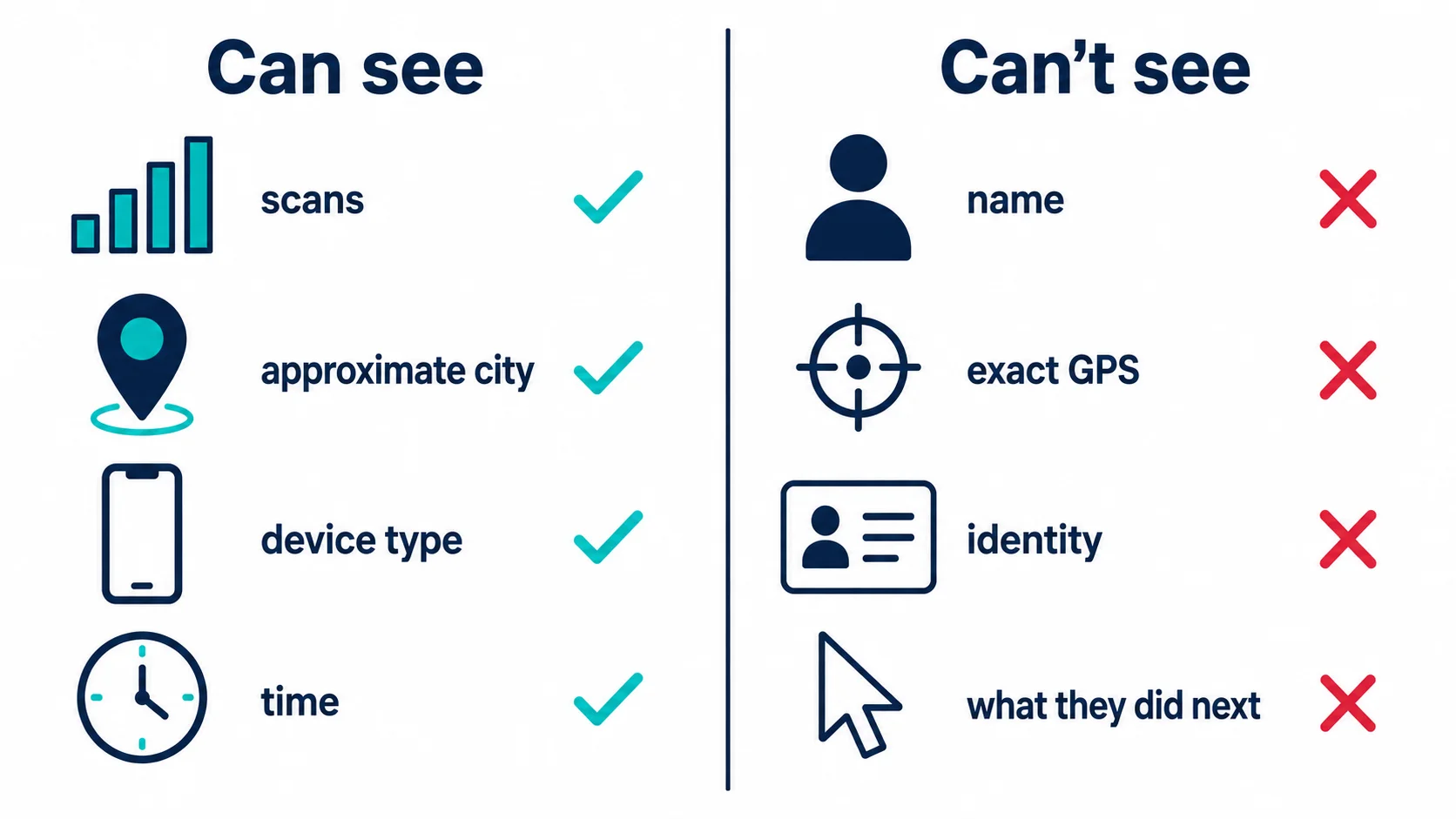
This is where the marketing screenshots get misleading. A QR code — dynamic or not — cannot see any of the following on its own:
- A name, email, or phone number. The scan is anonymous. You only get contact details if the person types them into a form on your page.
- Precise GPS location. IP geolocation lands on a city, sometimes a neighborhood in dense areas, often the wrong suburb. It is not the blue dot on a map. True GPS requires the scanner to grant location permission to a website or app — a separate action the code can't force.
- Who the individual is. Two scans from the same office building look identical and anonymous. There is no identity attached unless the person logs into an account.
- What they did after scanning. The redirect logs the scan and hands off. Whether they bought something, bounced, or read for ten minutes lives in your destination's analytics, not the QR platform's.
The counterintuitive part: the QR code is the least informative point in the whole funnel. The scan tells you "a device opened this link from roughly here, on this kind of phone, at this time." Everything that actually matters to a business happens one step later, on the page.
The Scan-Is-Not-a-Customer Trap
The single most common mistake in reading QR analytics is treating a scan as an outcome. It isn't.
A scan only means a camera decoded the pattern and a request reached the redirect. The same curious person scanning your poster three times is three scans. A scan is not a unique visitor, not a page view, and definitely not a sale. If your dashboard shows 4,000 scans and your sales didn't move, nothing is broken — you measured interest, not conversion.
To connect scans to results you have to instrument the destination. That means adding UTM parameters to the URL and reading them in Google Analytics 4, or tracking sign-ups and redemptions in your own system. Scan count tells you the poster got attention; checkout data tells you whether it worked. Our walkthrough on how to track QR code scans covers wiring both together, and the QR code GA4 tracking guide shows the exact UTM setup.
Why Your Scan Count Is Probably Inflated
Even the one number people trust most — the raw scan total — is noisier than it looks. Three things quietly pad it. Preview bots: when a link is pasted into iMessage, WhatsApp, Slack, or a social feed, the platform often fetches the URL to build a preview, and that fetch can hit your redirect and register as a "scan" no human made. In-app browsers: scanning from inside Instagram or TikTok can open a stripped browser that fails to set a cookie, so the same person on a second scan looks like a brand-new unique. Camera double-reads: some phones fire the redirect twice in a second while the user decides whether to tap.
The practical rule: treat total scans as a ceiling, not a count of people. Unique scans are closer to reality but still approximate, because de-duplication leans on IP and cookies that mobile networks and private browsing routinely scramble. If a decision depends on the exact number, validate it against the destination's own analytics rather than the scan counter alone.
How Much You Can See, by Use Case
The right depth of analytics depends on what you're running. Three concrete levels:
- Restaurant table menu (low). You barely need analytics. A static code is fine; if you want a rough sense of traffic, a dynamic code's daily scan count is plenty. Location and device data add nothing actionable when every scanner is sitting in your dining room.
- Regional retail campaign (mid). Now device and city data earn their keep — you can see which city responded, whether scans skew iOS or Android, and what time of day people scan. Pair a dynamic code with UTM tags so GA4 shows whether scans turned into purchases.
- National enterprise rollout (high). You want a dynamic code on a custom domain, server-side event tracking, per-location UTM campaigns, and unlimited data retention so a code printed in Q1 is still reporting in Q4. Here the QR platform's analytics is just the top of the funnel feeding a full attribution stack.
Privacy: What This Means for the Person Scanning
Because the data is request-level and anonymous, a plain QR scan is low-risk for the person scanning — there's no identity in it. The privacy questions start at the destination, where forms, logins, and third-party trackers can collect real personal data under data-protection rules like the GDPR. The honest framing for both sides: the QR code sees a city and a phone type; the website behind it is where actual personal data is collected, and that's where consent and disclosure belong.
How QR Nova Handles Scan Analytics

QR Nova gives every dynamic code the full request-level inventory above — scans, unique scans, time, city-level location, and device breakdown — without the two traps most platforms set. There are no scan-count caps that freeze your reporting mid-campaign, and there is no arbitrary retention window that deletes your early data. A code you print in January is still logging scans, and still showing you that January history, in December. You can also export your data, so the analytics belong to you rather than to a dashboard you're renting. Create one free at the QR code generator, or see why QR Nova drops the limits other platforms build their pricing around.
The Honest Summary
QR code analytics is real and useful, but narrower than the dashboards suggest. You can see how many times a dynamic code was scanned, roughly where, on what kind of device, and when. You cannot see who, exactly where, or what they did next — those answers live on your landing page, not in the code. Choose dynamic when you need the scan data, add UTM tracking when you need outcomes, and treat any platform that implies it can see more than a city and a device with healthy suspicion.
Frequently asked questions
What analytics can I see from a QR code?
Only a dynamic QR code produces analytics, and only these data points: total scans, unique scans, the date and time of each scan, approximate city-level location from the IP address, device type (mobile, tablet, desktop), operating system, and browser. You cannot see a scanner's name, email, phone number, or precise GPS location unless they separately enter that data on your landing page or log in.
Can a QR code track my exact location?
No. A QR code cannot read GPS. Location in QR analytics comes from the IP address of the scan, which resolves to a city or region — typically accurate to the city level, not a street address. Precise GPS would require the scanner to grant location permission to a website or app after scanning, which is a separate step the QR code itself cannot trigger.
Do static QR codes have any analytics?
No. A static QR code encodes the destination directly in the image and never contacts a server, so there is nothing to count. You get zero analytics — no scan count, no location, no device data. To see any analytics you need a dynamic QR code that routes through a redirect you control, or you must add tracking (like a UTM tag plus Google Analytics) to the destination URL.
Does a QR code know who scanned it?
No. A QR code cannot identify a person. The scan is an anonymous HTTP request — the most you learn is an approximate location, device, and timestamp. You only learn someone's identity if they choose to give it: filling in a form, signing into an account, or completing a purchase on the destination page. The QR code is anonymous by default.
Is a scan the same as a visit or a customer?
No. A scan only means the camera decoded the code and opened the link. It is not a unique visitor, a page view, or a customer. The same person scanning twice counts as two scans on most platforms unless 'unique scans' is tracked separately. To measure real outcomes — sign-ups, redemptions, sales — you need analytics on the destination page, not just the scan count.
How do I add Google Analytics to a QR code?
Add UTM parameters to the destination URL (for example, ?utm_source=qr&utm_medium=print&utm_campaign=spring) before you generate the code, then read the traffic in Google Analytics 4 under Traffic acquisition. A dynamic QR is better here because you can change the destination — and its UTM tags — after printing without reprinting the code. See our QR code GA4 tracking guide for the full setup.
How long is QR code scan data kept?
It depends entirely on the platform. Retention ranges from 30 days on some free plans to unlimited on paid tiers. This matters for print campaigns that run for months: if your platform purges data after 90 days, you lose the early scan history. QR Nova keeps your scan history without arbitrary expiry, so a code printed in January is still reporting in December.
Can I see analytics without creating an account?
For scan-level analytics (counts, location, device over time) you need a dynamic QR code, which requires an account so the data has somewhere to live. You can still measure results on a static code by adding UTM tags and using your own Google Analytics — no QR-platform account needed, but you only see destination traffic, not raw scan events.
Related articles
How to Track QR Code Scans, Complete Guide
How to track QR code scans: native platform analytics, UTM parameters + GA4, and what data you actually get. No guesswork.
QR Code for Feedback: The Complete Guide
How to make a QR code for feedback that people actually scan and complete. Static vs dynamic, response rate over scans, and the review-gating trap to avoid.
QR Code for Coupons: The Complete Guide
How to make a QR code coupon that you can edit after printing, track redemptions, and stop people from sharing. Free generator, no account.
Generate your first QR code — free
Get started