QR Code for Feedback: The Complete Guide
How to make a QR code for feedback that people actually scan and complete. Static vs dynamic, response rate over scans, and the review-gating trap to avoid.
This article was written by the QR Nova team. We build QR code software, which may inform our perspective.
Most guides on a QR code for feedback stop at "make a Google Form, generate a code, stick it on a table tent." That gets you a square that opens a survey. It doesn't tell you that the code has nothing to do with whether anyone completes the form, that a scan count is not a response, or that the popular "send happy customers to Google, unhappy ones to a private form" trick can get your business listing penalized. A feedback QR code works when the form behind it loads fast and asks little, when there's a real reason to scan at the moment of experience, and when you measure completed responses rather than scans. The code is the easy part. Everything that decides whether feedback actually arrives happens on the other side of the scan.
TL;DR
- A feedback QR encodes a link to a form or review page — the code is just delivery, the form does the work.
- Static codes are free and permanent; dynamic codes let you swap the survey or route by location after printing, but depend on a paid platform.
- A scan is not a response. Your real metric is the form's completion rate, not the scan count.
- Friction kills feedback: short, mobile-first, open on question one, no login wall, keep email optional and last.
- Avoid "review gating" — routing only happy customers to public reviews violates Google's policy and can get your listing penalized.
How Feedback QR Codes Actually Work
Try it now — no sign-up needed
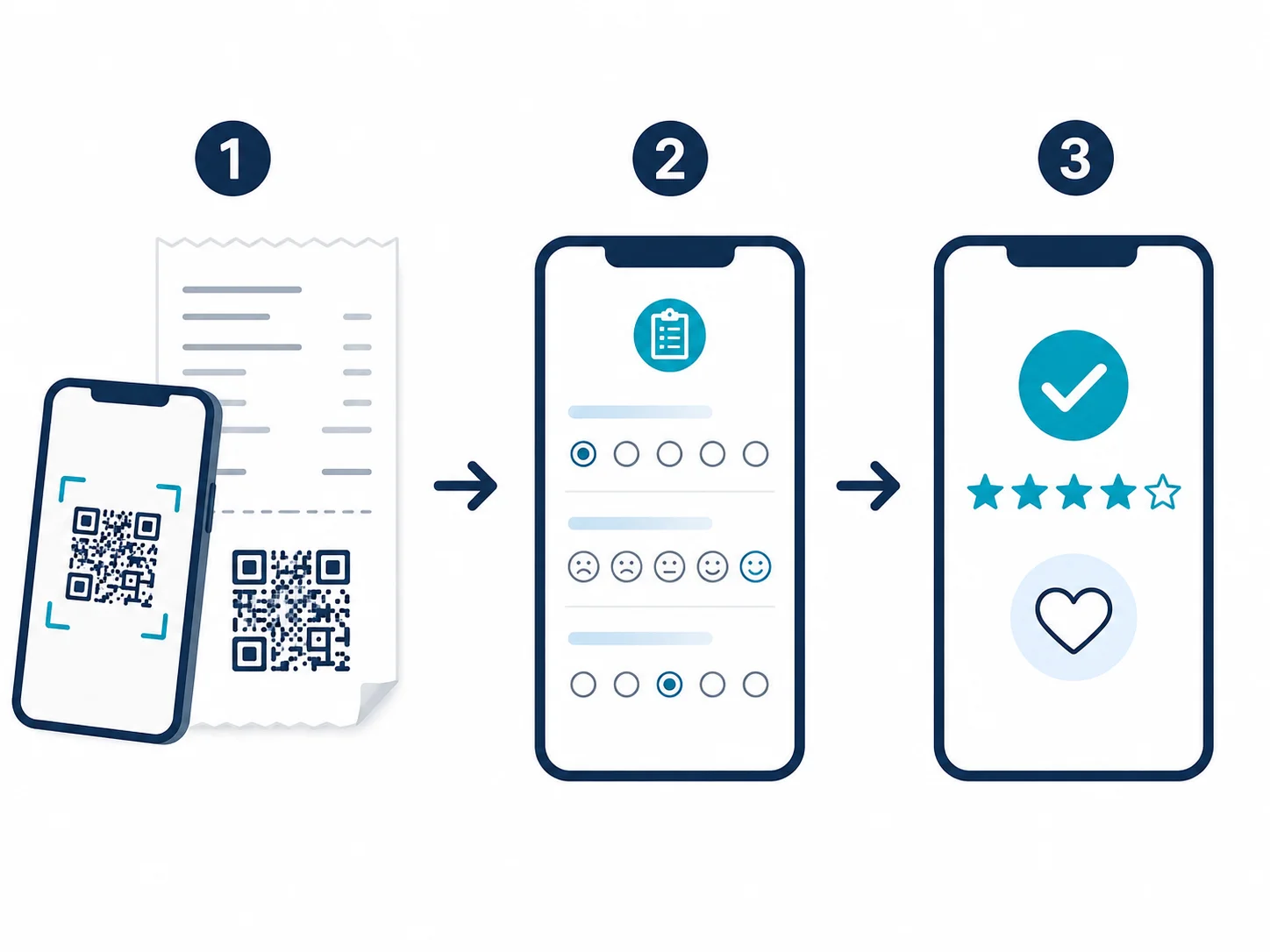
Get startedA feedback QR code is a standard QR code that carries a link — to a survey, a review page, or a feedback form you control. The code has no intelligence of its own. It does not host the questions, it cannot collect answers, and it cannot tell whether the experience was good or bad. Everything that matters — the questions, the response rate, the routing, the data — lives in the form or page the code points to.
This is the thing to internalize before you print anything. The QR code is a delivery mechanism. If your response rate is low, the code is almost never the problem; the form behind it is too long, opens behind a login, or there's no reason to scan in the first place. Choose the right destination and design it for a thumb on a phone, and the code does its one job perfectly. Point it at a clumsy form and the best QR code in the world won't save you.
What to Link a Feedback QR Code To
The destination is the whole game. There are three common targets, and the right one depends on what you're trying to learn.
1. A short survey form
Google Forms, Typeform, SurveyMonkey, or your own page. This is the default for structured feedback: rate your visit, what could be better, would you return. The rule that decides success is brutally simple — the fewer questions and the fewer taps before question one, the higher your completion rate. One to three questions on a mobile screen beats a ten-question form every time.
2. A public review page
If the goal is reviews rather than private feedback, link the code straight to your Google Business review page (or Yelp, Tripadvisor, App Store). The scanner lands with the star rating already on screen. This converts a satisfied moment into public proof — but it's a blunt instrument, because everyone, happy or not, lands on the same public page.
3. A tracked redirect (dynamic) link
The code encodes a short redirect — something like qrn.to/x7k — that forwards to your real form and can be changed after printing. This is a dynamic QR code, and it's the only option that lets you switch the survey tool, route by location, or update questions without reprinting a single table tent.
Static vs Dynamic: Which One for Feedback
This choice quietly defines how flexible your feedback program is, so it's worth being precise.
A static feedback QR encodes the form URL directly in the image. It's free, it never expires, and it depends on no server or subscription. The catch: whatever URL you encoded is locked. If you later move from Google Forms to Typeform, or your form link changes, the printed code points at the old destination forever. To change it, you reprint.
A dynamic feedback QR encodes a redirect you control. You can swap the survey behind it, send scans at different locations to different forms, change the questions for a new season, or A/B test two survey designs behind the same printed code. The cost is dependence: the redirect runs on a platform's servers, and on most platforms it stops the day you stop paying. We covered how that dependency becomes a trap in our breakdown of the QR code subscription scam — printed materials that go dead when a trial ends.
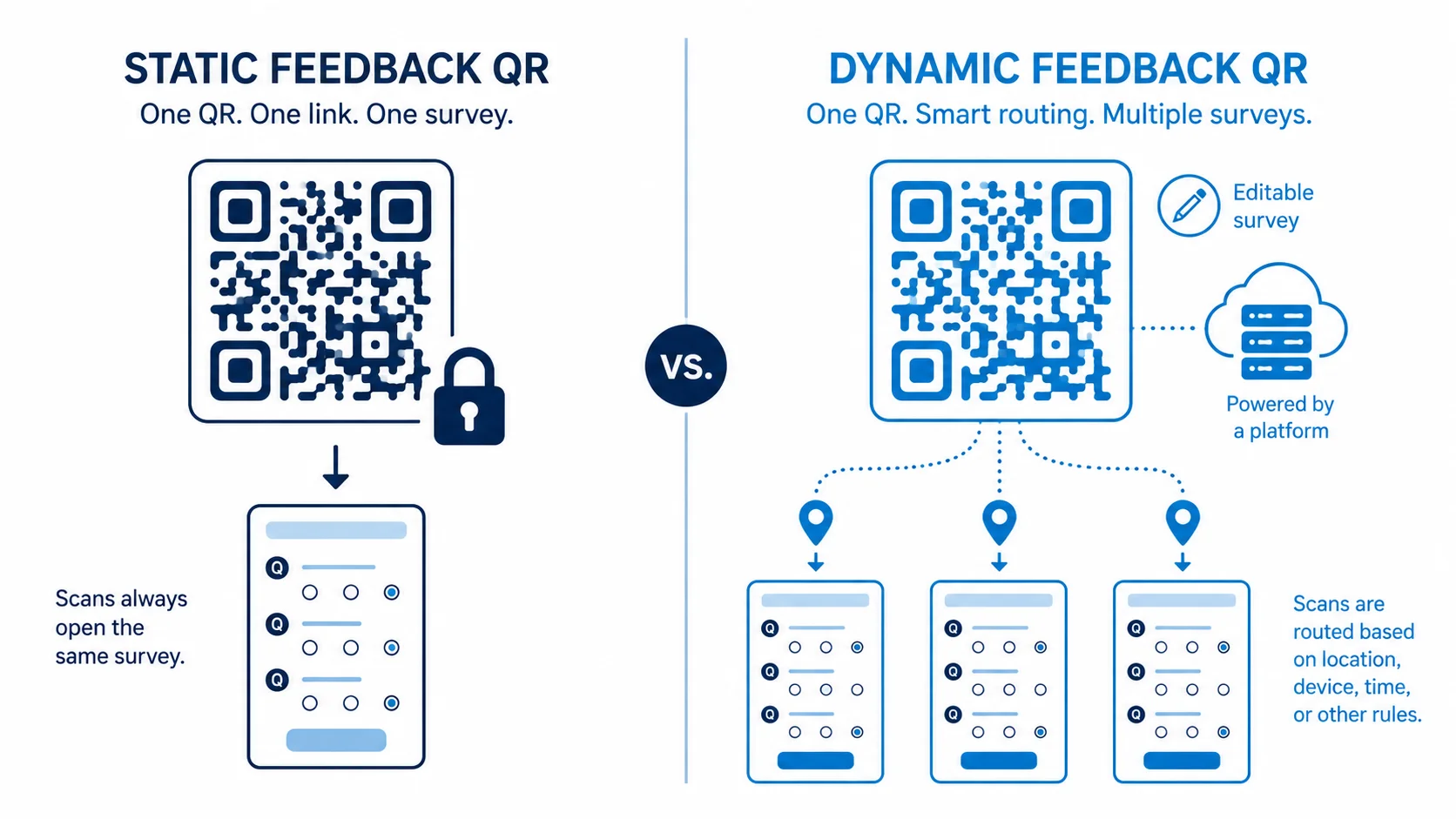
The honest rule: if you'll point at one stable form forever — a single restaurant's "rate us" link — static wins, free and bulletproof. If you run feedback across multiple locations, change surveys seasonally, or want per-channel tracking, dynamic earns its keep. Our static vs dynamic guide walks the full trade-off, but for feedback the question is simply: will this form link ever change after it's printed?
The Real Metric: Responses, Not Scans
Here's where feedback programs fool themselves. A dynamic QR code can count scans, and a healthy scan number feels like success. But a scan is somebody pointing a phone at a square. A response is somebody finishing your form. Those are wildly different numbers, and the gap between them is the entire story of your feedback program.
If 200 people scan and 12 complete, you don't have a scanning problem — you have a form problem. The scan count tells you the placement and the prompt are working. The completion rate, which lives in your survey tool, tells you whether the form respects people's time. Treat them as two separate metrics: scans measure interest, completions measure feedback. Optimize the gap by shortening the form, not by chasing more scans.
Why Nobody Is Scanning (and How to Fix It)
Most "feedback QR codes don't work" complaints come down to three fixable things, none of which are the code itself.
No reason to scan
A bare QR code with no prompt gets ignored. People scan when there's a clear, small ask: "30 seconds to help us improve" or "tell us how we did — and get 10% off next time." The reason has to be visible right next to the code, in plain language, with an honest sense of how little time it takes.
Wrong moment, wrong place
Feedback is emotional and it fades fast. The code has to be where the phone is already out and the experience is still fresh — on the receipt, the table tent, the checkout screen, the bottom of a confirmation email. A code on a wall by the exit, after the moment has passed, collects nothing.
Too much friction after the scan
Every login wall, every "tell us your name and email first," every long intro paragraph bleeds responses. Open on question one. Keep it to a handful of questions. Make contact details optional and last. The scan got you the hardest yes; don't waste it on a clumsy form.
The Review-Gating Trap Nobody Warns You About
There's a tempting pattern all over feedback marketing: route happy customers to your public Google reviews and quietly funnel unhappy ones to a private complaint form, so only good experiences become public. Some QR feedback tools sell this as a feature.
Don't do it. This is called review gating, and it violates Google's review policies — selectively soliciting public reviews based on how positive you expect them to be. Google can filter the reviews, and in clear cases penalize the listing. It also poisons the trust the reviews are supposed to build, because the public rating no longer reflects reality.
The compliant approach is straightforward: send everyone to the same feedback step, make leaving a public review easy for anyone who wants to, and offer a private channel for detailed complaints alongside — not instead of — the public option. You can absolutely make it convenient to leave a good review. You just can't hide the bad ones. Honest feedback collection compounds; gamed ratings get caught.
Placement: Where Feedback QR Codes Earn Responses
Placement decides response rate more than anything else. The best feedback QR is the one a customer sees while the experience is still fresh and the phone is already in hand.
Receipts and checkout
A code on the receipt or checkout screen catches the customer seconds after the transaction, when the experience is sharpest. "How did we do? 30 seconds" printed at the bottom of every receipt is one of the highest-volume feedback channels there is.
Table tents and counters
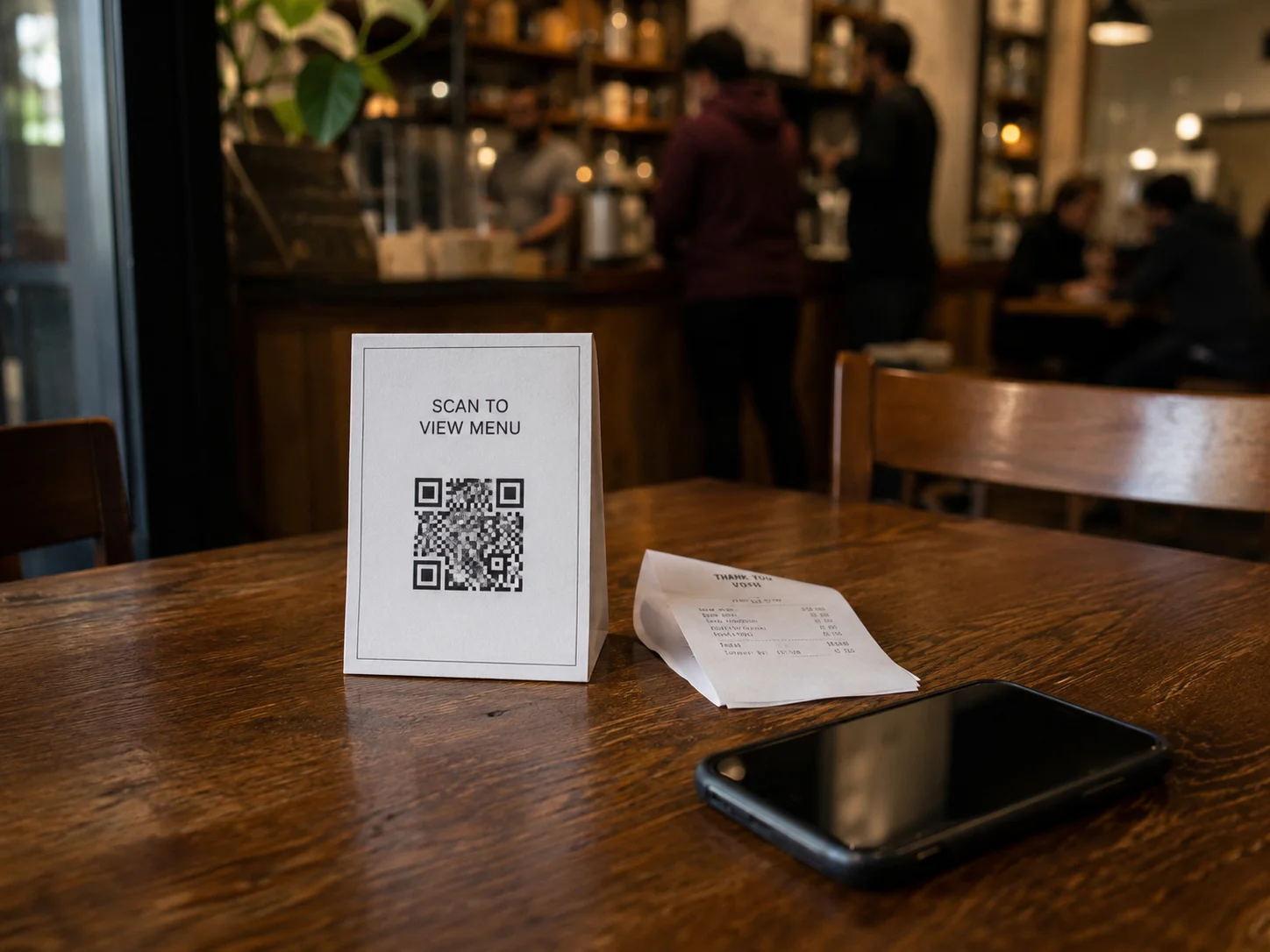
For restaurants, cafes, and service counters, a small card on the table or counter captures feedback during or right after the visit. Keep the prompt tiny and the form shorter — diners will give you three taps, not thirty.
Packaging and inserts
A "tell us what you think" insert in a delivered product reaches a customer at the unboxing moment. Use a dynamic code so one printed insert can point at a fresh survey across production runs without changing the artwork.
Email and digital receipts
A feedback QR in an email signature, confirmation email, or digital receipt works because the recipient is already on a device — though on mobile a plain link often beats a QR, since they can't scan their own screen. Use the QR for print, the link for digital.
Three Levels: Single Cafe, Multi-Location, Enterprise CX
The same feedback QR looks completely different depending on scale.
Level 1 — Single cafe (low complexity)
A coffee shop wants honest feedback on a new menu. Tool: a free three-question Google Form (see our step-by-step QR code for Google Forms guide). QR code: a single static code on table cards and the receipt. Metric: read the responses directly. Cost: zero. Static is perfect here — the form link never changes, so there's no reason to pay for a redirect.
Level 2 — Multi-location retail (mid complexity)
A chain wants per-store feedback across receipts and signage. Tool: a survey platform with location tagging. QR codes: a dynamic code per location so each store's scans route to a tagged form, letting you compare branches and swap the survey seasonally without reprinting. Metric: completion rate per store, not total scans.
Level 3 — Enterprise CX program (high complexity)
A national brand runs a structured voice-of-customer program tied to NPS and ticketing. Tool: a CX platform (Qualtrics, Medallia) with the QR feeding tagged, routed responses into dashboards and alerts. QR codes: dynamic, with UTM and location parameters so feedback maps to touchpoints automatically. Here the QR is the smallest part of a system built around routing, attribution, and closing the loop with customers.
When a Feedback QR Code Won't Work
Honest guidance includes the cases where this is the wrong tool.
When the audience won't scan
Scanning is mainstream, but it still skews by context and demographic. A feedback QR aimed at people who won't reliably scan — or placed somewhere awkward to point a phone — will lose to a verbal ask, a paper card, or a follow-up email. Match the channel to the audience.
When you need a representative sample
QR feedback is self-selecting: the people who scan are the delighted and the furious, rarely the indifferent middle. That's fine for catching problems and harvesting reviews, but it's not a statistically representative survey. If you need rigorous research, a sampled survey beats a QR on a table.
When the form is the real problem
If your survey is long, gated behind a login, or asks for personal details up front, a QR code only delivers more people to a bad experience. Fix the form first. The code can't compensate for friction you refuse to remove.
How QR Nova Handles Feedback Codes
Most platforms that sell "feedback QR" features are really renting you a dynamic redirect that lives on their servers and dies with your subscription. For multi-location or campaign feedback that flexibility can be worth paying for — but only if you understand exactly what you're renting.
At QR Nova, a static feedback QR encodes your form URL directly in the image: no redirect, no server, no scan cap, no expiry. Print "rate us" cards for every table pointing at a stable Google Form and those codes still work in three years, regardless of what happens to any platform. The free generator at QR Nova needs no account, no email, and no card — generate, download as PNG or SVG, and print.
When you genuinely need to route by location or swap the survey after printing, a dynamic code is the right tool, and we're transparent about how the redirect works and what keeps it alive — no silent deactivation, no trial that bricks your print run. The permanent QR code guide lays out exactly when static is enough and when the flexibility of dynamic is worth it.
Make Your Feedback QR Code — Free, Right Now
It takes under two minutes. Go to qrcodenova.com/en/qr-code-generator, paste your survey or review-page URL, adjust the colors to match your branding, and download as SVG for signage or high-res PNG for receipts and table cards. No account, no sign-up, no scan limits, ever.
Build the form first and keep it short. Put the code where the experience is fresh and the phone is out. Give people a real reason to scan. Measure completed responses, not scans. And never gate your reviews — honest feedback is the only kind worth collecting.
Frequently asked questions
How do I make a QR code for feedback?
Build your feedback form first — a Google Form, Typeform, SurveyMonkey, or your own page — then copy its URL and paste it into QR Nova's generator at qrcodenova.com/en/qr-code-generator. Download as PNG for receipts and table cards or SVG for large signage. No account required. The QR just carries the link; the form does all the work.
Should a feedback QR code be static or dynamic?
Static if the form URL will never change — it's free, permanent, and has no scan limits. Dynamic if you might switch survey tools, route scans by location, or run different questions per season, because a dynamic code lets you change the destination after printing. Most table tents and receipts are fine static; multi-location or campaign feedback benefits from dynamic.
What's the best thing to link a feedback QR code to?
A short, mobile-first form that opens directly on the first question — no login wall, no long intro. Every extra tap before question one costs you responses. Google Forms and Typeform both produce clean mobile links. For public reviews, link straight to your Google Business review page so the rating box is the first thing people see.
Why is nobody scanning my feedback QR code?
Usually placement and motivation, not the code. People scan when there's a clear reason ('30 seconds, help us improve') and the code is where their phone is already out — the receipt, the table, the checkout. A code buried on a wall with no prompt gets ignored. Add a one-line reason to respond and put the code at the moment of experience.
Can I route happy customers to Google reviews and unhappy ones to a private form?
Technically yes, but Google's policy prohibits 'review gating' — selectively soliciting public reviews only from satisfied customers. It can get your listing penalized. The compliant approach is to send everyone to the same feedback step and make leaving a public review easy for anyone, while still offering a private channel for detailed complaints.
How do I track feedback QR code responses?
A scan is not a response. The QR can count scans if it's dynamic, but completion happens in your survey tool — so your real metric is the form's response and completion rate, not the scan count. Use separate codes per location or channel (table vs receipt vs entrance) to see where responses actually come from.
Should feedback collected by QR code be anonymous?
Anonymous feedback gets more honest answers and higher response rates, so default to it unless you need to follow up. If you do collect contact details, ask for them last and make them optional — requiring an email up front is one of the fastest ways to kill your completion rate. State clearly whether responses are anonymous; people answer differently when they know.
Do feedback QR codes expire?
A static feedback QR never expires — the form URL is encoded in the image itself, so it works as long as the form exists. A dynamic one can stop working if you cancel the subscription running its redirect, and any QR is only as alive as the form behind it: delete the Google Form and the code leads nowhere. The image surviving and the form surviving are two separate things.
Related articles
QR Code for Google Forms: Step-by-Step Guide
Create a QR code for Google Forms in under 2 minutes — free, no account, no scan limits. Step-by-step guide with size, placement, and testing tips.
QR Code for Coupons: The Complete Guide
How to make a QR code coupon that you can edit after printing, track redemptions, and stop people from sharing. Free generator, no account.
QR Code for Surveys: Step-by-Step Guide
QR code survey setup for Google Forms, Typeform, and SurveyMonkey — with real platform limits, print use cases, and when QR surveys fail.
Try it now — no sign-up needed
Get started