QR Code for Coupons: The Complete Guide
How to make a QR code coupon that you can edit after printing, track redemptions, and stop people from sharing. Free generator, no account.
This article was written by the QR Nova team. We build QR code software, which may inform our perspective.
Most guides on QR code for coupons stop at "paste your link into a generator and print it." That gets you a square that scans. It doesn't tell you that a static coupon QR locks your offer forever the moment it hits the printer, that a "scan count" is not a redemption, or that anyone can screenshot your discount and pass it to a hundred friends. A QR code for coupons works when the code points to something you can change, the redemption is enforced at checkout rather than at the scan, and the offer is printed at a high enough resolution to actually scan in the wild. The encoding method you choose decides whether you can edit the deal later, track who used it, and stop it from leaking.
TL;DR
- A coupon QR encodes either a URL (best — editable, trackable) or the raw discount code text (locked once printed).
- Static codes are free and permanent but freeze your offer; dynamic codes let you change the deal after printing but depend on a paid platform.
- A scan is not a redemption. Count real redemptions at the checkout or POS, not at the QR scan.
- A QR code cannot stop sharing on its own — single-use enforcement lives on the landing page or POS, never in the image.
- Print at 300 DPI or use SVG. A blurry coupon QR is a coupon nobody can use.
How QR Code Coupons Actually Work
Try it now — no sign-up needed
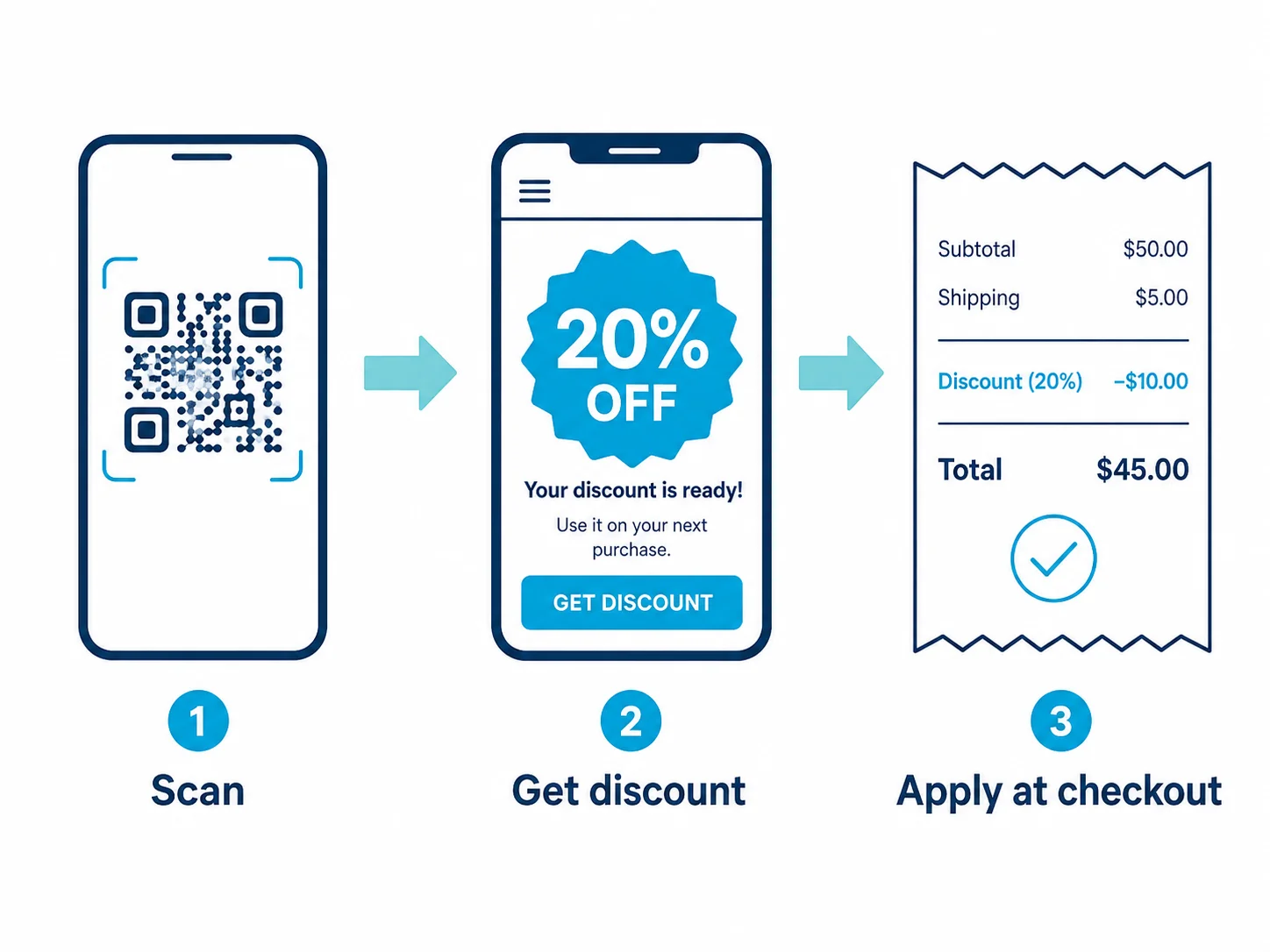
Get startedA coupon QR code is a standard QR code that carries one of three things: a web address, a block of text, or a tracked redirect link. The code has no intelligence of its own. It does not "know" it's a coupon, it cannot expire on a schedule, and it cannot count anything. Everything smart about a coupon campaign happens on the other side of the scan — on the page or system the code points to.
This is the single most important thing to understand before you print anything. The QR code is a delivery mechanism. The coupon logic — the discount, the expiry, the single-use enforcement, the tracking — all of that lives in your landing page, your e-commerce platform, or your point-of-sale system. Choose the right thing to encode and the campaign is flexible and measurable. Choose wrong and you've printed a dead end onto 5,000 flyers.
The Three Ways to Encode a Coupon
There are exactly three things you can put inside a coupon QR code, and the choice has consequences you'll live with after the print run.
1. A URL to a coupon or landing page (recommended)
The code encodes a link like yourstore.com/summer-deal. The scanner lands on a page that shows the offer, displays or auto-applies the discount code, and can require an email, a login, or a tap to claim. This is the most flexible option: the page can change, the offer can change, and you can measure everything that happens after the click. Almost every serious coupon campaign should encode a URL, not a raw code.
2. The discount code as plain text
The code encodes the literal string SAVE20. When scanned, the phone shows the text, which the customer copies into a promo field. It works without a landing page, but it's rigid: the code is frozen in the image, anyone who sees it can reuse it, and you have no way to know it was scanned. Fine for a tiny one-off; wrong for anything you want to track or change.
3. A tracked redirect (dynamic) link
The code encodes a short redirect URL — something like qrn.to/x7k — that bounces through a platform and forwards to your real destination. Because the redirect is editable, you can change where the code goes after printing and the platform counts every scan. This is a dynamic QR code, and it's the only encoding method that lets you edit the offer once the artwork is out the door.
Static vs Dynamic: The Decision That Defines Your Campaign
This is where most coupon campaigns are won or lost, so it's worth being precise.
A static coupon QR encodes the destination directly in the image. It is free, it never expires, and it depends on no server or subscription. But it is permanent in the literal sense: whatever you encoded is what scans forever. If you printed "20% off" and the promotion ends, the code still points there. To change anything, you reprint.
A dynamic coupon QR encodes a redirect you control. You can swap a 10% offer for 20%, redirect an expired promo to a "this deal has ended, here's a new one" page, or A/B test two landing pages behind the same printed code. The cost is dependence: the redirect runs on a platform's servers, and on most platforms it stops the day you stop paying. We covered exactly how that dependency turns into a trap in our breakdown of the QR code subscription scam — print materials that go dead when a trial ends.
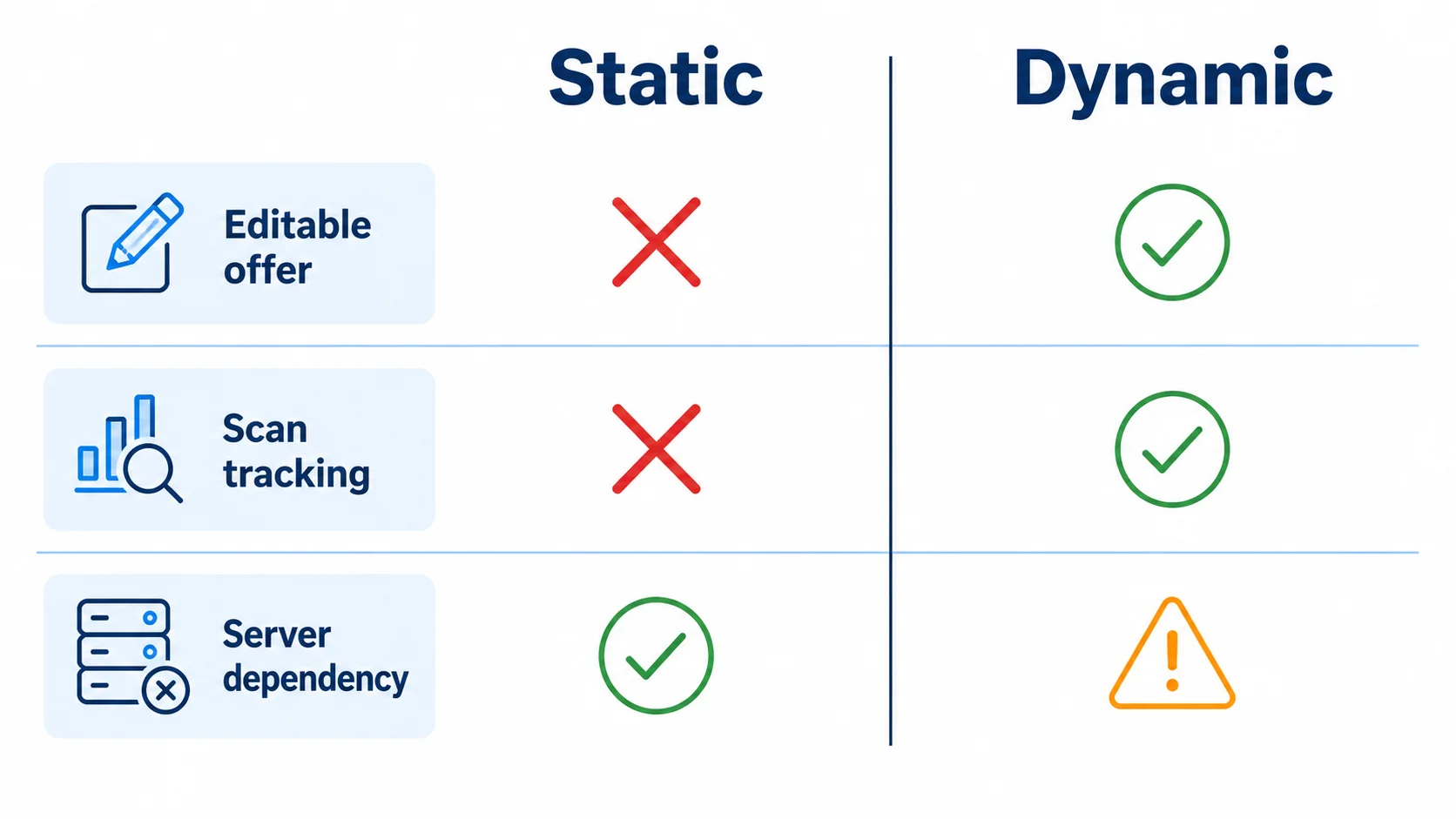
The honest rule: if the offer is fixed and evergreen, static wins — it's free and bulletproof. If the offer is time-limited, seasonal, or something you might tweak, dynamic earns its keep. Our static vs dynamic guide walks through the full trade-off, but for coupons specifically the question is simply: will I ever want to change this deal after it's printed?
Step-by-Step: Make a Coupon QR Code
Step 1 — Build the destination first
Before you touch a generator, decide what the scan lands on. For most campaigns that's a coupon landing page: a clean mobile page showing the offer, the code, and a clear "claim" or "shop now" button. If you use Shopify, WooCommerce, or Square, create the discount code in that system first so checkout can actually apply it. Encode nothing until the destination exists and works on a phone.
Step 2 — Copy the URL
Grab the final URL of your coupon page or your auto-apply discount link (many platforms generate a link like yourstore.com/discount/SAVE20 that applies the code on click). This is the cleanest experience — the customer scans, the discount is already in their cart.
Step 3 — Generate the code
Go to QR Nova's free generator. Paste your coupon URL. Add your brand colors or logo if you want the code to match the artwork — just keep enough contrast that it stays scannable. Download as SVG for large-format print or a high-resolution PNG for receipts and flyers. No account required.
Step 4 — Test on real material, not on screen
Scan the printed proof with two different phones before the full run. A code that scans crisply on your monitor can fail on glossy packaging, a crumpled flyer, or under shop lighting. Confirm the page loads fast, the offer is visible without scrolling past a giant header, and — critically — that the discount actually applies at checkout. A coupon QR that opens a page where the code is expired or mistyped is worse than no coupon at all.
Where to Put a Coupon QR Code
Placement decides redemption. The best coupon QR is the one a customer sees at the exact moment they're deciding to buy or to come back.
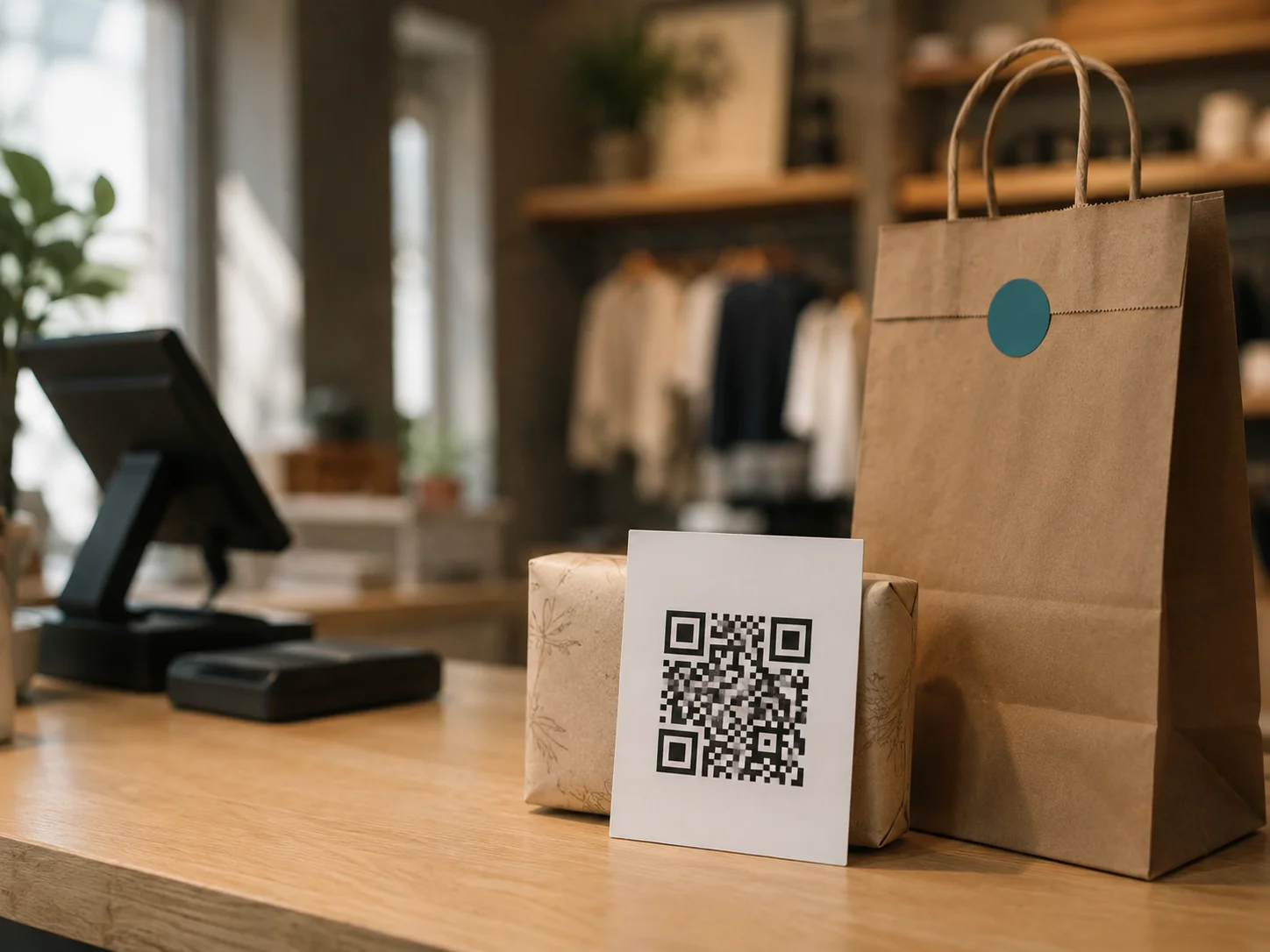
Product packaging and inserts
A "scan for 15% off your next order" insert reaches a customer who already trusts you enough to have bought once. It's one of the highest-intent placements there is. Use a dynamic code so a single printed artwork can carry a fresh offer across production runs — change the deal, not the box.
Receipts and bags
A coupon QR printed on the receipt or bag captures the customer seconds after purchase, when satisfaction is highest. "Scan within 7 days for 10% off your return visit" turns a one-time buyer into a repeat one. The urgency window is built into the offer, not the code.
Direct mail and flyers
Postcards and flyers are where dynamic codes shine. You commit to the print weeks before the campaign goes live, and a dynamic code lets you finalize or change the actual offer after the mail has shipped — or extend a promo that's performing well without a second mailing.
In-store signage and shelf talkers
A shelf talker or window decal with a coupon QR catches the shopper mid-decision, standing in front of the product. Keep the offer dead simple and the code large enough to scan from a step or two back.
The Single-Use Problem Nobody Warns You About
Here's the failure mode generic guides skip entirely. A QR code is an image. Anyone can photograph it, screenshot the page it opens, and forward both. If your coupon is a static "SAVE20" or a landing page with one shared code, you have not made a coupon — you've published a discount to the entire internet the first time someone posts it on a deals forum.
The QR code cannot fix this, because the problem isn't the code. Enforcing one redemption per person requires the destination to do the work: issue a unique single-use code per visitor, require a login or email to claim, or validate redemption at the POS so a code can only be applied once. The QR is the delivery layer. The anti-fraud logic lives entirely on the other side of the scan.
If single-use matters — and for high-value offers it always does — build that enforcement into your landing page or commerce platform before you print. A coupon QR campaign with no redemption control is a budget leak waiting to be discovered by exactly the people you didn't want to give the discount to.
Three Levels: Cafe Punch Card, Retail Chain, Enterprise Loyalty
The same coupon QR looks completely different depending on scale.
Level 1 — Cafe (low complexity)
A coffee shop wants a "scan for a free pastry with any drink, this month only." Tool: a free landing page or even a Google Site showing the offer. QR code: a single dynamic code from QR Nova on a counter card and the door. Redemption: staff eyeball the screen and ring it in. Single-use risk: low, because it's staff-validated in person. Cost: near zero. The dynamic code matters only so next month's offer reuses the same printed card.
Level 2 — Retail chain (mid complexity)
An 8-store retailer runs a seasonal "20% off, ends Sunday" campaign across flyers and receipts. Tool: their e-commerce platform's discount engine (Shopify/Square) plus a coupon landing page. QR code: a dynamic code so the offer can be extended or swapped without reprinting, with separate codes per channel (flyer vs receipt vs window) to see which drives traffic. Redemption: the discount code is applied at the POS, so checkout data — not scan count — is the real metric.
Level 3 — Enterprise loyalty (high complexity)
A national brand runs a packaging-insert program issuing personalized next-purchase offers to millions of buyers. Tool: a backend that generates a unique single-use code per insert, tied to a customer profile, with UTM parameters for attribution. QR codes: dynamic, pointing to a personalized claim page; redemption validated against the unique code at checkout to block reuse. Here the QR code is the smallest part of a system built around fraud control and per-user tracking.
When a Coupon QR Code Won't Work
Honest guidance includes the cases where this is the wrong tool.
When you need true single-use but won't build the backend
If you require one-redemption-per-person but aren't willing to issue unique codes or validate at the POS, a QR coupon will leak. There's no shortcut. Without enforcement on the destination, treat any printed coupon QR as a public discount and price the promotion accordingly.
When the audience doesn't scan
QR scanning is now mainstream, but adoption still skews by context and demographic. A coupon QR aimed at an audience that won't reliably scan — or printed somewhere awkward to point a phone — will underperform a plain printed code or a short URL. Match the channel to the audience.
When the offer is genuinely permanent
If the deal never changes — a standing "scan to join our rewards program" — you don't need the cost or server dependency of a dynamic code at all. A free static code does the job forever. Paying a subscription for flexibility you'll never use is just a recurring bill.
How QR Nova Handles Coupon Codes
Most platforms that sell "coupon QR" features are really selling you a dynamic redirect that lives on their servers and dies with your subscription. For a lot of coupon campaigns that flexibility is genuinely worth paying for — but only if you understand exactly what you're renting.
At QR Nova, a static coupon QR encodes your URL directly in the image: no redirect, no server, no scan cap, no expiry. Print 10,000 packaging inserts pointing at a stable loyalty page and those codes still work in three years, regardless of what happens to any platform. The free generator at QR Nova needs no account, no email, and no card — generate, download as PNG or SVG, and print.
When you genuinely need to change the offer after printing, a dynamic code is the right tool, and we're transparent about how the redirect works and what keeps it alive — no silent deactivation, no trial that bricks your print run. The permanent QR code guide lays out exactly when static is enough and when the flexibility of dynamic is worth it.
Make Your Coupon QR Code — Free, Right Now
It takes under two minutes. Go to qrcodenova.com/en/qr-code-generator, paste your coupon page URL or discount link, adjust the colors to match your artwork, and download as SVG for print or high-res PNG for receipts. No account, no sign-up, no scan limits, ever.
Build the destination first. Enforce single-use on the page, not the code. Test on the real material with two phones. And decide one thing before you print: will you ever want to change this offer? If yes, go dynamic. If never, static is free and forever.
Frequently asked questions
How do I make a QR code for a coupon?
Create a landing page or coupon page that holds your discount code, copy its URL, paste it into QR Nova's generator at qrcodenova.com/en/qr-code-generator, then download as PNG for print or SVG for large-format. No account required. For a single fixed code, you can also encode the discount code text directly into the QR.
Can I change the coupon offer after the QR code is printed?
Only with a dynamic QR code. A static QR has the destination baked into the image, so a printed offer is locked. A dynamic QR points to a redirect you control, so you can swap a 10% offer for 20% — or end the promo — without reprinting. The trade-off is that dynamic codes depend on the platform's servers and usually a paid subscription.
How do I stop people from sharing or screenshotting a coupon QR code?
A QR code itself cannot prevent sharing — it's just an image anyone can photograph. To enforce one redemption per person, the code must point to a backend that issues unique single-use codes or requires login. The QR is the delivery layer; the anti-fraud logic lives on the landing page or POS system, not in the code.
Should a coupon QR code be static or dynamic?
Use a static code for a fixed, permanent offer (a standing 'scan for our loyalty signup' card) — it's free and never expires. Use a dynamic code for time-limited campaigns where you may change the offer, end it, or track redemptions after printing. Most printed coupon campaigns benefit from dynamic; evergreen signage is fine with static.
Can I track how many people redeemed a coupon from a QR code?
The QR code can track scans if it's dynamic — but a scan is not a redemption. To count actual redemptions you need the discount code applied at checkout (in your e-commerce or POS system) or a unique code per user. Scan counts tell you interest; checkout data tells you conversions. Treat them as two different metrics.
Do coupon QR codes expire?
The QR image never expires if it's static — the URL is encoded in the image itself. A dynamic coupon QR can stop working if you cancel the subscription that runs its redirect, and the offer behind any QR expires whenever your promo or landing page ends. The code surviving and the offer surviving are two separate things.
What's the best file format for printing a coupon QR code?
Use SVG for anything printed large — packaging, posters, direct mail — because it scales to any size without pixelation. Use a high-resolution PNG (at least 300 DPI at final print size) for standard receipts and flyers. Avoid screenshots or low-res PNGs; a blurry coupon QR fails to scan and kills redemptions at the worst moment.
Can I put a coupon QR code on product packaging?
Yes, and it's one of the highest-intent placements — the customer already bought the product. Encode a URL to a 'thank you, here's 15% off your next order' page or a loyalty signup. Use a dynamic code so you can refresh the offer across production runs without changing the printed artwork, and test scannability on the actual material before the full run.
Related articles
QR Code for Google Forms: Step-by-Step Guide
Create a QR code for Google Forms in under 2 minutes — free, no account, no scan limits. Step-by-step guide with size, placement, and testing tips.
QR Code for Feedback: The Complete Guide
How to make a QR code for feedback that people actually scan and complete. Static vs dynamic, response rate over scans, and the review-gating trap to avoid.
QR Code for Posters: Size, Placement & Print Guide
How to add a QR code to a poster that actually gets scanned — distance-based sizing, placement, contrast, and a clear call to action. Free, no account needed.
Try it now — no sign-up needed
Get started