ISO 18004: The QR Code Standard Explained
ISO 18004 is the spec every QR code follows. Learn what it defines: structure, encoding modes, error correction, and the version system, explained plainly.
This article was written by the QR Nova team. We build QR code software, which may inform our perspective.
Every QR code you have ever scanned follows the same standard. Restaurant menu, shipping label, concert ticket, government ID. All of them. ISO 18004 specifies everything from the size of those three square corners to the math that lets a code survive being torn, dirty, or half-covered by a sticker. Most engineers work with QR codes for years without cracking open the spec. This guide covers what it actually says, in the plain language you'd use to explain it to a colleague over coffee.
TL;DR
- ISO/IEC 18004 is the international specification that defines exactly how every QR code is structured and decoded.
- QR codes come in 40 versions (sizes), from 21×21 to 177×177 modules.
- Four encoding modes, numeric, alphanumeric, byte, and kanji, optimize data density for different content types.
- Four error correction levels (L, M, Q, H) let you trade data capacity for damage resilience.
- The standard requires a quiet zone of at least 4 modules on all sides.
- The current edition is ISO/IEC 18004:2024, the fourth edition published in August 2024.
What ISO 18004 actually is
Generate your first QR code — free
Get startedISO/IEC 18004 is a joint publication from the International Organization for Standardization and the International Electrotechnical Commission. It was first published in 2000, with major revisions in 2006, 2015, and most recently August 2024. The standard is titled "Information technology, Automatic identification and data capture techniques, QR code bar code symbology specification."
That title tells you the scope. It covers symbology specification: the physical and logical rules defining what a QR code is, how data gets encoded, and how a reader reconstructs it. QR code generators, scanning hardware, industry-specific applications? Not in scope. Other standards and implementation guides handle those, all pointing back to ISO 18004 as their foundation.
The 2024 edition recognizes four members of the QR code family: QR Code Model 1 (the 1994 original), QR Code Model 2 (which added alignment patterns for better reliability at large sizes), the standard QR Code (Model 2 refined, and the one you see everywhere today), and Micro QR Code (a compact variant for tiny labels). All four live under ISO 18004.
The physical structure of a QR code
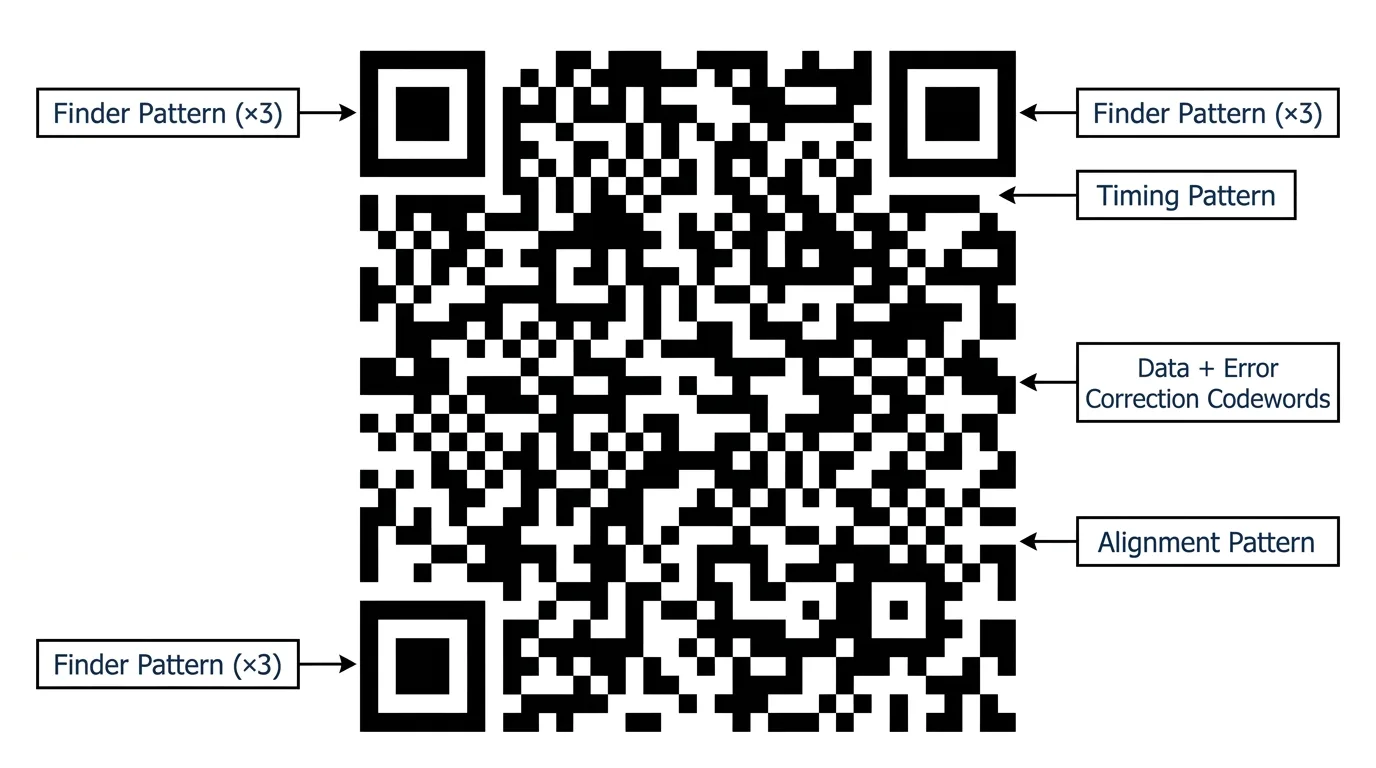
A QR code symbol is a square grid of dark and light units called modules. Each module is either dark (binary 1) or light (binary 0). The grid splits into two zones: function patterns and the encoding region. Function patterns carry no data. Their job is to help the scanner find, orient, and calibrate its read of the symbol. The encoding region holds the actual data bits.
Finder patterns
Those three large squares in the corners? Finder patterns. Each one is a 7x7 dark square surrounding a 5x5 light square surrounding a 3x3 dark square. The nested rings produce a consistent 1:1:3:1:1 dark-to-light ratio no matter which direction a scanner approaches from. That ratio is distinctive enough for a scanner to locate all three finder patterns almost instantly, even in a cluttered scene.
Notice the fourth corner has no finder pattern. That asymmetry is intentional. Because only three corners carry the pattern, any 90-degree rotation produces a different spatial arrangement, giving the decoder an unambiguous way to determine orientation.
Separators
A one-module-wide border of light modules called a separator surrounds each finder pattern. It isolates the finder from the encoding region so the scanner does not misread nearby data modules as part of the pattern.
Timing patterns
Between the finder patterns, running horizontally and vertically, are timing patterns: alternating dark and light modules in a straight line. They start and end at the finder pattern separators. Timing patterns let the scanner calculate exact module grid coordinates, which matters most when the symbol is warped by perspective or printed on a curved surface.
Alignment patterns
Starting at Version 2, QR codes include alignment patterns: a 5x5 dark square surrounding a 3x3 light square with a single dark center module, placed at regular intervals across the symbol. A Version 1 code (21x21 modules) needs none. A Version 40 code (177x177 modules) has 46 of them. They give the scanner extra reference points to correct for distortion across a large printed area.
Format information
Two copies of the format information strip sit adjacent to the finder patterns. Each strip encodes 15 bits: 5 data bits (2 for error correction level, 3 for the mask pattern number) plus 10 error correction bits computed with a BCH code that can fix up to 3 bit errors in the strip itself. Two copies means the format info survives even if one gets damaged.
That mask pattern number is one of eight predefined patterns (0 through 7), XOR-applied to the encoding region before printing. Masking breaks up large uniform regions of dark or light modules so the scanner can maintain contrast calibration. Without it, you would get big blobs that confuse decoders.
Version information
For versions 7 and above, the symbol also includes version information strips: two copies of an 18-bit field encoding the version number (6 data bits) with 12 BCH error correction bits. Versions 1–6 are small enough that the scanner can determine the version directly from the symbol's physical dimensions.
The quiet zone
The standard requires a quiet zone of at least 4 modules of uniform light color on all four sides. Not decorative. The scanner uses this blank border to establish its background contrast reference for distinguishing dark from light modules. Skimp on the quiet zone and you get a code that scans fine on your desk but fails the moment it is printed on a busy packaging label. It is the single most common compliance mistake I see in the wild.
The version system: sizes 1 through 40
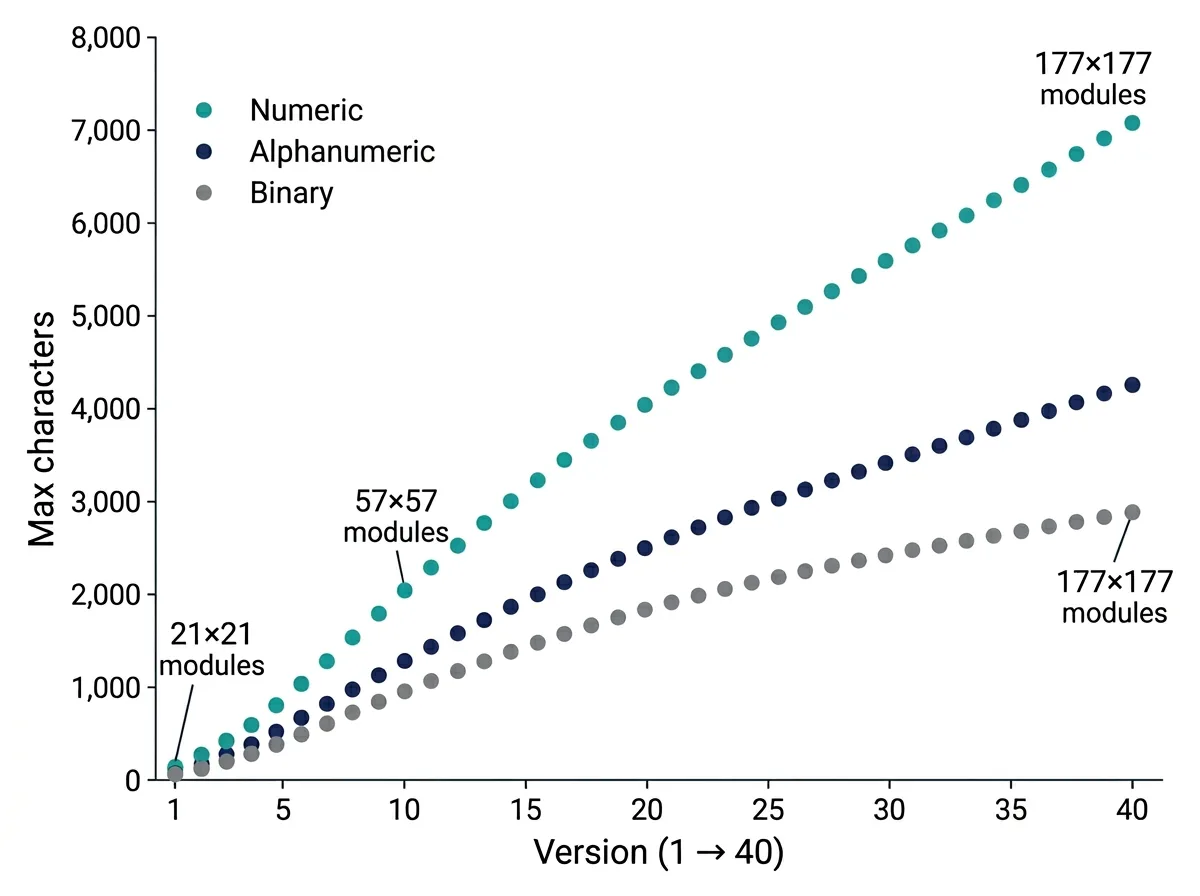
QR code versions define symbol size. Version 1 is 21x21 modules. Each step up adds 4 modules per side, so Version 2 is 25x25, Version 3 is 29x29, all the way to Version 40 at 177x177 modules. The formula: (version x 4) + 17 = modules per side.
Bigger version, more data, bigger printed code. In practice, generators pick the smallest version that fits your data at the chosen error correction level. A URL like https://example.com/p/1234 typically lands in Version 3 or 4 at level M. Pack a full vCard with name, address, phone, and email, and you are looking at Version 10 or higher.
| Version | Size (modules) | Numeric (L) | Alphanumeric (L) | Byte (L) |
|---|---|---|---|---|
| 1 | 21×21 | 41 | 25 | 17 |
| 5 | 37×37 | 154 | 93 | 64 |
| 10 | 57×57 | 652 | 395 | 271 |
| 20 | 97×97 | 2,061 | 1,249 | 858 |
| 40 | 177×177 | 7,089 | 4,296 | 2,953 |
These figures are maximum capacities at error correction level L. Higher error correction levels reduce usable capacity because more modules are dedicated to redundancy codewords.
Encoding modes: four ways to pack data
Before data goes into a QR code, it gets encoded into bits. ISO 18004 defines four encoding modes, each tuned for a different character set. Your choice of mode directly determines how large the resulting symbol needs to be.
Numeric mode
Numeric mode encodes digits 0 through 9 only. Three digits pack into 10 bits, roughly 3.33 bits per character. The most compact mode by far. If your QR code will only ever contain digits (a serial number, a loyalty card ID), this is what you want.
Alphanumeric mode
Alphanumeric mode handles 0-9, uppercase A-Z, and nine special characters: space, $, %, *, +, -, ., /, and :. Pairs of characters encode into 11 bits (5.5 bits per character). Here is a trick worth knowing: URLs encoded in all-uppercase fit in alphanumeric mode and produce noticeably smaller codes than byte mode. That is why many QR generators uppercase your URL before encoding it.
Byte mode
Byte mode encodes arbitrary binary data at 8 bits per character. The default character set is ISO/IEC 8859-1 (Latin-1), though the Extended Channel Interpretation mechanism lets you declare any encoding. Need lowercase letters, special symbols, or a long URL with query parameters? Byte mode. Least efficient, most flexible.
Kanji mode and mixed-mode encoding
Kanji mode is the niche one. It encodes Shift JIS double-byte characters at 13 bits each, purpose-built for Japanese text. Outside Japan, you will almost never encounter it.
Worth noting: a single QR code can mix modes within the same symbol. Each data segment gets a 4-bit mode indicator, so a numeric product ID can sit next to a byte-mode URL, each segment using its most efficient representation. Most generator libraries handle the switching automatically.
Error correction: how QR codes survive damage
QR codes use Reed-Solomon error correction, a well-studied algorithm that allows a decoder to reconstruct data even when part of the symbol is missing or unreadable. The standard defines four error correction levels, identified by the letters L, M, Q, and H.
| Level | Name | Recoverable Damage | Typical Use Case |
|---|---|---|---|
| L | Low | ~7% of codewords | Clean environments, maximum data density needed |
| M | Medium | ~15% of codewords | General purpose, the most common choice |
| Q | Quartile | ~25% of codewords | Industrial labels, codes with logo overlays |
| H | High | ~30% of codewords | Harsh environments, curved surfaces, branded codes |
The trade-off is simple: higher error correction eats into your data capacity. A Version 5 code at level L holds 154 numeric characters; the same version at level H holds only 64. When you slap a logo onto a QR code, covering part of the encoding region, you are spending your error correction budget. Level H leaves the most headroom for that kind of deliberate damage.
Under the hood, the Reed-Solomon implementation operates over the finite field GF(256), using a generator polynomial whose degree depends on how many error correction codewords are needed. Take a Version 1 code at level M: 16 data codewords plus 10 error correction codewords, 26 total. Bump that to level H and the balance tilts heavily toward error correction.
Data placement and the encoding region
Once data is encoded and error correction codewords computed, the resulting bit stream gets placed into the encoding region following a specific path. Data goes in 2-module-wide columns, starting at the bottom-right corner, moving upward, then shifting left and snaking downward. The zigzag continues across the whole symbol, skipping over timing patterns and function patterns as it goes.
Then one of eight mask patterns gets XOR-applied to the encoding region. The encoder tries all eight, scores each one using penalty rules from the standard, and picks the mask that produces the most balanced distribution of dark and light modules. It writes the winning mask number into the format information strip so the decoder knows how to reverse it.
What the standard does not cover
ISO 18004 is a symbology specification, not an application specification. It defines how a QR code symbol is constructed and decoded. It does not define:
- What data you should put in a QR code, or what format that data should follow (vCard, URL, deep link schema, those are application-layer decisions)
- Minimum physical print size (though ISO 15415 and related standards cover print quality grading)
- Visual customization rules (rounded corners, color, embedded logos)
- Dynamic vs. static operation (whether the QR code redirects through a URL shortener is entirely outside the standard's scope)
- How scanning applications parse or act on the decoded content
This boundary matters more than you might expect. When a compliance officer asks whether a QR code is "ISO compliant," they mean: does the symbol conform to ISO 18004's structural and encoding requirements? That is answerable and verifiable. What happens after the scan is a different question entirely, governed by different specs.
The 2024 edition: what changed
ISO/IEC 18004:2024 is the fourth edition, replacing the 2015 version. The core stayed stable: version system, module structure, encoding modes, error correction levels, all unchanged. What the 2024 revision did touch were encoding efficiency, more precise error correction procedures, and the structured append feature.
Structured append lets you split a single data stream across up to 16 QR code symbols. Each one scans independently; the decoder reassembles the pieces in order. Handy when your data exceeds what a single symbol can hold at a printable size. The 2024 edition tightened how this reassembly gets signaled and verified.
Why engineers should know this
If you build anything that generates, reads, or validates QR codes (retail POS, warehouse scanners, marketing platforms, ticketing), knowing ISO 18004 leads to better decisions at every level.
Error correction level is not a cosmetic decision. It directly affects scan reliability in your deployment environment. Version selection determines physical size and decode speed. Encoding mode determines payload capacity. Quiet zone compliance determines whether your codes actually work at small print sizes. All of these are spec-level choices with real consequences.
Tools like QR Nova's QR code generator handle these parameters for you, but knowing the underlying standard means you can audit the output, set informed constraints, and diagnose scan failures with precision instead of guesswork.
Conclusion
ISO 18004 is the reason a QR code printed in Tokyo, scanned by a camera made in Germany, gets decoded correctly by software written in California. It pins down every structural element (finder patterns, timing patterns, alignment patterns, format info, version info, quiet zone) and every logical layer (encoding modes, error correction, mask patterns, data placement). Dense reading in its published form, but the engineering underneath is genuinely elegant.
The practical takeaways: use the right encoding mode for your data type, choose error correction based on the physical conditions where the code will live, respect the 4-module quiet zone, and let the version pick itself based on content length. Get those four things right and your codes will scan reliably on any compliant reader.
Frequently asked questions
What is ISO 18004 and who publishes it?
ISO/IEC 18004 is the international standard that defines the QR code symbology specification. It is published jointly by the International Organization for Standardization (ISO) and the International Electrotechnical Commission (IEC). The current edition is the fourth, published in August 2024.
What is the difference between QR Code Model 1, Model 2, and standard QR Code?
Model 1 is the original 1994 specification. Model 2 added alignment patterns to help scanners navigate larger symbols more reliably. The modern standard QR code (what everyone uses today) is based on Model 2 with further refinements. Micro QR Code is a compact variant governed by the same standard, optimized for small physical labels.
How many characters can a QR code hold?
It depends on the version and error correction level. A Version 40 code at error correction level L can hold up to 7,089 numeric digits, 4,296 alphanumeric characters, or 2,953 bytes of binary data. A Version 1 code holds as little as 41 numeric characters. Most real-world QR codes use versions in the 1–10 range.
What do the four error correction levels mean in practice?
Level L recovers up to 7% damaged codewords, M recovers 15%, Q recovers 25%, and H recovers 30%. Higher levels make the code physically larger because more of the symbol is dedicated to redundancy rather than data. Level M is the most common general-purpose choice; level H is used when codes will be printed on curved surfaces or in harsh environments.
What is a quiet zone and how wide does it need to be?
The quiet zone is the blank white border surrounding the QR code symbol. ISO 18004 requires it to be at least 4 modules wide on every side. Violating this requirement is one of the most common reasons a QR code fails to scan reliably, because scanners use the contrast boundary of the quiet zone to locate the symbol.
Does ISO 18004 cover how a QR code looks, colors, logos, rounded corners?
No. The standard defines the data encoding, module placement, error correction, and measurement tolerances, not visual styling. Adding a logo, rounding corners, or using non-black-on-white colors is possible but it consumes your error correction budget. The standard does specify minimum print quality requirements (ISO 15415 grading) to ensure scannability.
What changed in ISO/IEC 18004:2024 compared to the 2015 edition?
The 2024 fourth edition optimized encoding efficiency, improved error correction procedures, and refined the structured append functionality that allows data to be split across multiple QR code symbols. The core symbology, version system, module structure, encoding modes, remained stable.
Related articles
QR Code Error Correction Levels: The Reed-Solomon Math
QR code error correction levels (L, M, Q, H) explained with the real Reed-Solomon math, version trade-offs, and damage-test data. Generate yours free.
How QR Code Scanning Works: 8-Stage Pipeline Explained
Image capture, binarization, finder patterns, Reed-Solomon correction — every step to decode a QR code in under a second, explained with diagrams.
How Dynamic QR Code Redirects Work: Technical Deep Dive
Scan to destination in under 300ms. The full redirect chain: edge routing, caching, failover, and why vendor lock-in is a real risk — with latency benchmarks.
Generate your first QR code — free
Get started