QR Code Error Correction Levels: The Reed-Solomon Math
By Nacho González, Founder of QR Nova · Updated August 2, 2026
QR code error correction levels (L, M, Q, H) explained with the real Reed-Solomon math, version trade-offs, and damage-test data. Generate yours free.
This article was written by Nacho González, founder of QR Nova. We build QR code software, which may inform our perspective.
Every article about QR code error correction levels repeats the same four bullet points: L recovers 7%, M recovers 15%, Q recovers 25%, H recovers 30%. Copy, paste, done. None of them explain why those specific numbers exist, what a QR code is actually doing with that recovered data, or why a level H code can, in some real conditions, scan worse than a level M one. Error correction levels control how many Reed-Solomon parity codewords get added to a QR code, and that number is a direct trade-off against data capacity and physical code size, not just an abstract "protection percentage." Understanding that trade-off, not memorizing four letters, is what actually determines whether your code scans reliably. QR Nova's free generator builds every code at maximum protection by default, so the trade-off below is worth understanding whether or not you ever touch a settings panel.
TL;DR
- The four levels (L 7%, M 15%, Q 25%, H 30%) describe the share of Reed-Solomon parity codewords added to a QR code, not just a generic "damage resistance" score.
- Moving from L to H cuts usable data capacity by roughly 53-57% at any QR version, per the ISO/IEC 18004 codeword tables.
- Developer Huon Wilson's 2021 ZBar scanning test of all 40 versions and 4 error correction levels found level H codes scanned successfully 60% more often than level L overall under simulated damage, but level H also forces a larger, denser QR version for the same data, which can need more field of view to scan than level L.
- Level H is necessary for logo overlays and harsh physical environments. It actively hurts scan reliability on small, clean, well-lit codes because of the extra density it forces.
What Are QR Code Error Correction Levels?
Generate a maximum-protection QR code — free
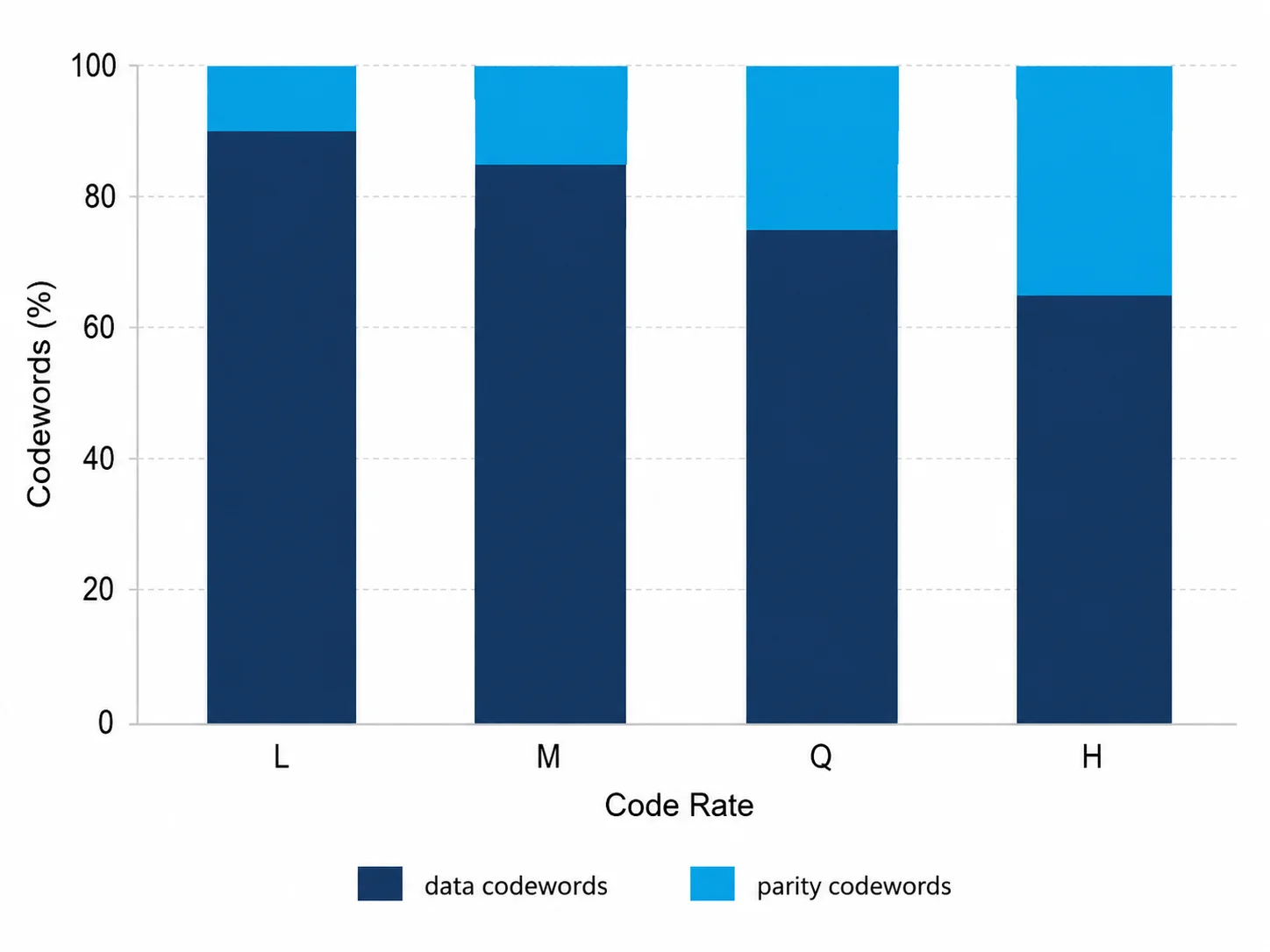
Get startedQR code error correction levels are four configurable settings, L, M, Q, and H, that determine how many Reed-Solomon parity codewords get appended to a QR code's data during encoding. A level that reserves more parity codewords can reconstruct more corrupted data if the printed code gets damaged, obscured, or partially misread, but it leaves fewer codewords available for your actual content at the same physical size. This is why the choice isn't "which level is best," it's "how much data capacity am I willing to trade for how much damage tolerance."
Every QR code you've ever scanned made this trade already, whether the person who generated it knew it or not. Most generators default to level M, DENSO Wave's own recommendation for general-purpose codes, because it balances capacity and resilience reasonably well without anyone having to think about it.
If you need the plain-language decision first, our guide to the four ECC levels and our breakdown of which level to use for logos, print, and outdoor signage cover that ground on their own. This piece stays on the Reed-Solomon mechanism, the version-by-version capacity math, and the real-world scan data behind those recommendations.
The four levels, precisely
- L (Low): recovers up to 7% of damaged codewords. Maximum data capacity at a given version.
- M (Medium): recovers up to 15%. The default on most generators and the one DENSO Wave recommends for general use.
- Q (Quartile): recovers up to 25%. Used for codes expected to see moderate wear, factory floors, warehouse labels.
- H (High): recovers up to 30%. Required for logo overlays and harsh physical environments.
Those percentages are not marketing language, they're the direct output of how many parity codewords the standard allocates at each level, which is where the actual mechanism comes in.
Why Four Levels Exist: The Reed-Solomon Mechanism Behind L, M, Q, H
QR codes use Reed-Solomon coding, the same family of error-correcting codes used in CDs, DVDs, and deep-space communication, to protect data against physical damage. The mechanism is the same across all four levels; what changes is how many parity codewords each level generates. For the full specification these levels are defined under, see our plain-language breakdown of ISO 18004, the QR code standard.
The Galois Field GF(256), in plain terms
Reed-Solomon math happens inside GF(256), a Galois Field containing exactly 256 elements, one for every possible byte value (0-255). Addition in GF(256) is just XOR, no carrying, fully reversible. Multiplication follows a fixed primitive polynomial (QR codes use x^8 + x^4 + x^3 + x^2 + 1), which lets every non-zero value be expressed as a power of a primitive root, turning multiplication into simple exponent addition.
The reason this matters at all: in ordinary arithmetic, dividing two numbers can produce a fraction with no exact remainder. Inside a finite field like GF(256), every non-zero element has an exact multiplicative inverse, so polynomial division always produces a clean quotient and remainder. That property is the entire foundation of Reed-Solomon error correction. Without it, the "check the remainder" trick that detects and locates errors simply wouldn't work.
How error correction levels change the codeword split
During encoding, your data becomes a polynomial. It gets multiplied by x^r (where r is the number of parity codewords for the chosen level) and divided by a generator polynomial built from consecutive powers of GF(256)'s primitive root. The remainder of that division, exactly r bytes, becomes the parity codewords appended to your data.
r is the entire mechanism behind the four letters. A higher error correction level simply means a bigger r, more parity codewords computed and stored, which is also why it eats directly into the data codewords available at a fixed QR version. A scanner can correct up to r / 2 corrupted codewords (or up to r known "erasures," positions flagged as unreliable during sampling) using syndrome calculations and the Berlekamp-Massey and Forney algorithms. We walk through that decoding sequence step by step in how QR code scanning actually works; this piece focuses on what changes across L, M, Q, and H, not the decode pipeline itself.
The Real Trade-off: Error Correction vs. Data Capacity
Here's the part almost no explainer shows: exactly how much capacity each level costs you, at real QR versions, using the codeword tables defined in ISO/IEC 18004.
| QR Version | Total codewords | Data codewords at L | at M | at Q | at H | L → H capacity loss |
|---|---|---|---|---|---|---|
| 1 (21×21) | 26 | 19 | 16 | 13 | 9 | 53% |
| 5 (37×37) | 134 | 108 | 86 | 62 | 46 | 57% |
| 10 (57×57) | 346 | 271 | 213 | 151 | 119 | 56% |
| 40 (177×177) | 3,706 | 2,953 | 2,331 | 1,663 | 1,273 | 57% |
The total codeword count per version never changes, that's fixed by the physical grid size. What shifts is the split between data codewords and parity codewords. Look at the last column: at every version we checked, moving from level L to level H costs roughly 53-57% of your usable data capacity, a consistent ratio regardless of how big the code is. This is the one number that should drive your level choice more than the raw percentages ever do.
Why higher error correction makes the code bigger, not just "safer"
Because the total codeword count per version is fixed, encoding the same amount of data at a higher error correction level often forces your generator to bump up to the next QR version, more modules, a physically larger or denser printed symbol, to fit both your data and the extra parity codewords. A URL that fits comfortably in a version 3 code at level L might need a version 5 code at level H. That's a real, visible size difference on your printed material, not a hidden backend detail.
Real-World Damage Tolerance: Theory vs. What Actually Happens
The 7/15/25/30% figures are theoretical maximums under ideal, uniformly distributed damage. Developer Huon Wilson's 2021 QR scanning experiment tested how that holds up against simulated real-world damage, reflections, dirt, and partial obstruction, run through the open-source ZBar decoder.
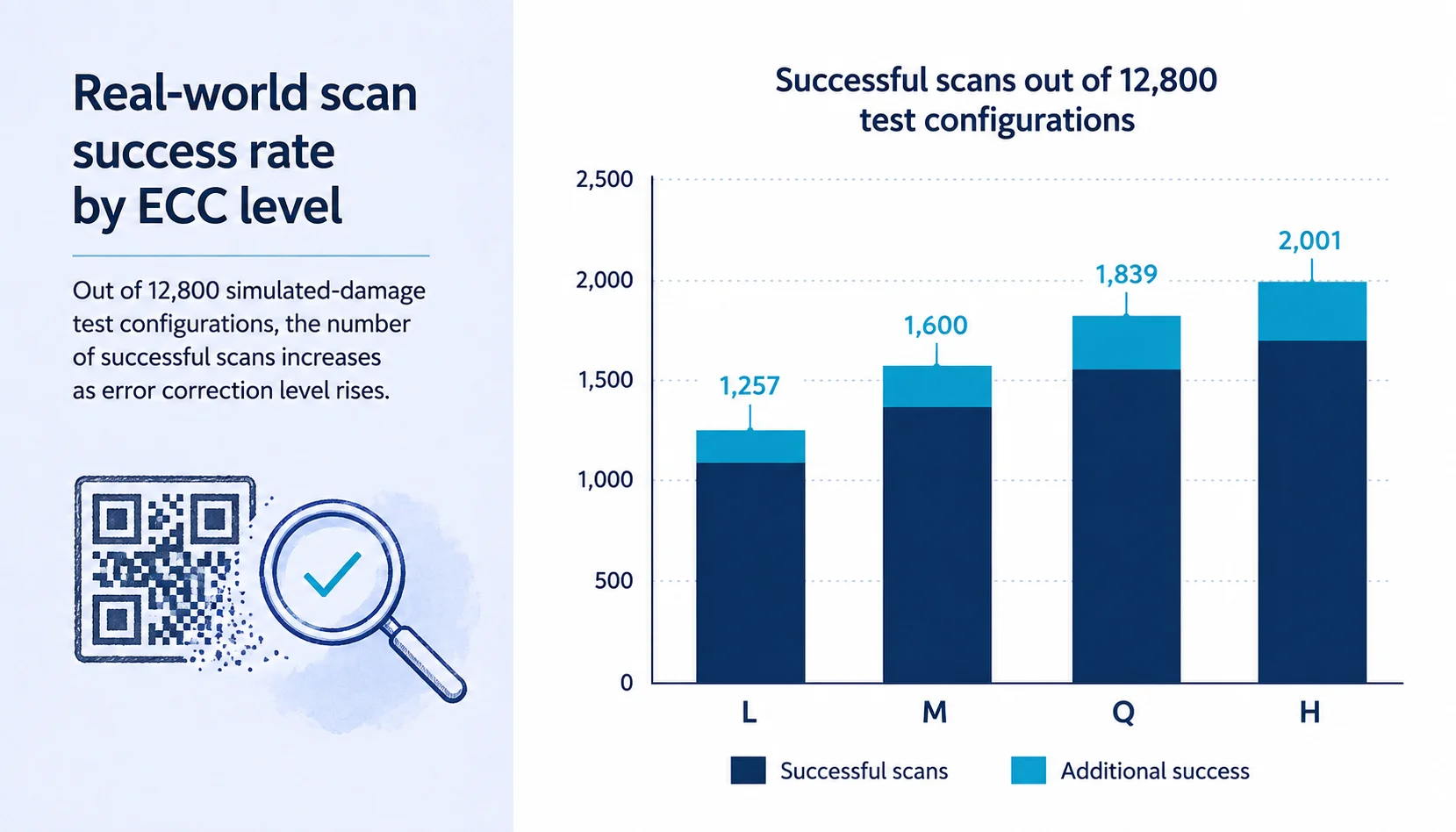
Wilson overlaid 10 noise patterns at 8 damage thresholds across all 40 QR versions at all 4 error correction levels, 12,800 configurations in total, and counted how many scanned successfully.
Level H codes scanned successfully 2,001 times out of the full configuration set, level M 1,600 times, level Q 1,839 times, and level L only 1,257 times, roughly 60% more successful scans at level H than at level L overall. But error correction cuts both ways: at a fixed QR version, higher levels scan more reliably under damage; at a fixed amount of encoded data, higher levels force a larger version with more total modules, which can require a bigger field of view to scan than a lower-level code carrying the same data. (Huon Wilson, "QR error correction helps and hinders scanning," 2021)
Two things stand out here. First, the 60% gap between L and H under simulated damage is a real, measured scanning outcome, not a marketing estimate, exactly the kind of evidence generic "here are the four percentages" articles never cite. Second, Wilson's finding that higher error correction can also hurt scanning, once you account for the larger QR version it forces at a fixed data length, is the same capacity-versus-density trade-off this piece measures in codewords above, arrived at independently through real scan testing rather than the ISO/IEC 18004 tables. To be fair, ZBar is one decoder among several, and a phone's built-in camera scanner can behave differently on any single test image. The Reed-Solomon math underneath doesn't change based on which software reads it, though, so the trade-off Wilson measured isn't an artifact of his particular test setup.
Why Logo Overlays Specifically Need Level H
A centered logo doesn't nibble at the edges of a QR code, it obliterates a solid block of modules in the densest, most central part of the symbol. That's exactly the kind of concentrated damage error correction has to absorb, and it eats into the same correction budget as physical wear. We cover the full 20% logo-sizing rule separately in how to add a logo to a QR code; here's the mechanism behind why H specifically is required.
Take a version 5 QR code. At level Q, it carries 72 parity codewords out of 134 total, giving a correction capacity of roughly 36 codewords, about 27% of the symbol. At level H, it carries 88 parity codewords, a correction capacity of roughly 44 codewords, close to 33% of the symbol, before you even account for the format information and finder pattern regions that sit outside the correctable data area.
A logo commonly recommended to stay within 20-30% of a QR code's visual area consumes nearly all of level Q's correction budget on its own, leaving almost no margin for print imperfections, ink bleed, or a slightly worn corner. Think of the correction budget like a bank account: the logo makes its withdrawal first, before a single scratch or reflection ever gets a chance to make its own. At level H, that same logo leaves enough headroom to also absorb normal print variance. This is the actual mechanism behind the advice you'll see everywhere to "use level H for logos", it isn't a rule of thumb, it's a direct consequence of how much of the correction budget a centered logo consumes.
When High Error Correction Backfires
Here's the part most guides skip entirely, including the "when not to use H" caveat in our own ECC levels guide: error correction level and scannability are not the same axis, and pushing level H onto a code that doesn't need it can make it scan worse. What follows is the mechanism behind that caveat, not just the recommendation.
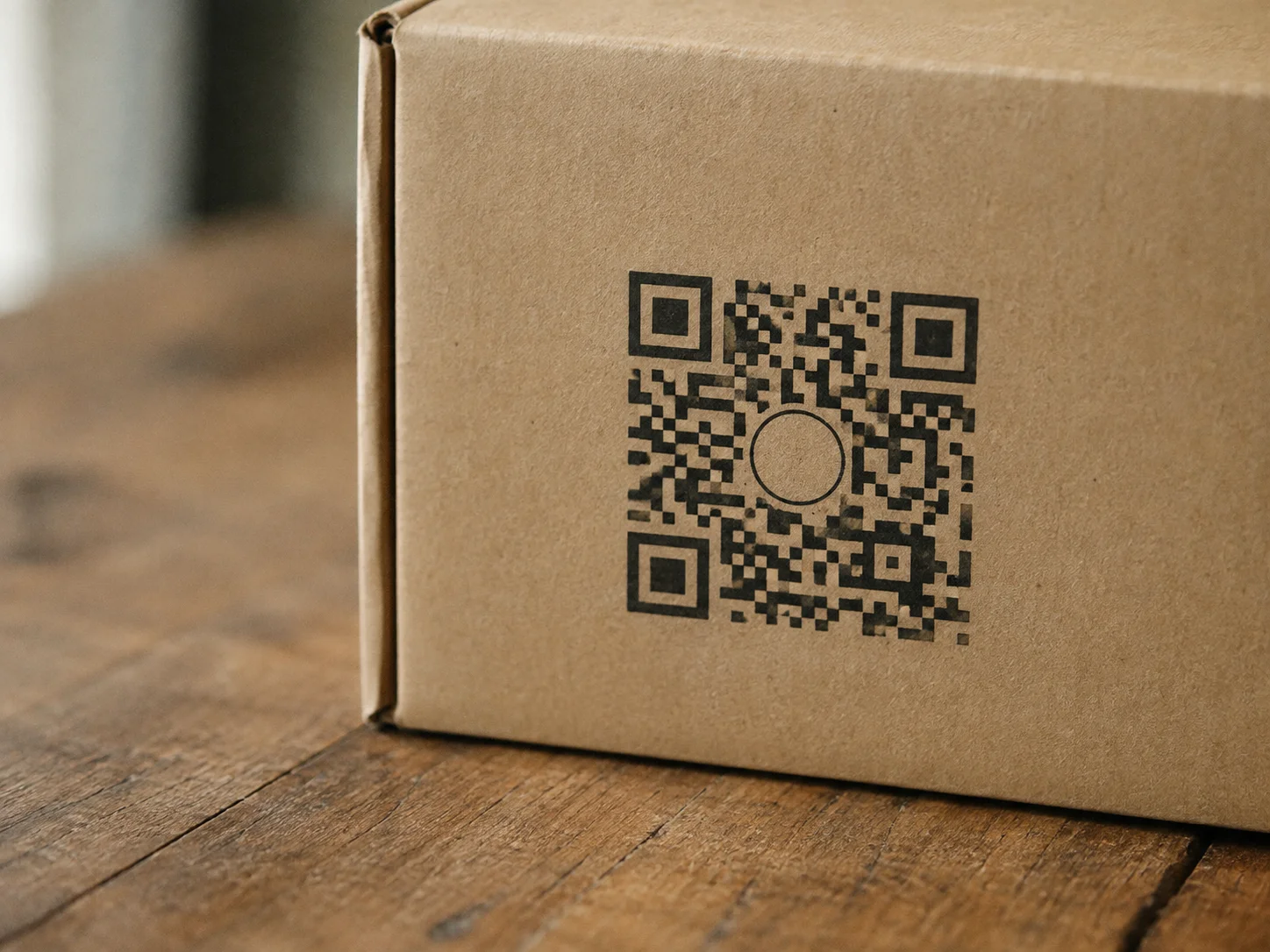
Because a higher error correction level either shrinks your usable data capacity or forces a larger QR version at the same data length, an unnecessarily high level produces a denser module grid at a fixed print size. Denser modules mean smaller individual squares, and smaller squares are harder for a camera to resolve at a distance, in low light, or on an older or lower-end phone. The correction algorithm running at 100% strength doesn't help if the binarization step upstream can't even resolve individual modules cleanly. You end up trading a damage-tolerance benefit you didn't need for a scannability cost you didn't want.
This backfires most visibly in three situations:
- Small printed codes with no logo. A business card or product label at 2-3cm doesn't need level H's density penalty if the destination has no logo overlay and the print environment is clean.
- Screen-displayed codes. A code shown on a laptop or TV screen for scanning is rarely damaged; forcing level H adds density with zero corresponding benefit.
- Cheap or older scanning hardware. If your audience is likely to scan with budget Android phones or older cameras, a lower error correction level with larger, cleaner modules often scans more reliably than a denser, higher-level code at the same physical size.
The right default is level M for general use, stepping up to Q or H only when the code has a logo, will face real physical wear, or lives somewhere the print quality can't be tightly controlled, not the other way around.
Choosing the Right Level: Three Real Examples
The right level depends entirely on what the code will encounter physically. Three scenarios cover most real use cases:
Low complexity: a table tent menu QR code
Clean indoor lighting, printed on fresh cardstock, no logo, scanned from 20-30cm. Level L or M is enough. There's no damage to correct for, and keeping the module density low maximizes scan speed and reliability across a wide range of phone cameras.
Mid complexity: a branded flyer with a logo
Same clean environment, but now a centered logo takes up roughly 20% of the code's area. Level H is required here, not because the flyer will get damaged, but because the logo itself is a form of intentional, concentrated data loss that only level H's correction budget comfortably absorbs.
High complexity: an outdoor equipment asset tag
A weatherproof label riveted to industrial equipment, exposed to sun fading, dirt, scratches, and years of handling, with no logo but genuine physical risk. Level H is the right call here too, for a completely different reason than the flyer: real, cumulative physical wear over a multi-year service life, not a design choice.
How QR Nova Handles Error Correction Levels
QR Nova's free generator builds every code at level H, the maximum 30% recovery tier, automatically, no sign-up, no setting to find, no paid tier gate, no extra step. That's a deliberate trade-off: it costs some data capacity on every code (the 53-57% loss we measured above), in exchange for the highest damage tolerance available on any code you create, logo or no logo.
This matters most for the two cases this guide already flags as needing level H anyway: logo overlays and codes that will face real physical wear. If your priority is squeezing in a long URL or a text-heavy vCard on a clean, digital-only code, the capacity tables above are what to check before you commit to a long payload, since the level itself isn't something you dial down.
Static codes generated through QR Nova, URL, WiFi, vCard, PDF, carry that error correction level permanently baked into the image, no server dependency, no subscription required to keep the code working.
Quick Decision Checklist
Use this to pick a level in under a minute:
| Situation | Recommended level |
|---|---|
| Clean, indoor, no logo, general use | M |
| Warehouse, factory floor, moderate wear expected | Q |
| Logo covering 15%+ of the code area | H |
| Outdoor, industrial, or multi-year physical exposure | H |
| Very small print size, no logo, clean environment | L or M (avoid unnecessary density) |
| Maximizing data capacity (long URLs, vCards) | L |
If you're not sure which level fits your case, this table is the fastest way to decide before you generate anything. QR Nova's free generator builds every code at level H automatically, so you always get the maximum damage tolerance without configuring anything, just plan your data length with the capacity trade-off in mind if you're encoding a long URL or payload.
Frequently asked questions
What are QR code error correction levels?
QR code error correction levels are four settings, L, M, Q, and H, that control how many Reed-Solomon parity codewords get added to a QR code alongside its actual data. Level L reserves the least redundancy and recovers up to 7% damaged codewords; level H reserves the most and recovers up to 30%. The trade-off is data capacity: more parity codewords means fewer codewords left for your actual content, and a physically larger or denser symbol at the same data length.
What is the difference between error correction levels L, M, Q, and H?
L (Low) recovers up to 7% of damaged codewords and maximizes data capacity. M (Medium) recovers up to 15% and is the default on most generators. Q (Quartile) recovers up to 25% and suits moderate wear. H (High) recovers up to 30% and is required for logo overlays or harsh physical environments. Each step up trades roughly 15-20% of usable data capacity for more damage tolerance, at any QR version.
Which error correction level should I use for a QR code with a logo?
Use level H. A centered logo covering 20-30% of a QR code's area consumes a large share of the correction budget by itself, and only level H's 30% ceiling leaves enough margin for the logo plus normal print imperfections. At level M or Q, a logo of that size can push the code past its recoverable error rate and cause scan failures, especially on lower-end phone cameras.
Does a higher error correction level make a QR code bigger?
Yes, if the data length stays the same. Moving from level L to level H at a fixed QR version roughly cuts usable data capacity in half (a 53-57% reduction across the versions we checked in the ISO/IEC 18004 tables), so encoding the same amount of data at level H often forces the generator to bump up to a larger version with more modules, meaning a physically bigger or denser printed code.
How does Reed-Solomon error correction actually work in a QR code?
The encoder treats the data as a polynomial over GF(256), a finite field of 256 byte values, and divides it by a generator polynomial to produce parity codewords, which get appended to the data. A scanner recomputes the same division; a non-zero remainder (the syndrome) signals damage, and algorithms called Berlekamp-Massey and Forney locate and correct the errors, up to half the number of parity codewords added. We cover the full syndrome-decoding walkthrough in our guide to how QR code scanning works.
Can too much error correction make a QR code harder to scan?
Yes. Error correction level and physical scannability are separate variables, and pushing level H onto a code that does not need it makes the module grid denser at the same print size, which can hurt scanning under low light, at a distance, or on cheap cameras. Developer Huon Wilson's 2021 ZBar test scanning all 40 QR versions across all four error correction levels found that for a fixed amount of data, level H's larger, denser QR version can need more field of view to scan than level L's smaller one, confirming that unnecessary density has a measurable cost.
What error correction level does QR Nova use by default?
QR Nova generates every code at level H, the maximum 30% recovery tier, automatically. There's no dashboard setting, no paid tier gate, and no extra step, every free code gets the highest damage tolerance available by default. The trade-off is the reduced data capacity covered above, worth factoring in if you're encoding a long URL or a text-heavy payload like a vCard.
Is level H always the safest choice for printed QR codes?
No. Level H is the right choice specifically for logo overlays, outdoor or industrial exposure, and codes printed on materials prone to damage. For a clean, well-lit, indoor code with no logo, level M or even L scans just as reliably and keeps the printed symbol smaller and less dense, which is its own scannability advantage.
Related articles
How QR Code Scanning Works: 8-Stage Pipeline Explained
Image capture, binarization, finder patterns, Reed-Solomon correction — every step to decode a QR code in under a second, explained with diagrams.
How Dynamic QR Code Redirects Work: Technical Deep Dive
Scan to destination in under 300ms. The full redirect chain: edge routing, caching, failover, and why vendor lock-in is a real risk — with latency benchmarks.
QR Code Error Correction Levels Explained: L, M, Q, H
QR code error correction levels L, M, Q, H control damage tolerance. Learn Reed-Solomon math, recovery percentages, and which ECC level to pick.
QR Code for Direct Mail: The Complete Guide
QR code for direct mail campaigns done right. Size specs, placement rules, tracking setup, and why the USPS offers a 3% postage discount. Free generator.
Generate a maximum-protection QR code — free
Get started